Clipboard History
Save history of copied text in browser.
What is Clipboard History?
Clipboard History is a Chrome extension developed by Fast Simple Apps, and its main feature is "Save history of copied text in browser.".
Extension Screenshots
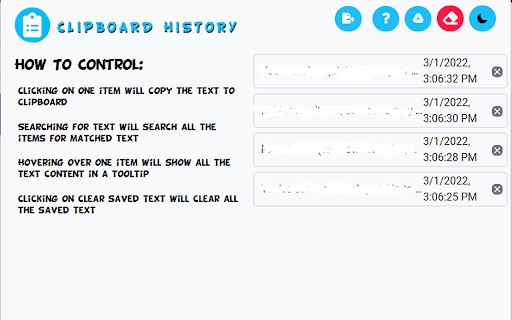
Download Clipboard History Extension CRX File
Download Clipboard History extension files in crx format, manually install Chrome extensions in the browser, or share the crx files with friends to easily install Chrome extensions.
Extension Usage Instructions
                        Keep a history of the text you copy and paste in your Chrome Browser.

Need a simple way to track all the text you copy and paste each day? You can do so when you install this
simple extension today.

This software will store in your own computer, all the phrases/paragraphs of text you copy and paste in the
Google Chrome browser each day.

Please note this information is stored on your computer and is NOT uploaded onto our servers. The software will
also show you when a specific piece of text was copied and marks down the exact date/time this text was copied.

You can also choose to delete any piece of history from the Clipboard manager. This clipboard software is simple
to use and all the data which you copy & paste will never leave your computer.
Extension Basic Information
| Name |  Clipboard History Clipboard History |
| ID | hocnnmhgcikjadmcgimjfabidalgejio |
| Official URL | https://chromewebstore.google.com/detail/clipboard-history/hocnnmhgcikjadmcgimjfabidalgejio |
| Description | Save history of copied text in browser. |
| File Size | 1.52 MB |
| Installation Count | 1,355 |
| Current Version | 3.0.0 |
| Last Updated | 2023-10-29 |
| Publish Date | 2022-03-24 |
| Rating | 3.69/5 Total 16 Ratings |
| Developer | Fast Simple Apps |
| [email protected] | |
| Payment Type | free |
| Supported Languages | id,ms,de,en,en-US,fil,fr,nl,no,vi,tr,ca,da,et,es,hr,it,lv,lt,hu,pl,ro,sk,sl,fi,sv,cs,el,sr,bg,ru,uk,iw,fa,hi,th,ar,zh-CN,zh-TW,ja,ko |
| manifest.json | |
{
    "update_url": "https:\/\/clients2.google.com\/service\/update2\/crx",
    "manifest_version": 3,
    "name": "__MSG_appName__",
    "version": "3.0.0",
    "description": "__MSG_appDescription__",
    "default_locale": "en",
    "permissions": [
        "storage"
    ],
    "icons": {
        "16": "icons\/icon16.png",
        "32": "icons\/icon32.png",
        "48": "icons\/icon48.png",
        "64": "icons\/icon64.png",
        "128": "icons\/icon128.png",
        "256": "icons\/icon256.png",
        "512": "icons\/icon512.png"
    },
    "action": {
        "default_icon": "icons\/icon64.png",
        "default_popup": "ui\/popup.html",
        "default_title": "__MSG_appName__"
    },
    "background": {
        "service_worker": "scripts\/background.js"
    },
    "content_scripts": [
        {
            "matches": [
                "https:\/\/*\/*",
                "http:\/\/*\/*"
            ],
            "js": [
                "scripts\/content.js"
            ]
        }
    ],
    "homepage_url": "https:\/\/clipboard-history.freespeedcheck.net\/"
} | |