Save to Playpost
Listen to articles. Easily save articles from your browser to your Playpost playlist.
What is Save to Playpost?
Save to Playpost is a Chrome extension developed by http://playpost.app, and its main feature is "Listen to articles. Easily save articles from your browser to your Playpost playlist.".
Extension Screenshots

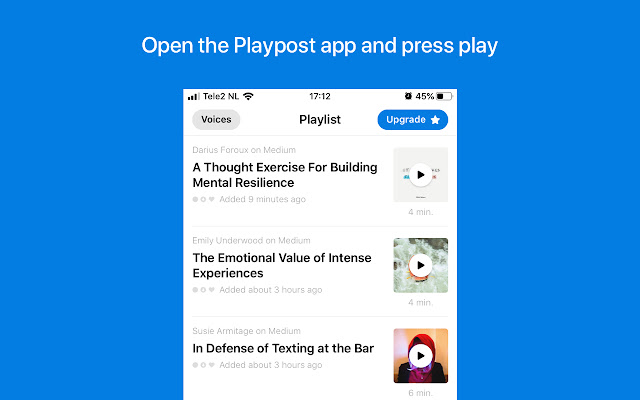
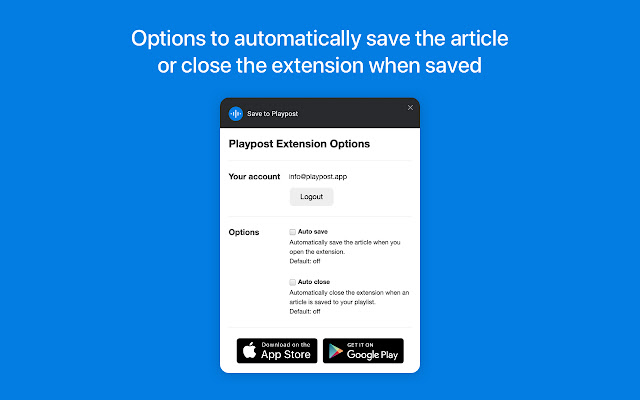
Download Save to Playpost Extension CRX File
Download Save to Playpost extension files in crx format, manually install Chrome extensions in the browser, or share the crx files with friends to easily install Chrome extensions.
Extension Usage Instructions
                        This browser extension makes it super easy to save articles from your laptop or computer, to your Playpost playlist.

About Playpost

Create your own playlist of bookmarks, news & articles. Listen to them everywhere you go, just like podcasts and audiobooks. Choose a voice you like out of 240+ voices.

* Listen on the go
Listen to news articles, blog posts, long reads, stories or other articles on the web during your daily commute to work, or when doing other tasks. Just put in your earphones and press play.

* 240+ High-quality voices
Industry-leading high-quality voices are used to automatically read the article to you. Choose between a variety of high-quality male and female voices that read the article to you.

* 28 languages supported
With new language support coming every week, we currently support 28 languages with over 240 different voices, including:
English, French, Spanish, German, Chinese, Arabic, Czech, Danish, Dutch, Finnish, Greek, Hindi, Hungarian, Icelandic, Indonesian, Italian, Japanese, Korean, Norwegian, Polish, Portuguese, Romanian, Russian, Slovak, Swedish, Turkish, Ukrainian and Vietnamese.

Is your language not on the list? Our goal is to support even your language in future updates!

* Full control over voice speed
Where podcast and audiobook apps usually offer just a few speed options, in Playpost you have full control over how fast a voice speaks to you. With steps of 0.01x you can tweak the voice speed to exactly match what you prefer for easy listening.

* Create your own playlist
A share button is added in every app on your phone to share articles to your playlist. Bookmark your favorite articles and save the articles for later in your playlist.

* Advanced optimization
The article’s text is optimized to be spoken to you. Correct pauses and emphasis are added for easy listening.

* Offline support
The articles audio can be downloaded and listened offline. So you can listen to articles when you have no internet connection. Or read articles when you are offline.

Upgrade to Playpost Premium or Plus for a higher quality experience.
Extension Basic Information
| Name |  Save to Playpost Save to Playpost |
| ID | ifnpinjadbboilclldkikcggajgpcdgm |
| Official URL | https://chrome.google.com/webstore/detail/save-to-playpost/ifnpinjadbboilclldkikcggajgpcdgm |
| Description | Listen to articles. Easily save articles from your browser to your Playpost playlist. |
| File Size | 129 KB |
| Installation Count | 137 |
| Current Version | 1.0.41 |
| Last Updated | 2019-10-11 |
| Publish Date | 2019-10-10 |
| Rating | 5.00/5 Total 1 Ratings |
| Developer | http://playpost.app |
| [email protected] | |
| Payment Type | free |
| Extension Website | https://playpost.app |
| Help Page URL | https://playpost.app/support |
| Privacy Policy Page URL | https://playpost.app/privacy |
| Supported Languages | en |
| manifest.json | |
{
    "update_url": "https:\/\/clients2.google.com\/service\/update2\/crx",
    "manifest_version": 2,
    "name": "Save to Playpost",
    "short_name": "Playpost",
    "author": "Playpost",
    "description": "Listen to articles. Easily save articles from your browser to your Playpost playlist.",
    "homepage_url": "https:\/\/playpost.app",
    "version": "1.0.41",
    "browser_action": {
        "default_title": "Save to Playpost",
        "default_icon": "images\/[email protected]",
        "default_popup": "popup.html"
    },
    "incognito": "spanning",
    "background": {
        "scripts": [
            "background.js"
        ]
    },
    "options_ui": {
        "chrome_style": true,
        "page": "options.html"
    },
    "content_scripts": [
        {
            "matches": [
                "*:\/\/*\/*"
            ],
            "js": [
                "content.js"
            ]
        }
    ],
    "icons": {
        "16": "images\/[email protected]",
        "48": "images\/[email protected]",
        "128": "images\/[email protected]"
    },
    "permissions": [
        "storage",
        "activeTab",
        "https:\/\/api.playpost.app\/*"
    ]
} | |