Snapshot Publisher
Snapshot Publisher Chrome Extension
What is Snapshot Publisher?
Snapshot Publisher is a Chrome extension developed by http://gosnapshot.com, and its main feature is "Snapshot Publisher Chrome Extension".
Extension Screenshots
Download Snapshot Publisher Extension CRX File
Download Snapshot Publisher extension files in crx format, manually install Chrome extensions in the browser, or share the crx files with friends to easily install Chrome extensions.
Extension Usage Instructions
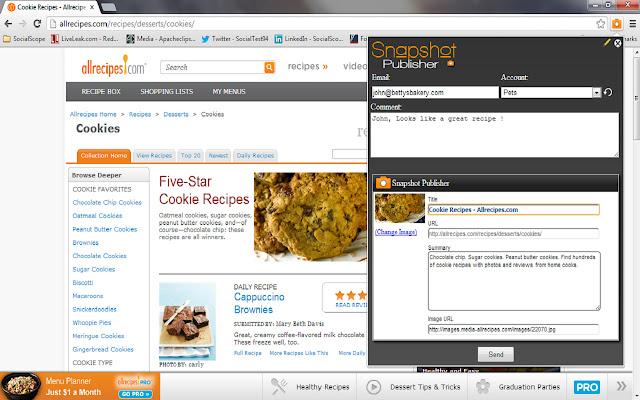
                        Snapshot Publisher Chrome Extension makes it as easy a point and click to capture content and contribute to a social media campaign.
Simply browse the web and when you find relevant content…just take a “1-click Snapshot”

Snapshot captures the web page information: Title, URL, Image & Summary and sends the Snapshot to the social media manager using their email.

Even non-Snapshot users can send great content to registered Snapshot users!
Extension Basic Information
| Name |  Snapshot Publisher Snapshot Publisher |
| ID | iglekojkeonkkpneiniepgcppdjemplc |
| Official URL | https://chrome.google.com/webstore/detail/snapshot-publisher/iglekojkeonkkpneiniepgcppdjemplc |
| Description | Snapshot Publisher Chrome Extension |
| File Size | 142 KB |
| Installation Count | 313 |
| Current Version | 1.4 |
| Last Updated | 2013-09-05 |
| Publish Date | 2013-09-05 |
| Rating | 3.40/5 Total 5 Ratings |
| Developer | http://gosnapshot.com |
| Payment Type | free |
| Supported Languages | en-US |
| manifest.json | |
{
"update_url": "https:\/\/clients2.google.com\/service\/update2\/crx",
"name": "Snapshot Publisher",
"version": "1.4",
"manifest_version": 2,
"description": "Snapshot Publisher Chrome Extension",
"background": {
"scripts": [
"content.js"
]
},
"browser_action": {
"default_icon": "cam-bulb-128sq.png",
"default_title": "Snapshot Publisher",
"default_popup": "popup.html"
},
"content_scripts": [
{
"matches": [
"http:\/\/www.google.com\/*"
],
"js": [
"jquery1.7.1.min.js",
"content.js",
"extract.js"
],
"css": [
"Reset.css",
"popup.css"
]
}
],
"permissions": [
"tabs",
"http:\/\/*\/*",
"https:\/\/*\/*",
" | |