Bookmarks
Save and organize your bookmarks.
What is Bookmarks?
Bookmarks is a Chrome extension developed by MindSky, and its main feature is "Save and organize your bookmarks.".
Extension Screenshots
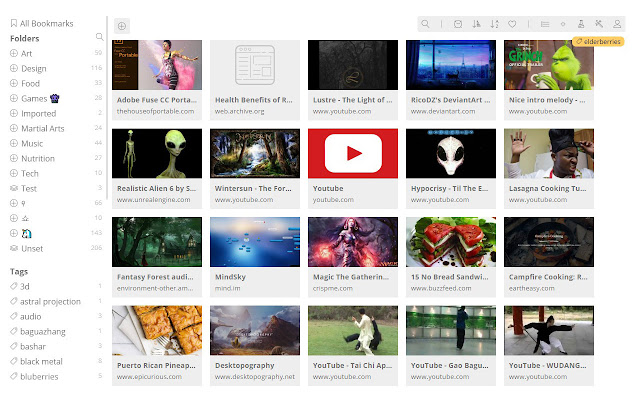


Download Bookmarks Extension CRX File
Download Bookmarks extension files in crx format, manually install Chrome extensions in the browser, or share the crx files with friends to easily install Chrome extensions.
Extension Usage Instructions
                        Provides a button to save active webpage title and URL to your account at https://mind.im/bookmarks.
Save and organize bookmarks.
Thumbnail previews
Dark and light themes
Tagging
Nested Folders
Search
Open all YouTube bookmarks in folder/tag as a playlist,
Watch bookmarked videos without leaving.
Drag and drop design
Extension Basic Information
| Name |  Bookmarks Bookmarks |
| ID | imppgbfkmkkehchbnkdcjfljaefgoblg |
| Official URL | https://chrome.google.com/webstore/detail/bookmarks/imppgbfkmkkehchbnkdcjfljaefgoblg |
| Description | Save and organize your bookmarks. |
| File Size | 38.04 KB |
| Installation Count | 227 |
| Current Version | 1.2 |
| Last Updated | 2020-03-16 |
| Publish Date | 2020-03-16 |
| Developer | MindSky |
| Payment Type | free |
| Extension Website | https://mind.im/bookmarks/ |
| Help Page URL | http://sky.mind.im/bookmark-manager |
| Privacy Policy Page URL | http://sky.mind.im/privacy |
| Supported Languages | de,en,fr,nl,no,es,pt-BR,pt-PT,sv,ru,hi,th,zh-CN,ja,ko |
| manifest.json | |
{
    "update_url": "https:\/\/clients2.google.com\/service\/update2\/crx",
    "background": {
        "scripts": [
            "background.js"
        ]
    },
    "browser_action": {
        "default_icon": "icon.png",
        "default_title": "Bookmarks"
    },
    "default_locale": "en",
    "description": "__MSG_appDesc__",
    "homepage_url": "http:\/\/mind.im\/bookmarks\/",
    "icons": {
        "128": "bookmark-128.png",
        "16": "bookmark-16.png",
        "48": "bookmark-48.png"
    },
    "manifest_version": 2,
    "name": "__MSG_appName__",
    "omnibox": {
        "keyword": "b"
    },
    "permissions": [
        "activeTab"
    ],
    "short_name": "Bookmarks",
    "version": "1.2"
} | |