Todo Cloud New Tab Page
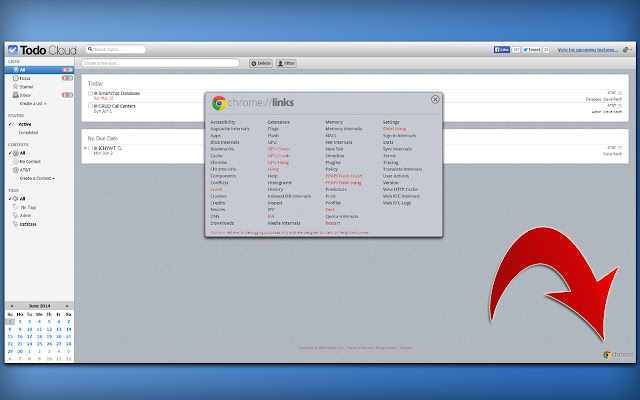
Replaces your new tab page with the Todo Cloud application.
What is Todo Cloud New Tab Page?
Todo Cloud New Tab Page is a Chrome extension developed by Steve Reich, and its main feature is "Replaces your new tab page with the Todo Cloud application.".
Extension Screenshots
Download Todo Cloud New Tab Page Extension CRX File
Download Todo Cloud New Tab Page extension files in crx format, manually install Chrome extensions in the browser, or share the crx files with friends to easily install Chrome extensions.
Extension Usage Instructions
                        This extension will open the Todo Cloud web application as your new tab page, making is simple and easy to always have your task list at hand. There is a Chrome button that gives you quick access to all of Chrome's internal links, such as Apps, Bookmarks, Extensions, Settings, and many more.

I created this extension for myself to use and it is not affiliated with nor endorsed by Appigo, Inc... at least not yet! :)
Extension Basic Information
| Name |  Todo Cloud New Tab Page Todo Cloud New Tab Page |
| ID | ipdkcnpbnghfkecmgfkehcfdninfaepj |
| Official URL | https://chrome.google.com/webstore/detail/todo-cloud-new-tab-page/ipdkcnpbnghfkecmgfkehcfdninfaepj |
| Description | Replaces your new tab page with the Todo Cloud application. |
| File Size | 946 KB |
| Installation Count | 208 |
| Current Version | 1.0.6 |
| Last Updated | 2014-06-05 |
| Publish Date | 2014-06-05 |
| Rating | 3.67/5 Total 3 Ratings |
| Developer | Steve Reich |
| Payment Type | free |
| Supported Languages | en |
| manifest.json | |
{
    "update_url": "https:\/\/clients2.google.com\/service\/update2\/crx",
    "name": "Todo Cloud New Tab Page",
    "version": "1.0.6",
    "manifest_version": 2,
    "description": "Replaces your new tab page with the Todo Cloud application.",
    "icons": {
        "16": "img\/icon16.png",
        "19": "img\/icon19.png",
        "32": "img\/icon32.png",
        "38": "img\/icon48.png",
        "48": "img\/icon48.png",
        "64": "img\/icon48.png",
        "96": "img\/icon48.png",
        "128": "img\/icon128.png"
    },
    "chrome_url_overrides": {
        "newtab": "newtab.html"
    },
    "permissions": [
        "tabs"
    ]
} | |