Save to Facebook
Save things you want to come back to later.
What is Save to Facebook?
Save to Facebook is a Chrome extension developed by https://facebook.com, and its main feature is "Save things you want to come back to later.".
Extension Screenshots
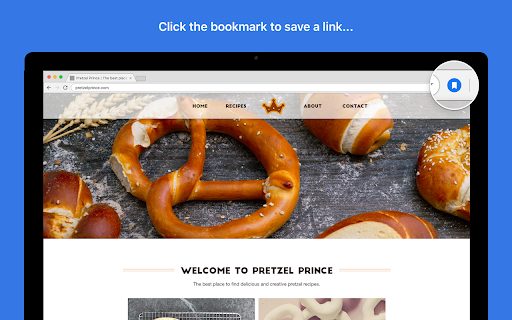


Download Save to Facebook Extension CRX File
Download Save to Facebook extension files in crx format, manually install Chrome extensions in the browser, or share the crx files with friends to easily install Chrome extensions.
Extension Usage Instructions
                        NO TIME, NO PROBLEM
See a funny video, workout, recipe or article you want to view or share with friends or family, but don’t have time? The Save to Facebook Chrome extension lets you save all those interesting things you see on the Internet, and easily find them later.

GET ORGANIZED
When you save an item from the Internet to Facebook, we help you keep it organized by presenting you with collection options. Add the item you want to save to an existing collection, or create a new one-- it’ll be easier to find when you’re ready to view or share it later. You can create as many collections as you like, and name them whatever you want.

FOR YOUR EYES ONLY (until you share it)
Only you can view and access your saved items, which are stored in your own private Saved Items list. From there, you can share your saved items on your timeline, in a group, or elsewhere on Facebook. You can also share a whole collection of saved items with a select group of friends using the Shared Collections feature.

SEE YOUR SAVES FROM ANYWHERE
You can quickly access your saved items and collections on Facebook, no matter where your browser takes you. Once you click the Save to Facebook icon, click “View All” link in the upper right corner and your Saved list opens in a separate window.


Next time you find interesting content at an inconvenient moment, just use the Save to Facebook extension. When you’re ready to view it, select “Saved & Collections” on the menu to the left of Facebook News Feed, or type www.facebook.com/saved in your browser.

Learn more about Saved & Collections on Facebook at https://www.facebook.com/help/516581611792218?helpref=related.

By using this feature, you agree to Facebook's Data Policy and terms of service, available at https://www.facebook.com/legal/terms and https://www.facebook.com/about/privacy
Extension Basic Information
| Name |  Save to Facebook Save to Facebook |
| ID | jmfikkaogpplgnfjmbjdpalkhclendgd |
| Official URL | https://chromewebstore.google.com/detail/save-to-facebook/jmfikkaogpplgnfjmbjdpalkhclendgd |
| Description | Save things you want to come back to later. |
| File Size | 33.1 KB |
| Installation Count | 1,716,127 |
| Current Version | 2.4 |
| Last Updated | 2021-06-12 |
| Publish Date | 2019-06-26 |
| Rating | 3.96/5 Total 1423 Ratings |
| Developer | https://facebook.com |
| [email protected] | |
| Payment Type | free |
| Help Page URL | https://www.facebook.com/help/1471345899777163 |
| Supported Languages | en |
| manifest.json | |
{
    "update_url": "https:\/\/clients2.google.com\/service\/update2\/crx",
    "manifest_version": 2,
    "name": "Save to Facebook",
    "description": "Save things you want to come back to later.",
    "version": "2.4",
    "icons": {
        "16": "assets\/icon_default_16.png",
        "48": "assets\/icon_default_48.png",
        "128": "assets\/icon_default_128.png"
    },
    "background": {
        "page": "background.html"
    },
    "browser_action": {
        "default_title": "Save to Facebook",
        "default_popup": "popup.html"
    },
    "key": "MIIBIjANBgkqhkiG9w0BAQEFAAOCAQ8AMIIBCgKCAQEAwcJaskg2NbJmjo4wNyODw\/tEiWH66Wz6sdj1ky6jfNeZbZR\/ulrWUnh9CE1heSJ6Drzm62+aXTgRh1mcHgai4h3NvD+pMerMsCVmRbM88cFMg04Ll2qvlCNMR73nooAo2feF\/jTIevn\/7yhRD45+esW90VnK+YDU7moQlmbV9bvfBpviAsQskYf6JDm4PTD9bXhsZRVBhX5fTiDrPRDiVORajl3CGTKBB5wv\/NOdStOW1FWv9Tzof3OaKVUbo6fBd7Ml6LA67ef4n5cb0fw8OoeAqVN7yJ5fVhhkl88j7kt4PS98UyVry7hFRA7tTdsm3xcmGLzgx8DK\/a\/w3Q84yQIDAQAB",
    "permissions": [
        "activeTab",
        "cookies",
        "https:\/\/*.facebook.com\/*"
    ],
    "incognito": "split",
    "content_security_policy": "script-src 'self' 'unsafe-eval' chrome-extension-resource: https:\/\/*.facebook.com https:\/\/*.fbcdn.net; object-src 'self' chrome-extension-resource: https:\/\/*.facebook.com https:\/\/*.fbcdn.net;"
} | |