CarJongg - Mahjong with Cars
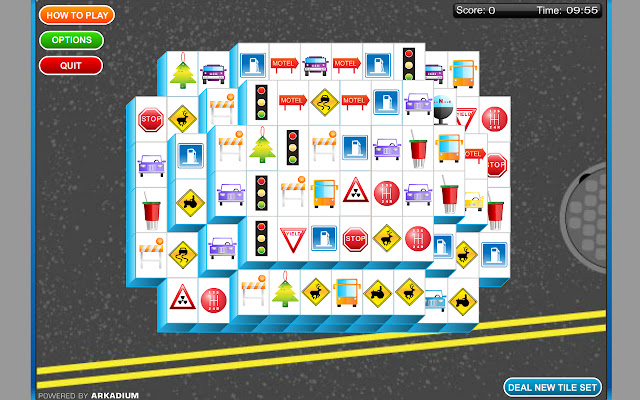
How quickly can you clear each tile set? Match road signs and traffic lights.
What is CarJongg - Mahjong with Cars?
CarJongg - Mahjong with Cars is a Chrome extension developed by Costel Ivu, and its main feature is "How quickly can you clear each tile set? Match road signs and traffic lights.".
Extension Screenshots


Download CarJongg - Mahjong with Cars Extension CRX File
Download CarJongg - Mahjong with Cars extension files in crx format, manually install Chrome extensions in the browser, or share the crx files with friends to easily install Chrome extensions.
Extension Usage Instructions
                        Mahjong is a game that comes in many forms but never have you seen it quite like this.

Matching road signs and traffic lights is every driver's dream and the Car-Jongg makes it a reality. How quickly can you clear each tile set?
Extension Basic Information
| Name |  CarJongg - Mahjong with Cars CarJongg - Mahjong with Cars |
| ID | jmnpeahpkgiibjiipekllmipipmppgeo |
| Official URL | https://chrome.google.com/webstore/detail/carjongg-mahjong-with-car/jmnpeahpkgiibjiipekllmipipmppgeo |
| Description | How quickly can you clear each tile set? Match road signs and traffic lights. |
| File Size | 172 KB |
| Installation Count | 1,000 |
| Current Version | 0.0.1.28 |
| Last Updated | 2016-12-26 |
| Publish Date | 2016-12-26 |
| Rating | 4.04/5 Total 26 Ratings |
| Developer | Costel Ivu |
| Payment Type | free |
| Supported Languages | id,ms,de,en,en-GB,en-US,fil,fr,nl,no,vi,tr,da,es,es-419,it,pl,pt-BR,pt-PT,fi,sv,cs,el,ru,uk,hi,th,zh-CN,zh-TW,ja,ko |
| manifest.json | |
{
    "update_url": "http:\/\/clients2.google.com\/service\/update2\/crx",
    "name": "__MSG_appName__",
    "description": "__MSG_appDesc__",
    "default_locale": "en",
    "version": "0.0.1.28",
    "offline_enabled": true,
    "manifest_version": 2,
    "browser_action": {
        "default_title": "__MSG_appName__",
        "default_icon": {
            "19": "icon19.png",
            "38": "icon38.png"
        },
        "default_popup": "popup.html"
    },
    "icons": {
        "16": "icon16.png",
        "48": "icon48.png",
        "128": "icon128.png"
    }
} | |