Play Genius
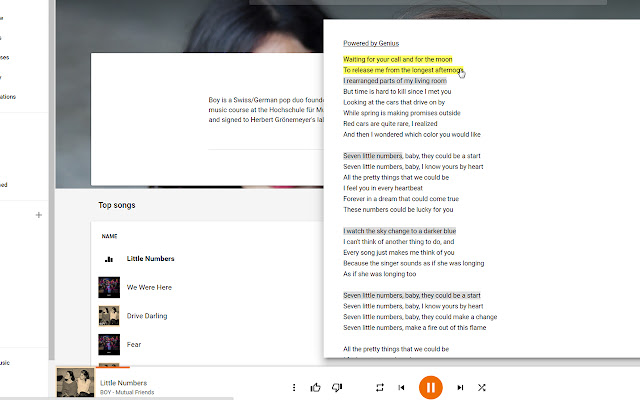
Adds lyrics from Genius to Google Play Music
What is Play Genius?
Play Genius is a Chrome extension developed by Rab Rennie, and its main feature is "Adds lyrics from Genius to Google Play Music".
Extension Screenshots
Download Play Genius Extension CRX File
Download Play Genius extension files in crx format, manually install Chrome extensions in the browser, or share the crx files with friends to easily install Chrome extensions.
Extension Usage Instructions
                        Adds a lyrics button next to the queue button in Google Play Music.

Lyrics from Genius.com open in google play music and allow you to click on annotated lyrics to view their meaning.

Changelog
v1.1.0 Added options menu and themes
v1.0.7 Lyrics button is now grey when no song is playing.
       Lyrics button now has a tooltip.
       Thanks to /u/StargateCommand on reddit for the suggestions.
v1.0.6 Open animation now plays correctly
v1.0.5 No longer stops displaying randomly
v1.0.4 Extension now loads if the tab is opened in the background
v1.0.3 Lyrics now close properly
v1.0.2 Music queue now closes if open
       Improved look
v1.0.1 Lyrics button now changes to orange like the queue button when lyrics are open
v1.0.0 Initial Release

Icon made by Elegant Themes from www.flaticon.com
Lyrics provided by Genius.com.
Extension Basic Information
| Name |  Play Genius Play Genius |
| ID | khlghnjfjflnecmoildkjfoaenhgnegm |
| Official URL | https://chrome.google.com/webstore/detail/play-genius/khlghnjfjflnecmoildkjfoaenhgnegm |
| Description | Adds lyrics from Genius to Google Play Music |
| File Size | 694 KB |
| Installation Count | 247 |
| Current Version | 1.1.0 |
| Last Updated | 2016-07-02 |
| Publish Date | 2016-07-02 |
| Rating | 4.00/5 Total 22 Ratings |
| Developer | Rab Rennie |
| [email protected] | |
| Payment Type | free |
| Supported Languages | en |
| manifest.json | |
{
    "update_url": "https:\/\/clients2.google.com\/service\/update2\/crx",
    "name": "Play Genius",
    "version": "1.1.0",
    "manifest_version": 2,
    "description": "Adds lyrics from Genius to Google Play Music",
    "homepage_url": "http:\/\/extensionizr.com",
    "options_page": "src\/options\/index.html",
    "icons": {
        "16": "icons\/icon16.png",
        "48": "icons\/icon48.png",
        "128": "icons\/icon128.png"
    },
    "default_locale": "en",
    "web_accessible_resources": [
        "src\/inject\/interface.svg"
    ],
    "permissions": [
        "https:\/\/play.google.com\/*",
        "https:\/\/api.genius.com\/*",
        "storage"
    ],
    "content_scripts": [
        {
            "matches": [
                "https:\/\/play.google.com\/*"
            ],
            "css": [
                "src\/inject\/inject.css"
            ]
        },
        {
            "matches": [
                "https:\/\/play.google.com\/*"
            ],
            "js": [
                "src\/inject\/inject.js"
            ]
        }
    ]
} | |