Worldwide Clock Extension
An extension that groups together clocks from all the time zones that are relevant to you and conveniently shows
What is Worldwide Clock Extension?
Worldwide Clock Extension is a Chrome extension developed by Online Leonz, and its main feature is "An extension that groups together clocks from all the time zones that are relevant to you and conveniently shows".
Extension Screenshots
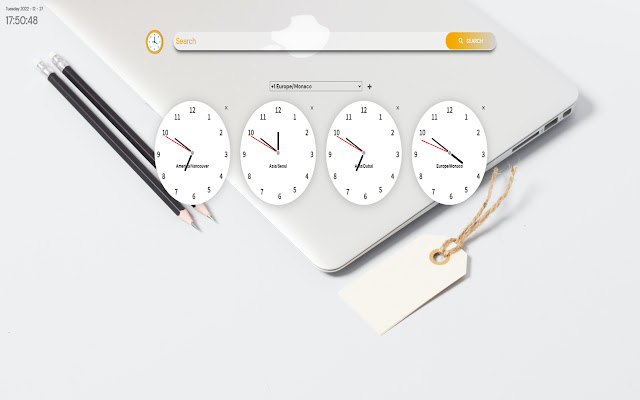
Download Worldwide Clock Extension Extension CRX File
Download Worldwide Clock Extension extension files in crx format, manually install Chrome extensions in the browser, or share the crx files with friends to easily install Chrome extensions.
Extension Usage Instructions
                        By clicking "Add to Chrome", users agree to:
1. Installing the Worldwide Clock Extension extension,
2. The ToS and Privacy Policy as shown on the Online Leonz website
3. Setting the new tab search engine to be provided by Bing

The ultimate extension that helps you stay connected with every part of the world. Perfect for people who's relatives or loved ones live overseas, or to those who conduct business internationally in their line of work.

How it works:
Users can choose which clocks they want to showcase every time they open a new window or tab by clicking on the drop down menu and choosing their desired time zones. After a time zone is chosen, users need to click the "+" sign on the right side of the menu to add the clock. Users can remove certain clocks by clicking the "X" button on the top right corner of each clock. The clocks chosen will carry over to new tabs or windows, so no need to choose them again every time a new one is opened.

Alongside the worldwide clocks, users will be show a digital clock on the top left corner of the screen which tells the current time in their location, as well as the current date.

Privacy Policy - https://onlineleonz.com/privacy-policy/
Terms of Use - https://onlineleonz.com/terms-of-use/
Extension Basic Information
| Name |  Worldwide Clock Extension Worldwide Clock Extension |
| ID | ledahgpflmbpohkbeobgjjmancpdnbdl |
| Official URL | https://chrome.google.com/webstore/detail/worldwide-clock-extension/ledahgpflmbpohkbeobgjjmancpdnbdl |
| Description | An extension that groups together clocks from all the time zones that are relevant to you and conveniently shows |
| File Size | 639 KB |
| Installation Count | 50,211 |
| Current Version | 0.1.2 |
| Last Updated | 2023-01-11 |
| Publish Date | 2022-12-28 |
| Rating | 4.26/5 Total 31 Ratings |
| Developer | Online Leonz |
| [email protected] | |
| Payment Type | free |
| Extension Website | https://onlineleonz.com/ |
| Help Page URL | https://onlineleonz.com/contacts/ |
| Privacy Policy Page URL | https://onlineleonz.com/privacy-policy |
| Supported Languages | en-US |
| manifest.json | |
{
    "update_url": "https:\/\/clients2.google.com\/service\/update2\/crx",
    "icons": {
        "16": "icon16.plasmo.00ac8b83.png",
        "32": "icon32.plasmo.9ad0c5b6.png",
        "48": "icon48.plasmo.cae3a6b3.png",
        "64": "icon64.plasmo.e4b604fc.png",
        "128": "icon128.plasmo.b89b7dfa.png"
    },
    "manifest_version": 3,
    "action": {
        "default_icon": {
            "16": "icon16.plasmo.00ac8b83.png",
            "32": "icon32.plasmo.9ad0c5b6.png",
            "48": "icon48.plasmo.cae3a6b3.png",
            "64": "icon64.plasmo.e4b604fc.png",
            "128": "icon128.plasmo.b89b7dfa.png"
        }
    },
    "version": "0.1.2",
    "author": "Online Leonz LLC",
    "name": "Worldwide Clock Extension",
    "description": "An extension that groups together clocks from all the time zones that are relevant to you and conveniently shows",
    "permissions": [
        "storage"
    ],
    "background": {
        "service_worker": "background.803675d6.js"
    },
    "chrome_url_overrides": {
        "newtab": "newtab.html"
    },
    "host_permissions": [
        "*:\/\/*.worldwideclockextension.com\/*"
    ]
} | |