HKUL Search Assistant
Search the HKU Libraries Catalogue without leaving your current page
What is HKUL Search Assistant?
HKUL Search Assistant is a Chrome extension developed by HKU Libraries, and its main feature is "Search the HKU Libraries Catalogue without leaving your current page".
Extension Screenshots

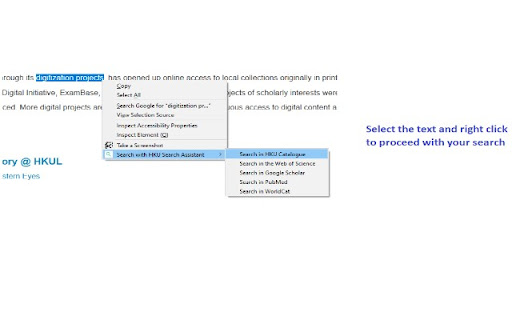
Download HKUL Search Assistant Extension CRX File
Download HKUL Search Assistant extension files in crx format, manually install Chrome extensions in the browser, or share the crx files with friends to easily install Chrome extensions.
Extension Usage Instructions
                        HKUL Search Assistant helps you to search HKU Libraries Catalogue and other popular search engines within your current page.

Access from a non-HKUL website, such as a Publisher’s website, would not trigger the HKUL login page, and you will be asked to pay for access. HKUL Search Assistant identifies your affiliation with HKUL, you will need to route via the EZProxy server.
Extension Basic Information
| Name |  HKUL Search Assistant HKUL Search Assistant |
| ID | lfjmkaiddobaebgokockcncpchpbnoad |
| Official URL | https://chromewebstore.google.com/detail/hkul-search-assistant/lfjmkaiddobaebgokockcncpchpbnoad |
| Description | Search the HKU Libraries Catalogue without leaving your current page |
| File Size | 2.01 MB |
| Installation Count | 4,000 |
| Current Version | 3.0.16 |
| Last Updated | 2024-02-15 |
| Publish Date | 2020-08-03 |
| Rating | 5.00/5 Total 2 Ratings |
| Developer | HKU Libraries |
| [email protected] | |
| Payment Type | free |
| Extension Website | https://lib.hku.hk/ |
| Supported Languages | en |
| manifest.json | |
{
    "update_url": "https:\/\/clients2.google.com\/service\/update2\/crx",
    "manifest_version": 3,
    "name": "HKUL Search Assistant",
    "description": "Search the HKU Libraries Catalogue without leaving your current page",
    "version": "3.0.16",
    "author": "HKU Libraries",
    "content_security_policy": {
        "extension_pages": "script-src 'self'; object-src 'self';"
    },
    "action": {
        "default_icon": "images\/icons\/icon128.png",
        "default_popup": "popup.html",
        "default_title": "HKUL Search Assistant"
    },
    "icons": {
        "16": "images\/icons\/icon16.png",
        "48": "images\/icons\/icon48.png",
        "128": "images\/icons\/icon128.png"
    },
    "background": {
        "service_worker": "background.js"
    },
    "permissions": [
        "contextMenus",
        "activeTab",
        "tabs",
        "storage"
    ]
} | |