Netflix Codes
Netflix Code generator is an extension which will help you find the perfect movie to watch by generating a code
What is Netflix Codes?
Netflix Codes is a Chrome extension developed by achal.ch, and its main feature is "Netflix Code generator is an extension which will help you find the perfect movie to watch by generating a code".
Extension Screenshots

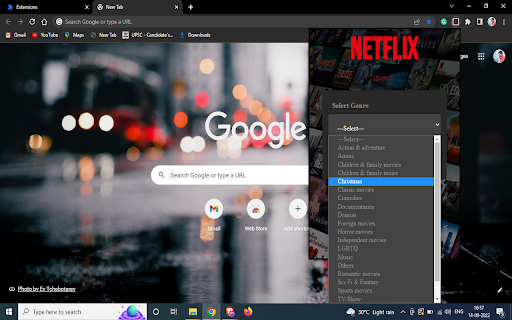
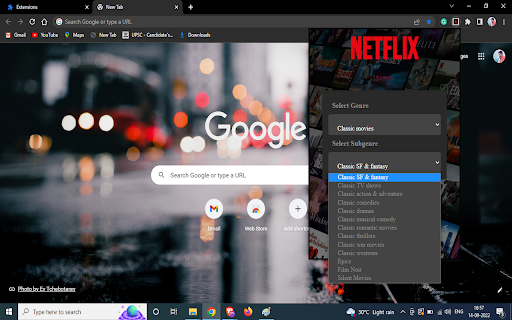

Download Netflix Codes Extension CRX File
Download Netflix Codes extension files in crx format, manually install Chrome extensions in the browser, or share the crx files with friends to easily install Chrome extensions.
Extension Usage Instructions
Sometimes when you wanna watch a movie and you just can't decide what to watch, But not anymore this extension will help you find the movie you wanna watch just select type of movie you wanna watch select a genre and it will generate a Netflix code by which it will only suggest that type of movies This extension is made by use of HTML, CSS, JavaScript. Extension Basic Information
| Name |  Netflix Codes Netflix Codes |
| ID | lhojojjidomkdaccdkpmejlmmbdjlhjo |
| Official URL | https://chromewebstore.google.com/detail/netflix-codes/lhojojjidomkdaccdkpmejlmmbdjlhjo |
| Description | Netflix Code generator is an extension which will help you find the perfect movie to watch by generating a code |
| File Size | 193 KB |
| Installation Count | 95 |
| Current Version | 1.0 |
| Last Updated | 2022-09-16 |
| Publish Date | 2022-09-16 |
| Rating | 5.00/5 Total 3 Ratings |
| Developer | achal.ch |
| [email protected] | |
| Payment Type | free |
| Supported Languages | en-US |
| manifest.json | |
{
    "update_url": "https:\/\/clients2.google.com\/service\/update2\/crx",
    "manifest_version": 3,
    "name": "Netflix Codes",
    "version": "1.0",
    "description": "Netflix Code generator is an extension which will help you find the perfect movie to watch by generating a code",
    "icons": {
        "16": "\/img\/icon16.png",
        "48": "\/img\/icon48.png",
        "128": "\/img\/icon128.png"
    },
    "action": {
        "default_icon": "\/img\/icon16.png",
        "default_popup": "\/HTML\/popup.html"
    }
} | |