Qlearly Light - Bookmark Manager
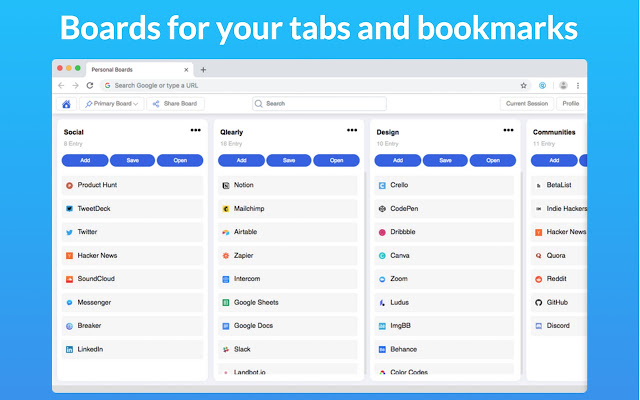
Same as Qlearly, without the new tab feature. Organize your favorite websites by boards and columns.
What is Qlearly Light - Bookmark Manager?
Qlearly Light - Bookmark Manager is a Chrome extension developed by https://qlearly.com, and its main feature is "Same as Qlearly, without the new tab feature. Organize your favorite websites by boards and columns.".
Extension Screenshots


Download Qlearly Light - Bookmark Manager Extension CRX File
Download Qlearly Light - Bookmark Manager extension files in crx format, manually install Chrome extensions in the browser, or share the crx files with friends to easily install Chrome extensions.
Extension Usage Instructions
                        A modern bookmarks and tabs manager. ✨

“I don’t want to have 100 tabs open anymore” – from a new Qlearly user
Stop wasting time looking for tabs or bookmarks.

➤ Save tabs in one click
➤ Quick and unified Search
➤ Powerful keyboard shortcuts
➤ Multi device bookmark syncing
➤ Collaborate with your teammates
➤ Create public boards and columns
➤ Unlimited bookmarks, boards and column

Why did we build Qlearly and now a light version? 🤔

The primary reason why we built Qlearly is to help you save time and remain organized. As visiting your favorite sites or bookmarking new ones is such a repetitive task, saving seconds can have a drastic impact to your workflow over time.
The reason we are shipping this 'Light' version is to allow you to not have Qlearly take over your new tab.


FEATURES 🛠

★ Fast bookmarking

Save all or a handful of your tabs to a specific column in the matter of a second by clicking 'save' in a column, or by clicking the extension icon, followed by the board/column and click the 'save session'.

★ Quick and unified Search

To make it easier for you to find the site(s) you are looking for, you can search through all your boards. You can use our keyboard shortcuts to search even faster!

★ Keyboard Shortcuts

We built numerous shortcuts to help you work even faster! You can search, create a new board, new column, save all your opened tabs all within a second.

★ Device Syncing:

By logging into your account on any device support by Qlearly, you will be able to access all your bookmarks. Additional bookmarks you will save will be synced as well.

★ Collaborate with your teammates

Collaborate on a board with an unlimited amount of teammates.

★ Shareable links

You can share a full board or specific columns with anyone by getting a shareable link.


✪ Genuinely enjoy the Qlearly experience? Did it help you save time at work? Support the Qlearly community by giving us a great review!


GET IN TOUCH 💌
Twitter: @QlearlyHQ, @Guillaumebardet
Contact: [email protected] or [email protected]

SUPPORT & BUG REPORTING
http://www.Qlearly.com/contact

HELP CENTER
https://help.qlearly.com

PRIVACY POLICY
https://qlearly.com/privacy-policy
Extension Basic Information
| Name |  Qlearly Light - Bookmark Manager Qlearly Light - Bookmark Manager |
| ID | lkmkjmklcnhfcfpojimnbjpaimbdjeao |
| Official URL | https://chrome.google.com/webstore/detail/qlearly-light-bookmark-ma/lkmkjmklcnhfcfpojimnbjpaimbdjeao |
| Description | Same as Qlearly, without the new tab feature. Organize your favorite websites by boards and columns. |
| File Size | 3.76 MB |
| Installation Count | 1,000 |
| Current Version | 1.6 |
| Last Updated | 2020-11-15 |
| Publish Date | 2019-10-10 |
| Rating | 4.00/5 Total 18 Ratings |
| Developer | https://qlearly.com |
| [email protected] | |
| Payment Type | free |
| Extension Website | https://qlearly.com/ |
| Help Page URL | https://help.qlearly.com/qlearly-browser-extension-v2 |
| Privacy Policy Page URL | https://qlearly.com/privacy-policy |
| Supported Languages | en |
| manifest.json | |
{
    "update_url": "https:\/\/clients2.google.com\/service\/update2\/crx",
    "manifest_version": 2,
    "name": "Qlearly Light - Bookmark Manager",
    "description": "Same as Qlearly, without the new tab feature. Organize your favorite websites by boards and columns.",
    "version": "1.6",
    "author": "Guillaume Bardet, Ravi Shukla",
    "browser_action": {
        "default_icon": "asset\/image\/icons\/128.png",
        "default_popup": "popup.html"
    },
    "icons": {
        "16": "asset\/image\/icons\/16.png",
        "32": "asset\/image\/icons\/32.png",
        "48": "asset\/image\/icons\/48.png",
        "128": "asset\/image\/icons\/128.png"
    },
    "permissions": [
        "bookmarks",
        "contextMenus",
        "activeTab",
        "storage",
        "tabs",
        "https:\/\/*\/",
        "http:\/\/*\/"
    ],
    "background": {
        "scripts": [
            "background.js"
        ]
    },
    "content_scripts": [
        {
            "matches": [
                "https:\/\/qlearly.com\/beta\/setup\/ext\/social-token*"
            ],
            "js": [
                "asset\/js\/twitter-session.js"
            ]
        }
    ],
    "content_security_policy": "script-src 'self' 'unsafe-eval' https:\/\/qlearly.com https:\/\/*.google-analytics.com https:\/\/*.helpcrunch.com https:\/\/*.usemagnify.com https:\/\/stripe.com https:\/\/*.stripe.com; object-src 'self'; connect-src https:\/\/*.helpcrunch.com wss:\/\/qlearly.helpcrunch.com https:\/\/*.google-analytics.com https:\/\/qlearly.com https:\/\/*.usemagnify.com https:\/\/stripe.com https:\/\/*.stripe.com;"
} | |