WCAG Luminosity Contrast Ratio Analyzer
Pick colors from your Web, compute contrast, get suggestions. Preview with challenged visions. Versatile Color Dev Extension Tool
What is WCAG Luminosity Contrast Ratio Analyzer?
WCAG Luminosity Contrast Ratio Analyzer is a Chrome extension developed by Horia Tudosie, and its main feature is "Pick colors from your Web, compute contrast, get suggestions. Preview with challenged visions. Versatile Color Dev Extension Tool".
Extension Screenshots
Download WCAG Luminosity Contrast Ratio Analyzer Extension CRX File
Download WCAG Luminosity Contrast Ratio Analyzer extension files in crx format, manually install Chrome extensions in the browser, or share the crx files with friends to easily install Chrome extensions.
Extension Usage Instructions
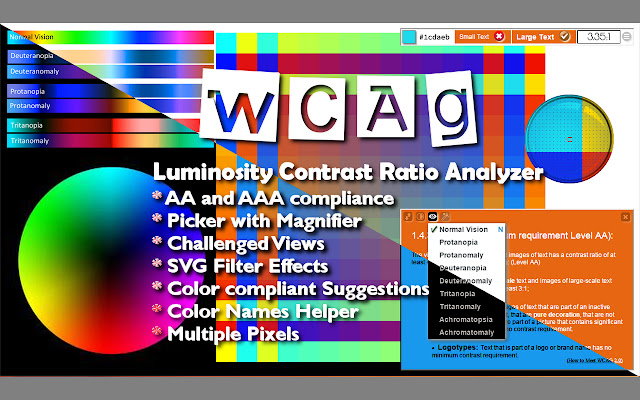
The extension allows you to pick colors from a web site and test the contrast compliance with WCAG 2.0.
A color picker with a magnifier glass facilitates the correct selection of the desired pixel, and even averages multiple pixels.
Picked colors shows in the toolbar as background or foreground of text.
The tool bar evaluates and displays the contrast and the success criteria.
The toolbar menu offers choices for 10 challenged visions and some effects.
A sample Text window lets you better see the look of your choices of color.
It offers up to 3 choices for foreground colors with AAA compliant contrast. Extension Basic Information
| Name |  WCAG Luminosity Contrast Ratio Analyzer WCAG Luminosity Contrast Ratio Analyzer |
| ID | lllpnmpooomecmbmijbmbikaacgfdagi |
| Official URL | https://chrome.google.com/webstore/detail/wcag-luminosity-contrast/lllpnmpooomecmbmijbmbikaacgfdagi |
| Description | Pick colors from your Web, compute contrast, get suggestions. Preview with challenged visions. Versatile Color Dev Extension Tool |
| File Size | 370 KB |
| Installation Count | 5,000 |
| Current Version | 1.0.5.29 |
| Last Updated | 2018-04-18 |
| Publish Date | 2018-04-18 |
| Rating | 4.25/5 Total 16 Ratings |
| Developer | Horia Tudosie |
| [email protected] | |
| Payment Type | free |
| Supported Languages | en |
| manifest.json | |
{
"update_url": "https:\/\/clients2.google.com\/service\/update2\/crx",
"manifest_version": 2,
"name": "WCAG Luminosity Contrast Ratio Analyzer",
"version": "1.0.5.29",
"description": "Pick colors from your Web, compute contrast, get suggestions. Preview with challenged visions. Versatile Color Dev Extension Tool",
"icons": {
"16": "\/images\/logos\/16.png",
"48": "\/images\/logos\/48.png",
"128": "\/images\/logos\/128.png"
},
"browser_action": {
"default_icon": "\/images\/icon.png",
"default_popup": "\/inc\/html\/popup.html"
},
"background": {
"page": "\/inc\/html\/background.html",
"persistent": true
},
"options_page": "\/inc\/html\/options.html",
"permissions": [
"tabs",
"activeTab",
" | |