Photo Rules
This extension draws guide lines on images. It is usefull to study photo composition.
What is Photo Rules?
Photo Rules is a Chrome extension developed by Paolodemo, and its main feature is "This extension draws guide lines on images. It is usefull to study photo composition.".
Extension Screenshots
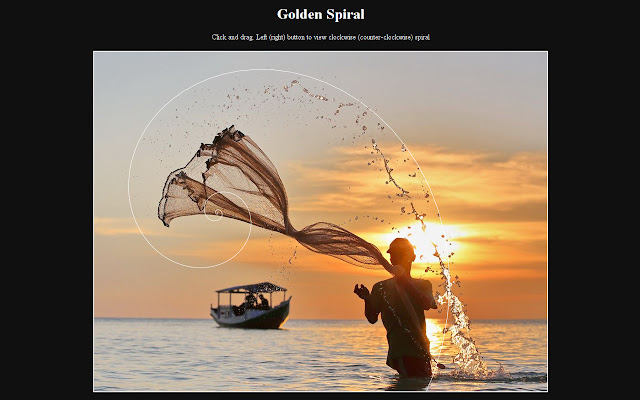
Download Photo Rules Extension CRX File
Download Photo Rules extension files in crx format, manually install Chrome extensions in the browser, or share the crx files with friends to easily install Chrome extensions.
Extension Usage Instructions
                        Update 0.6: Minor bugfix
Update 0.5: Added banner
            fixed functionality in Flickr (only in single photo view)
Update 0.4: fixed jquery min.map error
Update 0.3: added Triangles

---------------------------------------------------------------

This extension draws guide lines on images. It is usefull to study photo composition.
Usage: click before on the button in the toolbar and then on the image you want to study. A new tab will be opened containing the image with the following guides:
Center lines
Triangles
Rule of Thirds
Rule of Fifths
Diagonal lines
Golden section
Golden spiral
Extension Basic Information
| Name |  Photo Rules Photo Rules |
| ID | llomjalehmbhidabdjdbiadoeeioabbb |
| Official URL | https://chrome.google.com/webstore/detail/photo-rules/llomjalehmbhidabdjdbiadoeeioabbb |
| Description | This extension draws guide lines on images. It is usefull to study photo composition. |
| File Size | 839 KB |
| Installation Count | 201 |
| Current Version | 0.6 |
| Last Updated | 2014-11-13 |
| Publish Date | 2014-11-13 |
| Rating | 4.14/5 Total 7 Ratings |
| Developer | Paolodemo |
| [email protected] | |
| Payment Type | free |
| Supported Languages | en |
| manifest.json | |
{
    "update_url": "https:\/\/clients2.google.com\/service\/update2\/crx",
    "manifest_version": 2,
    "name": "Photo Rules",
    "description": "This extension draws guide lines on images. It is usefull to study photo composition.",
    "version": "0.6",
    "web_accessible_resources": [
        "js\/jquery-2.0.3.min.map"
    ],
    "icons": {
        "16": "images\/photo16.png",
        "48": "images\/photo48.png",
        "128": "images\/photo128.png"
    },
    "browser_action": {
        "default_icon": {
            "16": "images\/photo16.png",
            "19": "images\/photo19.png",
            "38": "images\/photo38.png",
            "48": "images\/photo48.png",
            "128": "images\/photo128.png"
        },
        "default_title": "Photo Rules"
    },
    "background": {
        "scripts": [
            "background.js"
        ]
    },
    "content_scripts": [
        {
            "matches": [
                "*:\/\/*\/*",
                "file:\/\/\/*"
            ],
            "js": [
                "js\/jquery-2.0.3.min.js",
                "js\/jquery.svg.min.js",
                "js\/jquery.mousewheel.js",
                "draw_rule.js"
            ],
            "all_frames": true
        }
    ],
    "content_security_policy": "script-src 'self' https:\/\/ssl.google-analytics.com; object-src 'self'",
    "permissions": [
        "tabs"
    ]
} | |