UT Orientation+
UT Orientation+ helps students navigate their way through orientation to get into the Longhorn State of Mind!
What is UT Orientation+?
UT Orientation+ is a Chrome extension developed by beepboopbevo, and its main feature is "UT Orientation+ helps students navigate their way through orientation to get into the Longhorn State of Mind!".
Extension Screenshots


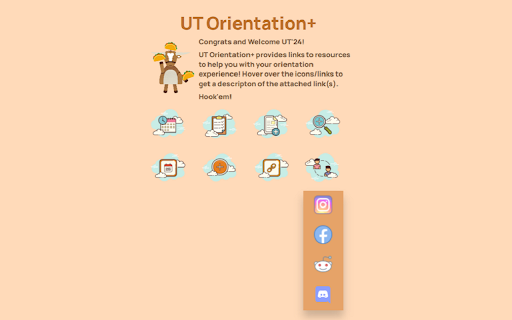
Download UT Orientation+ Extension CRX File
Download UT Orientation+ extension files in crx format, manually install Chrome extensions in the browser, or share the crx files with friends to easily install Chrome extensions.
Extension Usage Instructions
                        The extension offers a collection of resources to help incoming University of Texas at Austin students through their Freshman orientation and registration process.

Available features include:

- Link to MyUT
- Orientation Schedule
- Degree Checklists for Schools/Colleges
- Minors/Certificates at UT Austin
- Credit by Exam Information
- Degree Audit Access
- UT Schedule Planner
- Fall 2020 Course List at UT Austin
- Link to UT Registration Plus
- Link to HornsLink
- UT'24 Social Media Connections

Hook 'em!

Developers:
Shamira Kabir
Maria Gu
Bruce Nguyen
Extension Basic Information
| Name |  UT Orientation+ UT Orientation+ |
| ID | lpflcbhegpdlpobplhahfhcficjackdj |
| Official URL | https://chromewebstore.google.com/detail/ut-orientation+/lpflcbhegpdlpobplhahfhcficjackdj |
| Description | UT Orientation+ helps students navigate their way through orientation to get into the Longhorn State of Mind! |
| File Size | 331 KB |
| Installation Count | 186 |
| Current Version | 1.0.1 |
| Last Updated | 2020-06-07 |
| Publish Date | 2020-06-06 |
| Rating | 5.00/5 Total 1 Ratings |
| Developer | beepboopbevo |
| [email protected] | |
| Payment Type | free |
| Supported Languages | en-US |
| manifest.json | |
{
    "update_url": "https:\/\/clients2.google.com\/service\/update2\/crx",
    "manifest_version": 2,
    "name": "UT Orientation+",
    "description": "UT Orientation+ helps students navigate their way through orientation to get into the Longhorn State of Mind!",
    "version": "1.0.1",
    "icons": {
        "16": "16.png",
        "48": "48.png",
        "128": "128.png"
    },
    "browser_action": {
        "default_icon": "images\/icon_lh.png",
        "default_popup": "popup.html"
    }
} | |