WebPhone
Extension for Asterisk/Freeswitch that automatically identifies phone numbers and allows you to make calls through the browser
What is WebPhone?
WebPhone is a Chrome extension developed by Edu3 / CriativaSoft, and its main feature is "Extension for Asterisk/Freeswitch that automatically identifies phone numbers and allows you to make calls through the browser".
Extension Screenshots
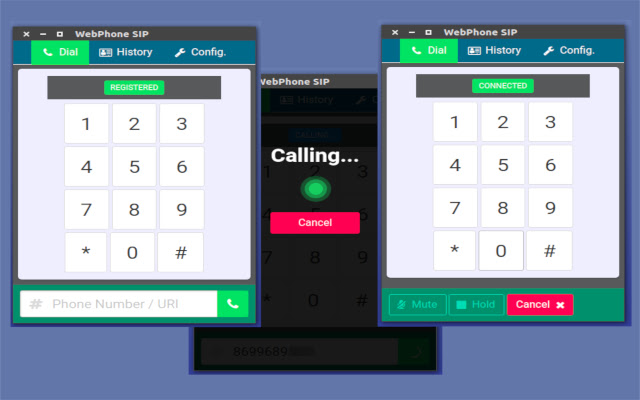
Download WebPhone Extension CRX File
Download WebPhone extension files in crx format, manually install Chrome extensions in the browser, or share the crx files with friends to easily install Chrome extensions.
Extension Usage Instructions
                        WebRTC SIP based VoIP client software (+chrome extension)

It allows you to make calls using your browser in an extremely productive way.

## Features
* Make and get calls
* Audio effects using JS Audio API (Ex.: DTMF)
* Phone Controls - HOLD / MUTE / STOP
* Visual Effects in Calls (waveform viewer)
* ONLY JAVA-SCRIPT (using SIP.js)
* Chrome Extension for Click-To-CALL
* Internationalization Support


See more:
https://github.com/ricardojlrufino/webphone-sip/
Extension Basic Information
| Name |  WebPhone WebPhone |
| ID | mcajodgaocmkmmomogbefkghjepgilnc |
| Official URL | https://chrome.google.com/webstore/detail/webphone/mcajodgaocmkmmomogbefkghjepgilnc |
| Description | Extension for Asterisk/Freeswitch that automatically identifies phone numbers and allows you to make calls through the browser |
| File Size | 21.51 KB |
| Installation Count | 1,000 |
| Current Version | 0.2.1 |
| Last Updated | 2017-11-09 |
| Publish Date | 2017-11-09 |
| Rating | 2.33/5 Total 3 Ratings |
| Developer | Edu3 / CriativaSoft |
| Payment Type | free |
| Extension Website | https://github.com/ricardojlrufino/webphone-sip/ |
| Supported Languages | en,pt-BR |
| manifest.json | |
{
"update_url": "https:\/\/clients2.google.com\/service\/update2\/crx",
"manifest_version": 2,
"name": "WebPhone",
"description": "__MSG_appDesc__",
"version": "0.2.1",
"default_locale": "en",
"icons": {
"128": "\/img\/icon_128.png"
},
"browser_action": {
"default_icon": "\/img\/icon_16.png"
},
"background": {
"scripts": [
"background.js"
]
},
"content_scripts": [
{
"matches": [
" | |