Single Click for for Google™ Apps
Allow users to select apps from App Launcher that will give single-click access
What is Single Click for for Google™ Apps?
Single Click for for Google™ Apps is a Chrome extension developed by http://www.ronchalant.com, and its main feature is "Allow users to select apps from App Launcher that will give single-click access".
Extension Screenshots
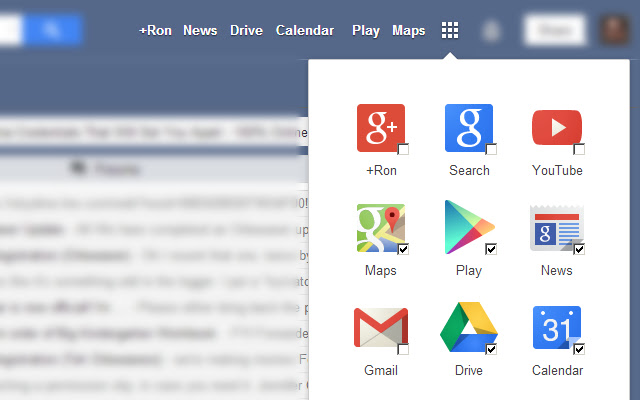
Download Single Click for for Google™ Apps Extension CRX File
Download Single Click for for Google™ Apps extension files in crx format, manually install Chrome extensions in the browser, or share the crx files with friends to easily install Chrome extensions.
Extension Usage Instructions
                        Restores one-click options for users based on app-launcher entries.

The applications listed in the App Launcher within compatible google pages will now have checkboxes to toggle one-click access to these sites.

This beta extension only works for users who have Google Plus. A release is forthcoming to support users w/o Google Plus.
Extension Basic Information
| Name |  Single Click for for Google™ Apps Single Click for for Google™ Apps |
| ID | mgobllckpakpkklabajnipmeedenicfk |
| Official URL | https://chrome.google.com/webstore/detail/single-click-for-for-goog/mgobllckpakpkklabajnipmeedenicfk |
| Description | Allow users to select apps from App Launcher that will give single-click access |
| File Size | 260 KB |
| Installation Count | 235 |
| Current Version | 0.6 |
| Last Updated | 2013-10-28 |
| Publish Date | 2013-10-28 |
| Rating | 4.86/5 Total 7 Ratings |
| Developer | http://www.ronchalant.com |
| Payment Type | free |
| Supported Languages | en-US |
| manifest.json | |
{
    "update_url": "https:\/\/clients2.google.com\/service\/update2\/crx",
    "manifest_version": 2,
    "author": [
        {
            "email": "[email protected]",
            "name": "Ron Rudy"
        }
    ],
    "name": "Single Click for for Google\u2122 Apps",
    "description": "Allow users to select apps from App Launcher that will give single-click access",
    "version": "0.6",
    "icons": {
        "48": "images\/sandbar-icon-48.png",
        "128": "images\/sandbar-icon-128.png"
    },
    "permissions": [
        "storage",
        "https:\/\/mail.google.com\/*",
        "https:\/\/www.google.com\/*"
    ],
    "content_scripts": [
        {
            "css": [],
            "js": [
                "src\/jquery.js",
                "app\/restore.js"
            ],
            "matches": [
                "http:\/\/mail.google.com\/*",
                "https:\/\/mail.google.com\/*",
                "https:\/\/www.google.com\/*"
            ]
        }
    ],
    "web_accessible_resources": [
        "src\/jquery.min.map"
    ]
} | |