Popup Translate
A lightweight translation tool giving you a hotkey to translate words or phrases without leaving the page.
What is Popup Translate?
Popup Translate is a Chrome extension developed by http://youngbullindustries.com, and its main feature is "A lightweight translation tool giving you a hotkey to translate words or phrases without leaving the page.".
Extension Screenshots
Download Popup Translate Extension CRX File
Download Popup Translate extension files in crx format, manually install Chrome extensions in the browser, or share the crx files with friends to easily install Chrome extensions.
Extension Usage Instructions
                        Here at Young Bull Industries we have a great love of languages - not just the programming kind, the human kind too! If like we do, you spend a lot of time reading web pages in languages other than English you'll often come across words that are new to you. Fine, you can always look them up - but pulling out a dictionary, going to Word Reference or Google Translate breaks up the flow of your reading and you can lose track of the article.

So it seemed like a great idea to make a Chrome extension which can be used to translate little snippets of text - just individual words or phrases - without leaving the page you're reading.

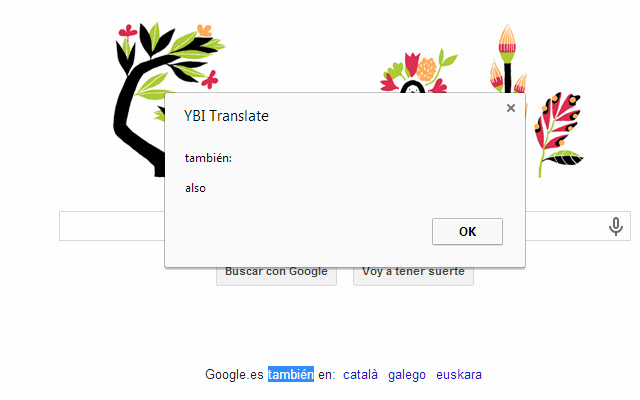
To get a translation, first highlight the word or words you want to translate, then right click and select the option "Translate 'text to translate'" from the menu, or hit "Alt+T"  and the original text and the translation will appear in an alert window.

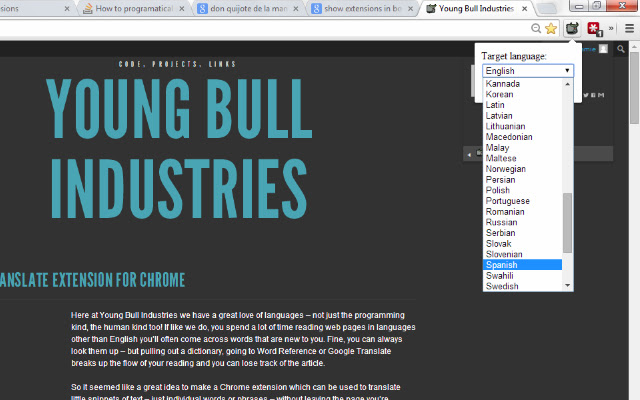
You can also set the target language (the one to translate into) by clicking on the Young Bull icon in your extensions bar, selecting from the options box and clicking "Save". This option is not only useful for non-native English speakers, but also for English speakers who need to translate a couple of words into another language. For example if you are writing an email in Spanish and you can't remember the correct Spanish for a particular word, just type it in English in your message, select the word, and hit "Alt+T" (making sure you've set Spanish as the target language) and the translation will pop up.
Extension Basic Information
| Name |  Popup Translate Popup Translate |
| ID | miibkmnanphndeoeccnablljidopiggj |
| Official URL | https://chrome.google.com/webstore/detail/popup-translate/miibkmnanphndeoeccnablljidopiggj |
| Description | A lightweight translation tool giving you a hotkey to translate words or phrases without leaving the page. |
| File Size | 114 KB |
| Installation Count | 1,000 |
| Current Version | 0.0.8 |
| Last Updated | 2015-05-06 |
| Publish Date | 2015-05-06 |
| Rating | 3.23/5 Total 22 Ratings |
| Developer | http://youngbullindustries.com |
| Payment Type | free |
| Extension Website | http://www.youngbullindustries.co.uk/popup_translate/ |
| Supported Languages | en,fr,es |
| manifest.json | |
{
    "update_url": "https:\/\/clients2.google.com\/service\/update2\/crx",
    "manifest_version": 2,
    "name": "__MSG_extName__",
    "short_name": "__MSG_extShortName__",
    "version": "0.0.8",
    "description": "__MSG_extDescription__",
    "options_page": "options.html",
    "default_locale": "en",
    "icons": {
        "16": "Little Bull-16x16.png",
        "48": "Little Bull-48x48.png",
        "128": "Little Bull-128x128.png"
    },
    "content_scripts": [
        {
            "all_frames": true,
            "js": [
                "get_selection.js"
            ],
            "matches": [
                "http:\/\/*\/*",
                "https:\/\/*\/*"
            ],
            "run_at": "document_start"
        }
    ],
    "background": {
        "scripts": [
            "background.js"
        ]
    },
    "browser_action": {
        "default_icon": "Little Bull-16x16.png",
        "default_popup": "options.html"
    },
    "permissions": [
        "contextMenus",
        "background",
        "tabs",
        "storage",
        "http:\/\/*\/*",
        "https:\/\/*\/*"
    ],
    "commands": {
        "translate-selection": {
            "suggested_key": {
                "windows": "Alt+T",
                "mac": "Alt+T"
            },
            "description": "__MSG_cmdTranslateSelection__"
        }
    }
} | |