Netflix Party
Install Netflix Party Plus Chrome extension to watch along with your friends
What is Netflix Party?
Netflix Party is a Chrome extension developed by https://netflixwatchparty.blogspot.com, and its main feature is "Install Netflix Party Plus Chrome extension to watch along with your friends".
Extension Screenshots

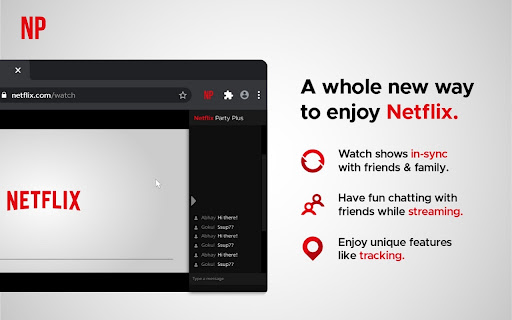
Download Netflix Party Extension CRX File
Download Netflix Party extension files in crx format, manually install Chrome extensions in the browser, or share the crx files with friends to easily install Chrome extensions.
Extension Usage Instructions
                        How to Start Netflix Party
>>Install Netflix Party chrome extension.
>>Open any Netflix video
>>Click on the extension icon and Start the Party
>>Share the Party link with your friends and ask them to join
>>Now watch along with your friends or family

Netflix Party Features
>>Sync: Click on sync button to match your video timings with all the other party members
>>Live Tracking: Get to know the real time video duration of every person in the party
>>Profile & Chat: Change your name and avatar to chat with your friends all the time.

We are making improvements to our backend, which may lead to occasional interruptions. We appreciate your patience and understanding.

Version 2.2.6 changes
>>all bugs fixed

Version 2.2.5 changes
>> chatting Bug Fixes
>> Run on other video platform also

Version 2.2.2 changes
>> Bug Fixes
>> Added support for multi streaming sites
>> Prime video, Disney plus coming soon
Extension Basic Information
| Name |  Netflix Party Netflix Party |
| ID | mmnbenehknklpbendgmgngeaignppnbe |
| Official URL | https://chromewebstore.google.com/detail/netflix-party/mmnbenehknklpbendgmgngeaignppnbe |
| Description | Install Netflix Party Plus Chrome extension to watch along with your friends |
| File Size | 204 KB |
| Installation Count | 652,147 |
| Current Version | 3.2.0 |
| Last Updated | 2023-12-22 |
| Publish Date | 2020-06-29 |
| Rating | 4.13/5 Total 358 Ratings |
| Developer | https://netflixwatchparty.blogspot.com |
| [email protected] | |
| Payment Type | free |
| Privacy Policy Page URL | https://bingewatchparty.com/privacy-policy |
| Supported Languages | en |
| manifest.json | |
{
    "update_url": "https:\/\/clients2.google.com\/service\/update2\/crx",
    "manifest_version": 2,
    "name": "__MSG_extName__",
    "description": "Install Netflix Party Plus Chrome extension to watch along with your friends",
    "version": "3.2.0",
    "default_locale": "en",
    "content_security_policy": "script-src 'self' https:\/\/ssl.google-analytics.com; object-src 'self'",
    "browser_action": {
        "default_icon": "32.png",
        "default_title": "__MSG_extName__",
        "default_popup": ""
    },
    "background": {
        "page": "background.html",
        "persistent": true
    },
    "permissions": [
        "tabs",
        "http:\/\/*\/*",
        "https:\/\/*\/*",
        "storage",
        "webRequest",
        "webRequestBlocking"
    ],
    "content_scripts": [
        {
            "js": [
                "content_script.js"
            ],
            "css": [
                "common.css"
            ],
            "run_at": "document_end",
            "match_about_blank": false,
            "matches": [
                "http:\/\/*\/*",
                "https:\/\/*\/*"
            ]
        }
    ],
    "icons": {
        "16": "16.png",
        "32": "32.png",
        "128": "128.png"
    },
    "web_accessible_resources": [
        "img\/*"
    ]
} | |