Grid View For Google Meet (fixed)
Adds a toggle to use a grid layout in Google Meets and more advanced features
What is Grid View For Google Meet (fixed)?
Grid View For Google Meet (fixed) is a Chrome extension developed by http://1bestlinks.net, and its main feature is "Adds a toggle to use a grid layout in Google Meets and more advanced features".
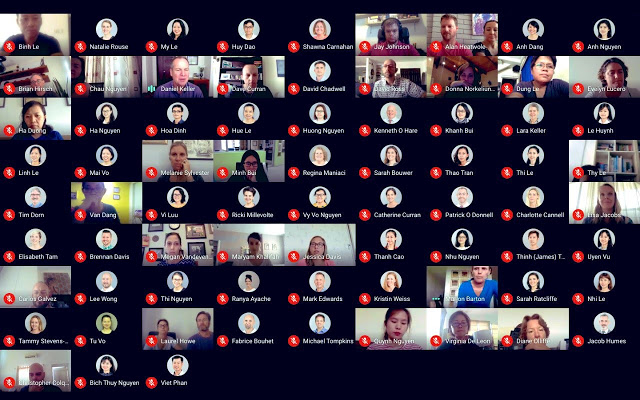
Extension Screenshots


Download Grid View For Google Meet (fixed) Extension CRX File
Download Grid View For Google Meet (fixed) extension files in crx format, manually install Chrome extensions in the browser, or share the crx files with friends to easily install Chrome extensions.
Extension Usage Instructions
                        Add a toggle button to use grid layouts in Google Meets

This extension adds a button to the top right bar (next to chat and a list of participants) to enable grid view in Google Meets. The grid view provides participants with an equal size video for use in meetings without the main speaker (such as working in silent meetings at home).

This extension forces every participant's video to load when grid view is enabled, and can cause performance problems during extremely large meetings.

Includes plenty of options to enhance your meeting: include your own videos, highlight who is speaking, and hide participants without video!
--------------------------------------------------------------------------
The great extension by Chris Gamble suddenly stopped working in July.
We brought the extension back to life for a long time.

Now, a major update of Google Meet broke the interface with the native code, so we moved to a different approach. We plan to work on some of the features that millions of users loved.. stay tuned!
--------------------------------------------------------------------------
Privacy Policy
This extension does not track any user data, and therefore does not have a detailed privacy policy.
Extension Basic Information
| Name |  Grid View For Google Meet (fixed) Grid View For Google Meet (fixed) |
| ID | mpbkppagklacnhegdnhgijandjnfcfbo |
| Official URL | https://chrome.google.com/webstore/detail/grid-view-for-google-meet/mpbkppagklacnhegdnhgijandjnfcfbo |
| Description | Adds a toggle to use a grid layout in Google Meets and more advanced features |
| File Size | 236 KB |
| Installation Count | 10,000 |
| Current Version | 1.0.2 |
| Last Updated | 2021-03-25 |
| Publish Date | 2020-11-02 |
| Rating | 1.88/5 Total 16 Ratings |
| Developer | http://1bestlinks.net |
| [email protected] | |
| Payment Type | free |
| Privacy Policy Page URL | http://1bestlinks.net/page/privacy-policy |
| Supported Languages | id,ms,de,en,fil,fr,nl,no,vi,tr,ca,da,et,es,hr,it,lv,lt,hu,pl,ro,sk,sl,fi,sv,cs,el,sr,bg,ru,uk,hi,th,zh-CN,zh-TW,ja,ko |
| manifest.json | |
{
    "update_url": "https:\/\/clients2.google.com\/service\/update2\/crx",
    "manifest_version": 2,
    "name": "__MSG_AppName__",
    "description": "__MSG_AppDescription__",
    "default_locale": "en",
    "version": "1.0.2",
    "homepage_url": "http:\/\/1bestlinks.net\/",
    "icons": {
        "24": "icons\/icon-24.png",
        "32": "icons\/icon-32.png",
        "48": "icons\/icon-48.png",
        "128": "icons\/icon-128.png"
    },
    "browser_action": {
        "default_icon": {
            "24": "icons\/icon-24.png",
            "32": "icons\/icon-32.png",
            "48": "icons\/icon-48.png",
            "128": "icons\/icon-128.png"
        },
        "default_popup": "popup.html",
        "default_title": "Google Meet Grid View"
    },
    "background": {
        "scripts": [
            "install.js"
        ],
        "persistent": true
    },
    "content_scripts": [
        {
            "matches": [
                "https:\/\/meet.google.com\/*"
            ],
            "js": [
                "browser-polyfill.js",
                "content.js"
            ],
            "run_at": "document_idle"
        }
    ],
    "web_accessible_resources": [
        "grid.user.js"
    ]
} | |