Saber Lily Hot Anime HD New Tabs Theme
Every time you open a new tab, you will get different HD wallpapers from Saber Lily. This new theme includes clock and more.
What is Saber Lily Hot Anime HD New Tabs Theme?
Saber Lily Hot Anime HD New Tabs Theme is a Chrome extension developed by http://mytab.me, and its main feature is "Every time you open a new tab, you will get different HD wallpapers from Saber Lily. This new theme includes clock and more.".
Extension Screenshots


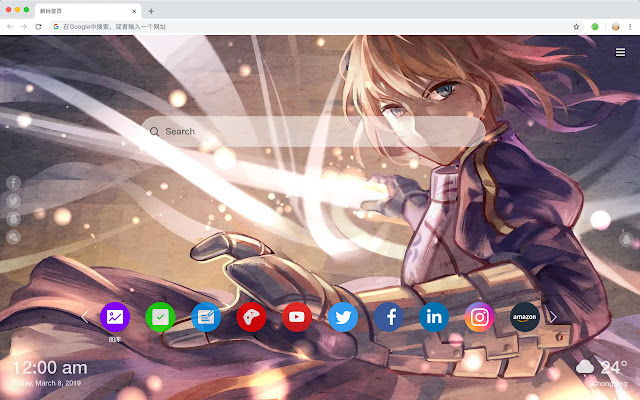
Download Saber Lily Hot Anime HD New Tabs Theme Extension CRX File
Download Saber Lily Hot Anime HD New Tabs Theme extension files in crx format, manually install Chrome extensions in the browser, or share the crx files with friends to easily install Chrome extensions.
Extension Usage Instructions
                        Lily is the role costume of the PS2 fighting game "Fate/unlimited codes" released on December 18, 2008 by CAPCOM with the world of "Fate/stay night".

Here's a list of other features you'll get:
 - To-do list
 - Set your favorite wallpapers
 - Discover new hot spots
 - Bookmarks
 - Social network notifications
 - High quality wallpaper for each new label
 - Clock showing date and time
 - Weather widget
 - Open to search
Extension Basic Information
| Name |  Saber Lily Hot Anime HD New Tabs Theme Saber Lily Hot Anime HD New Tabs Theme |
| ID | nadmjedlnhbbljcopfbkkpdlhcklgfph |
| Official URL | https://chrome.google.com/webstore/detail/saber-lily-hot-anime-hd-n/nadmjedlnhbbljcopfbkkpdlhcklgfph |
| Description | Every time you open a new tab, you will get different HD wallpapers from Saber Lily. This new theme includes clock and more. |
| File Size | 41.8 KB |
| Installation Count | 79 |
| Current Version | 1.1.1.0 |
| Last Updated | 2019-07-01 |
| Publish Date | 2019-07-01 |
| Developer | http://mytab.me |
| Payment Type | free |
| Supported Languages | en,zh-CN,zh-TW |
| manifest.json | |
{
    "name": "__MSG_ext_name__",
    "manifest_version": 2,
    "description": "__MSG_ext_desc__",
    "browser_action": {
        "default_icon": {
            "48": "icons\/48.png"
        },
        "default_title": "__MSG_ext_name__"
    },
    "chrome_url_overrides": {
        "newtab": "pages\/newtab\/index.html"
    },
    "background": {
        "scripts": [
            "app.js",
            "pages\/background\/index.js"
        ],
        "persistent": false
    },
    "default_locale": "en",
    "icons": {
        "48": "icons\/48.png",
        "128": "icons\/128.png"
    },
    "minimum_chrome_version": "57",
    "offline_enabled": true,
    "update_url": "https:\/\/clients2.google.com\/service\/update2\/crx",
    "version": "1.1.1.0"
} | |