Collect Apps for Vend Register
Check rewards from within Vend
What is Collect Apps for Vend Register?
Collect Apps for Vend Register is a Chrome extension developed by https://collectapps.io, and its main feature is "Check rewards from within Vend".
Extension Screenshots
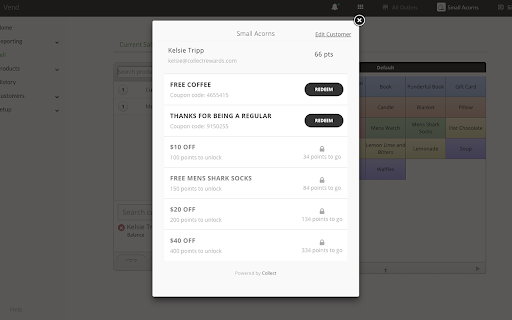
Download Collect Apps for Vend Register Extension CRX File
Download Collect Apps for Vend Register extension files in crx format, manually install Chrome extensions in the browser, or share the crx files with friends to easily install Chrome extensions.
Extension Usage Instructions
                        The Vend + Collect In-Store Redemption Extension makes it quick and easy to check customers' rewards and offers they have available and redeem them with a single click.
Once installed, when a customer is added in point-of-sale, the extension will load the customer's profile, prompting staff to ask the customer if they would like to redeem a reward and allowing them to double check that the customer is entitled to any coupon they present.

Now supports % OFF!
Extension Basic Information
| Name |  Collect Apps for Vend Register Collect Apps for Vend Register |
| ID | ncleoklhijegcelpebgdpplhbdjaaloj |
| Official URL | https://chromewebstore.google.com/detail/collect-apps-for-vend-reg/ncleoklhijegcelpebgdpplhbdjaaloj |
| Description | Check rewards from within Vend |
| File Size | 72.13 KB |
| Installation Count | 156 |
| Current Version | 2.0 |
| Last Updated | 2020-01-08 |
| Publish Date | 2020-01-07 |
| Rating | 5.00/5 Total 6 Ratings |
| Developer | https://collectapps.io |
| [email protected] | |
| Payment Type | free |
| Extension Website | http://loyalty.collectapps.io/vend |
| Supported Languages | en-US |
| manifest.json | |
{
    "update_url": "https:\/\/clients2.google.com\/service\/update2\/crx",
    "manifest_version": 2,
    "name": "Collect Apps for Vend Register",
    "description": "Check rewards from within Vend",
    "version": "2.0",
    "content_scripts": [
        {
            "matches": [
                "http:\/\/*.vendhq.com\/*",
                "https:\/\/*.vendhq.com\/*"
            ],
            "css": [
                "fancybox\/jquery.fancybox.css"
            ],
            "js": [
                "jquery.min.js",
                "fancybox\/jquery.fancybox.js",
                "vend-override-v2.js",
                "vend-override-register-v2.js"
            ]
        }
    ],
    "icons": {
        "16": "images\/16.png",
        "48": "images\/48.png",
        "128": "images\/128.png"
    },
    "permissions": [
        "https:\/\/portal.collectapps.io"
    ],
    "browser_action": {
        "default_icon": "img\/collect-icon-57.png"
    }
} | |