Awesome Vimeo Downloader
Download videos from vimeo.com (download 4K quality videos)
What is Awesome Vimeo Downloader?
Awesome Vimeo Downloader is a Chrome extension developed by https://pbion.com, and its main feature is "Download videos from vimeo.com (download 4K quality videos)".
Extension Screenshots
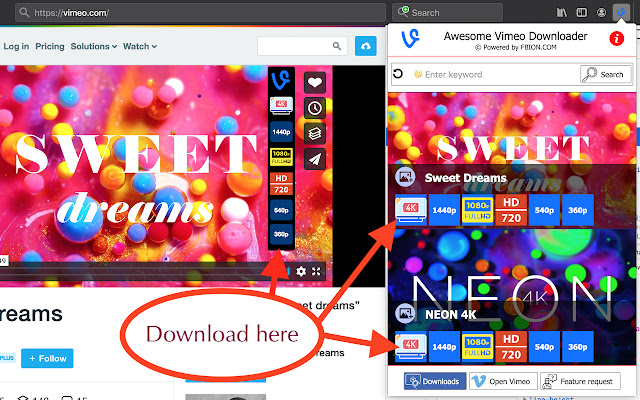

Download Awesome Vimeo Downloader Extension CRX File
Download Awesome Vimeo Downloader extension files in crx format, manually install Chrome extensions in the browser, or share the crx files with friends to easily install Chrome extensions.
Extension Usage Instructions
                        Download 4K videos from Vimeo

🧐 HOW TO USE
1. Open the Vimeo website.
2. Play a video on Vimeo.
3. Open Vimeo video downloader
4. Wait a few moments.
5. Click on the quality you want to download.
6. On the new tab, the file will automatically download and then save to your device.

💡 Version 4.2.3
+ Fix error download links.

☀ Download videos with just 1 click (enable/disable in user settings).
☀ Automatically select preset quality.
☀ Add download buttons directly into Vimeo player.
☀ Download Vimeo thumbnail full size.
☀ Download subtitles (closed caption)
☀ Get filmstrip image, owner avatar.
☀ Multi language.
☀ Suggest queries + Generate random keywords.
Extension Basic Information
| Name |  Awesome Vimeo Downloader Awesome Vimeo Downloader |
| ID | ngkjecadfeahlgbikjggbomigakdoifp |
| Official URL | https://chrome.google.com/webstore/detail/awesome-vimeo-downloader/ngkjecadfeahlgbikjggbomigakdoifp |
| Description | Download videos from vimeo.com (download 4K quality videos) |
| File Size | 361 KB |
| Installation Count | 9,000 |
| Current Version | 4.2.4 |
| Last Updated | 2022-07-24 |
| Publish Date | 2020-01-26 |
| Rating | 2.33/5 Total 12 Ratings |
| Developer | https://pbion.com |
| [email protected] | |
| Payment Type | free |
| Extension Website | https://fbion.com/en/vimeo-downloader.html |
| Help Page URL | https://fbion.com/en/vimeo-downloader.html#contact |
| Privacy Policy Page URL | https://pbion.com/privacy-policy.html |
| Supported Languages | id,ms,de,en,fil,fr,nl,no,vi,tr,ca,da,et,es,hr,it,lv,lt,hu,pl,ro,sk,sl,fi,sv,cs,el,sr,bg,ru,uk,mr,hi,bn,gu,ta,te,ml,th,zh-CN,zh-TW,ja,ko |
| manifest.json | |
{
    "update_url": "https:\/\/clients2.google.com\/service\/update2\/crx",
    "manifest_version": 2,
    "name": "__MSG_extName__",
    "short_name": "Awesome Vimeo Downloader",
    "version": "4.2.4",
    "description": "__MSG_extDescription__",
    "default_locale": "en",
    "icons": {
        "128": "img\/logo128.png",
        "64": "img\/logo64.png",
        "48": "img\/logo48.png",
        "16": "img\/logo16.png"
    },
    "background": {
        "scripts": [
            "jquery.js",
            "analytics.js",
            "background.js"
        ]
    },
    "content_scripts": [
        {
            "matches": [
                "*:\/\/vimeo.com\/*",
                "*:\/\/player.vimeo.com\/*"
            ],
            "js": [
                "content.js"
            ]
        },
        {
            "matches": [
                "https:\/\/*.pbion.com\/*"
            ],
            "js": [
                "pbion.js"
            ]
        }
    ],
    "browser_action": {
        "default_icon": {
            "128": "img\/logo128.png",
            "64": "img\/logo64.png",
            "48": "img\/logo48.png",
            "16": "img\/logo16.png"
        },
        "default_title": "Vimeo Downloader",
        "default_popup": "popup.html"
    },
    "permissions": [
        "https:\/\/suggestqueries.google.com\/*",
        "https:\/\/*.pbion.com\/*",
        "*:\/\/vimeo.com\/*",
        "*:\/\/player.vimeo.com\/*"
    ],
    "web_accessible_resources": [
        "img\/*.svg",
        "vimeo.js",
        "vimeo_player.css"
    ]
} | |