Merch Checker
This extension is scanning the products description for certain keywords!
What is Merch Checker?
Merch Checker is a Chrome extension developed by MerchLegend, and its main feature is "This extension is scanning the products description for certain keywords!".
Extension Screenshots
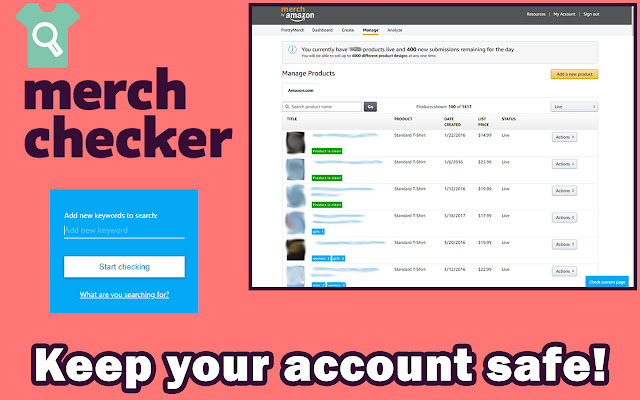


Download Merch Checker Extension CRX File
Download Merch Checker extension files in crx format, manually install Chrome extensions in the browser, or share the crx files with friends to easily install Chrome extensions.
Extension Usage Instructions
                        Are you sure your account is safe and compliant with the latest keyword changes?

Merch Checker automates the process of checking the brand names, titles, bullets and descriptions for your listings and shows you where you need to edit.

NOTE: The extension becomes active in the MANAGE tab.
HOW TO ACTIVATE: To enter the license key open your Merch by Amazon website, go to the MANAGE tab, press the extension icon and enter the license key.


For further assistance you can reach us at: [email protected]
Extension Basic Information
| Name |  Merch Checker Merch Checker |
| ID | nknmmnfkbmmpgmhkfjajihpnhdhoncje |
| Official URL | https://chrome.google.com/webstore/detail/merch-checker/nknmmnfkbmmpgmhkfjajihpnhdhoncje |
| Description | This extension is scanning the products description for certain keywords! |
| File Size | 87.34 KB |
| Installation Count | 1,000 |
| Current Version | 1.2.1 |
| Last Updated | 2018-08-12 |
| Publish Date | 2018-08-12 |
| Rating | 4.43/5 Total 7 Ratings |
| Developer | MerchLegend |
| [email protected] | |
| Payment Type | in_app |
| Supported Languages | en |
| manifest.json | |
{
"update_url": "https:\/\/clients2.google.com\/service\/update2\/crx",
"name": "Merch Checker",
"version": "1.2.1",
"description": "This extension is scanning the products description for certain keywords!",
"permissions": [
"activeTab",
"management",
"declarativeContent",
"storage",
" | |