Target Search
Easily locate the text you searched from google's results page.
What is Target Search?
Target Search is a Chrome extension developed by orduani, and its main feature is "Easily locate the text you searched from google's results page.".
Extension Screenshots
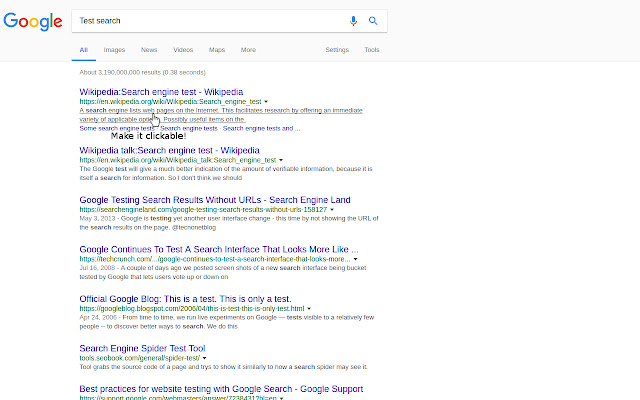

Download Target Search Extension CRX File
Download Target Search extension files in crx format, manually install Chrome extensions in the browser, or share the crx files with friends to easily install Chrome extensions.
Extension Usage Instructions
                        Improve your productivity when searching google! Google gives you 1-2 gray lines in each search result, with this extension you can click on them and redirect to the page with auto-scroll to the exact sentence you saw on the gray lines.

*Give it a try, it will change the way you search!*

Features:
* Makes the gray lines in google's search linkable
* Placing a small target icon near the text you search
* Flashing with the target icon and the paragraph background
* Support all languages, including RTL

Found bugs? Please use the "support" tab in google web store before leaving a negative feedback.
Extension Basic Information
| Name |  Target Search Target Search |
| ID | nohmjponpgbnhjokbmagdbnjpnmdaigb |
| Official URL | https://chrome.google.com/webstore/detail/target-search/nohmjponpgbnhjokbmagdbnjpnmdaigb |
| Description | Easily locate the text you searched from google's results page. |
| File Size | 154 KB |
| Installation Count | 199 |
| Current Version | 0.9.16 |
| Last Updated | 2019-04-24 |
| Publish Date | 2019-04-24 |
| Rating | 4.05/5 Total 22 Ratings |
| Developer | orduani |
| Payment Type | free |
| Supported Languages | en-US |
| manifest.json | |
{
"update_url": "https:\/\/clients2.google.com\/service\/update2\/crx",
"name": "Target Search",
"version": "0.9.16",
"manifest_version": 2,
"description": "Easily locate the text you searched from google's results page.",
"icons": {
"16": "assets\/media\/icons\/icon16.png",
"48": "assets\/media\/icons\/icon48.png",
"128": "assets\/media\/icons\/icon128.png"
},
"web_accessible_resources": [
"assets\/*"
],
"browser_action": {
"default_popup": "assets\/pages\/popup.html"
},
"permissions": [
"tabs",
" | |