Multiple Windows
It provide to create windows to different sizes and multiple for front-end developers.
What is Multiple Windows?
Multiple Windows is a Chrome extension developed by http://www.emreozbek.net, and its main feature is "It provide to create windows to different sizes and multiple for front-end developers.".
Extension Screenshots


Download Multiple Windows Extension CRX File
Download Multiple Windows extension files in crx format, manually install Chrome extensions in the browser, or share the crx files with friends to easily install Chrome extensions.
Extension Usage Instructions
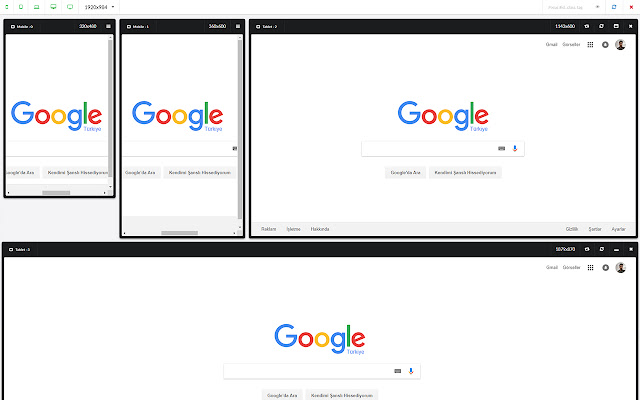
“Multiple Windows”; allows you to create multiple windows in the same single screen that each has a different resolution. Thus, while you are working on the development of front-end side, “Multiple Windows” meets all your window sizing needs. With this great “Resize” feature of “Multiple Windows”, you can reuse your previously created custom-sized screens in all your projects without a need to resize. Extension Basic Information
| Name |  Multiple Windows Multiple Windows |
| ID | npdmdcegegmlhfdpkflmkkmjpficmimk |
| Official URL | https://chrome.google.com/webstore/detail/multiple-windows/npdmdcegegmlhfdpkflmkkmjpficmimk |
| Description | It provide to create windows to different sizes and multiple for front-end developers. |
| File Size | 769 KB |
| Installation Count | 1,000 |
| Current Version | 1.4 |
| Last Updated | 2019-03-08 |
| Publish Date | 2019-03-08 |
| Rating | 4.56/5 Total 18 Ratings |
| Developer | http://www.emreozbek.net |
| [email protected] | |
| Payment Type | free |
| Extension Website | https://emreozbek.github.io/multiple-windows/ |
| Privacy Policy Page URL | http://www.emreozbek.net |
| Supported Languages | en |
| manifest.json | |
{
    "update_url": "https:\/\/clients2.google.com\/service\/update2\/crx",
    "background": {
        "scripts": [
            "background.js"
        ]
    },
    "manifest_version": 2,
    "name": "Multiple Windows",
    "description": "It provide to create windows to different sizes and multiple for front-end developers.",
    "version": "1.4",
    "browser_action": {
        "default_icon": "assets\/icon-16.png"
    },
    "icons": {
        "256": "assets\/icon-256.png",
        "128": "assets\/icon-128.png",
        "48": "assets\/icon-48.png",
        "16": "assets\/icon-16.png"
    },
    "permissions": [
        "activeTab",
        "storage"
    ],
    "content_security_policy": "script-src 'self' 'unsafe-eval'; object-src 'self'; font-src 'self' data: chrome-extension-resource:;",
    "web_accessible_resources": [
        "background.js",
        "assets\/bundle.js",
        "assets\/bundle.css",
        "cors.html",
        "*.ttf",
        "*.woff",
        "*.woff2",
        "*.png",
        "*.eot",
        "*.svg",
        "http:\/\/*",
        "https:\/\/*"
    ]
} | |