video-screenshot
Take screenshots of videos such as YouTube and other video sites
What is video-screenshot?
video-screenshot is a Chrome extension developed by mnao305, and its main feature is "Take screenshots of videos such as YouTube and other video sites".
Extension Screenshots
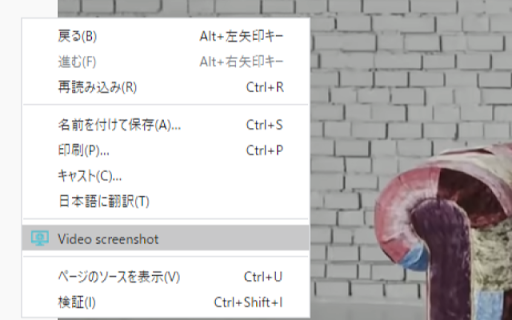
Download video-screenshot Extension CRX File
Download video-screenshot extension files in crx format, manually install Chrome extensions in the browser, or share the crx files with friends to easily install Chrome extensions.
Extension Usage Instructions
                        各種動画サイトの映像のスクリーンショットを撮るためのブラウザ拡張機能です。
右クリックからのコンテキストメニュー選択か、ショートカットキー(Ctrl + Q)でスクリーンショットを撮ることができます。

ファイルの保存形式はデフォルトpngです。オプションページからjpgとpngで選択できます。

そのページに複数の動画が存在していた場合、一番上にある動画のスクリーンショットを撮ります。

下記サイトで動作確認しています。
・YouTube(動画, 配信)
・ニコニコ動画
・ニコニコ生放送
・SHOWROOM

ソースコード
https://github.com/mnao305/video-screenshot
Extension Basic Information
| Name |  video-screenshot video-screenshot |
| ID | okbncahhjihmnjpiadepoioodfnfanjk |
| Official URL | https://chromewebstore.google.com/detail/video-screenshot/okbncahhjihmnjpiadepoioodfnfanjk |
| Description | Take screenshots of videos such as YouTube and other video sites |
| File Size | 20.9 KB |
| Installation Count | 863 |
| Current Version | 1.6.0 |
| Last Updated | 2023-01-29 |
| Publish Date | 2020-05-14 |
| Rating | 5.00/5 Total 1 Ratings |
| Developer | mnao305 |
| [email protected] | |
| Payment Type | free |
| Extension Website | https://github.com/mnao305/Video-Screenshot |
| Help Page URL | https://github.com/mnao305/Video-Screenshot/issues |
| Supported Languages | en |
| manifest.json | |
{
    "update_url": "https:\/\/clients2.google.com\/service\/update2\/crx",
    "name": "video-screenshot",
    "description": "Take screenshots of videos such as YouTube and other video sites",
    "version": "1.6.0",
    "manifest_version": 2,
    "icons": {
        "48": "icons\/icon_48.png",
        "128": "icons\/icon_128.png"
    },
    "options_ui": {
        "page": "options\/index.html",
        "chrome_style": true
    },
    "content_scripts": [
        {
            "matches": [
                "http:\/\/*\/*",
                "https:\/\/*\/*"
            ],
            "js": [
                "content\/index.js"
            ]
        }
    ],
    "background": {
        "scripts": [
            "background\/index.js"
        ],
        "persistent": false
    },
    "permissions": [
        "contextMenus",
        "storage"
    ],
    "commands": {
        "_execute_action": [],
        "shoot": {
            "description": "Take a screenshot",
            "suggested_key": {
                "default": "Ctrl+Q",
                "mac": "MacCtrl+Q"
            }
        }
    }
} | |