Video-Notes
Your personal youtube notes making assistant
What is Video-Notes?
Video-Notes is a Chrome extension developed by Akshay Kumar, and its main feature is "Your personal youtube notes making assistant".
Extension Screenshots

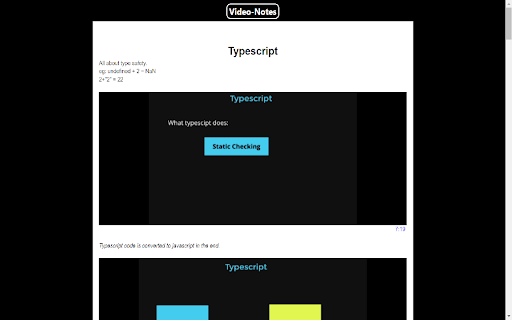
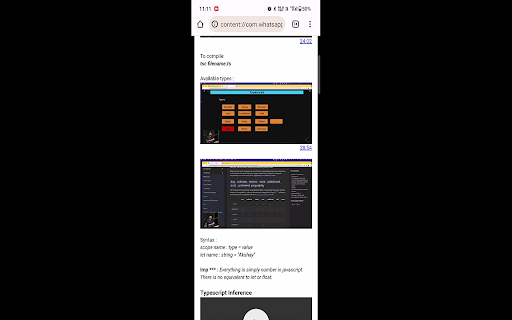
Download Video-Notes Extension CRX File
Download Video-Notes extension files in crx format, manually install Chrome extensions in the browser, or share the crx files with friends to easily install Chrome extensions.
Extension Usage Instructions
                        Video-Notes is a smart notes taking solution for online learners while watching youtube videos.

Along with writing notes You can take video clips & screenshots along with the timestamp while watching the video.

The downloaded notes are viewable in any device. You can transfer the notes using whatsapp-web or google drive and open them in any internet browser.

The extension is completely free.

What's New ?

Google Drive Integeration
This feature enables you to maintain all your notes in one centralized and organized location.
Extension Basic Information
| Name |  Video-Notes Video-Notes |
| ID | pinjmkdikinlhdjkkieabffplmdahpia |
| Official URL | https://chromewebstore.google.com/detail/video-notes/pinjmkdikinlhdjkkieabffplmdahpia |
| Description | Your personal youtube notes making assistant |
| File Size | 3.55 MB |
| Installation Count | 62 |
| Current Version | 1.18 |
| Last Updated | 2023-12-16 |
| Publish Date | 2023-09-17 |
| Rating | 5.00/5 Total 8 Ratings |
| Developer | Akshay Kumar |
| [email protected] | |
| Payment Type | free |
| Supported Languages | en |
| manifest.json | |
{
"update_url": "https:\/\/clients2.google.com\/service\/update2\/crx",
"manifest_version": 3,
"name": "Video-Notes",
"version": "1.18",
"description": "Your personal youtube notes making assistant",
"action": {
"default_popup": "index.html"
},
"oauth2": {
"client_id": "926015470115-hukteq61217rbo79omj08b7bfc2n2mua.apps.googleusercontent.com",
"scopes": [
"https:\/\/www.googleapis.com\/auth\/drive.file",
"https:\/\/www.googleapis.com\/auth\/userinfo.profile"
]
},
"permissions": [
"storage",
"identity"
],
"content_scripts": [
{
"matches": [
"https:\/\/www.youtube.com\/*"
],
"js": [
"content.js"
],
"run_at": "document_end"
}
],
"icons": {
"48": "notes.png"
},
"background": {
"matches": [
" | |