Media Control
Control Amazon music player, Spotify web player, and YouTube (HTML player only) without switching tabs.
What is Media Control?
Media Control is a Chrome extension developed by m.ryanmurphy, and its main feature is "Control Amazon music player, Spotify web player, and YouTube (HTML player only) without switching tabs.".
Extension Screenshots

Download Media Control Extension CRX File
Download Media Control extension files in crx format, manually install Chrome extensions in the browser, or share the crx files with friends to easily install Chrome extensions.
Extension Usage Instructions
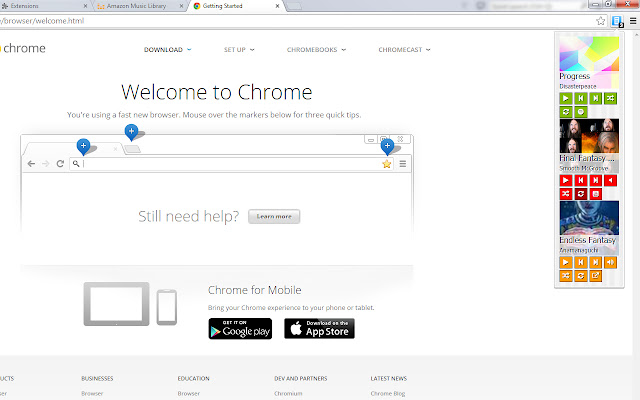
                        Media Control appears as a toolbar button, and is a simple dropdown to control media players from Amazon, Spotify, and YouTube (HTML player only).

For each you can play and pause, and if listening from a playlist, go forward and back within the list. Spotify allows additional control of repeat and shuffle. YouTube allows additional control of playlist autoplay and mute functionality. Amazon allows for all of the above. You can also click the external link button to go directly to the tab.

For each tab with a player you have open, a control will appear. If for some reason it is unable to control directly there appears a large button to go to the tab directly.
Extension Basic Information
| Name |  Media Control Media Control |
| ID | pncnfpeioeljgmelkbboabkefmccechp |
| Official URL | https://chrome.google.com/webstore/detail/media-control/pncnfpeioeljgmelkbboabkefmccechp |
| Description | Control Amazon music player, Spotify web player, and YouTube (HTML player only) without switching tabs. |
| File Size | 371 KB |
| Installation Count | 96 |
| Current Version | 1.5 |
| Last Updated | 2015-02-13 |
| Publish Date | 2015-02-13 |
| Rating | 1.00/5 Total 2 Ratings |
| Developer | m.ryanmurphy |
| [email protected] | |
| Payment Type | free |
| Supported Languages | en |
| manifest.json | |
{
    "update_url": "https:\/\/clients2.google.com\/service\/update2\/crx",
    "name": "Media Control",
    "version": "1.5",
    "manifest_version": 2,
    "description": "Control Amazon music player, Spotify web player, and YouTube (HTML player only) without switching tabs.",
    "homepage_url": "https:\/\/bitbucket.org\/whote\/media-control",
    "permissions": [
        "tabs"
    ],
    "background": {
        "scripts": [
            "background.js"
        ],
        "persistent": false
    },
    "content_scripts": [
        {
            "matches": [
                "*:\/\/play.spotify.com\/*",
                "*:\/\/*.youtube.com\/*",
                "*:\/\/*.amazon.com\/*\/cloudplayer\/*"
            ],
            "js": [
                "page-inject.js"
            ]
        }
    ],
    "icons": {
        "16": "images\/16.png",
        "48": "images\/48.png",
        "64": "images\/64.png",
        "128": "images\/128.png"
    },
    "browser_action": {
        "default_icon": "images\/38.png",
        "default_title": "Media Control",
        "default_popup": "popup\/control.html"
    }
} | |