CC Search
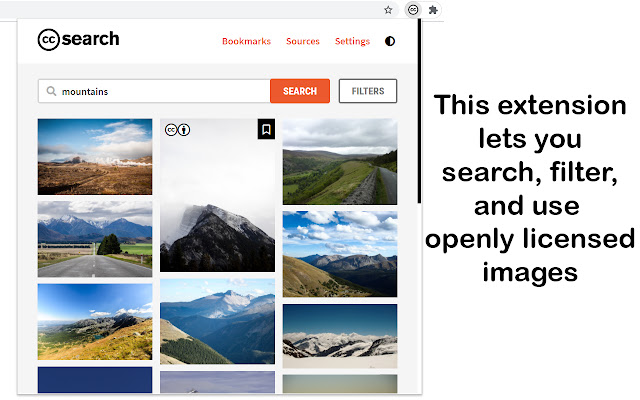
Search, filter, and use images in the Public Domain and under Creative Commons licenses.
Qu'est-ce que CC Search ?
CC Search est une extension Chrome développée par creativecommons.extension, et sa fonction principale est "Search, filter, and use images in the Public Domain and under Creative Commons licenses.".
Captures d'Écran de l'Extension



Télécharger le fichier CRX de l'extension CC Search
Téléchargez les fichiers d'extension CC Search au format crx, installez manuellement les extensions Chrome dans le navigateur ou partagez les fichiers crx avec des amis pour installer facilement les extensions Chrome.
Instructions d'Utilisation de l'Extension
                        Unlock the full potential of the internet and search through a plethora of openly licensed images and use them legally in your works.

Features:

* Search and filter - Extension has various filters to help you find what are looking for.

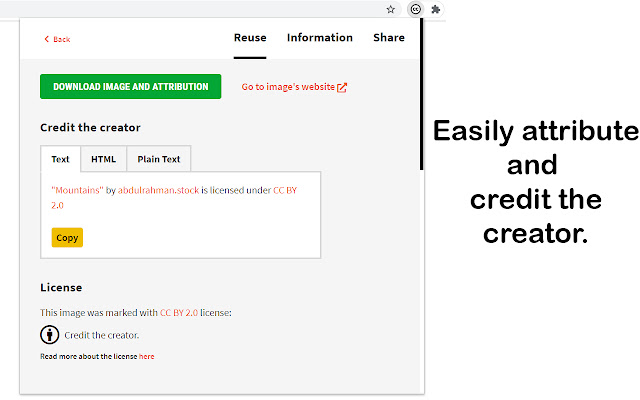
* One-click easy attribution - It's super easy to credit the source of any image you discover.

* Download images (and attribution) - Use the images in your works.

* Bookmark images - Save those perfect images in the extension itself.

* Image tags and recommendations - Get relevant image tags and recommendations for a particular image.

* Export and import bookmarks -  Easily transfer your bookmarks or archive them.

* Sync your custom setting and bookmarks across devices - The settings and bookmarks are synced using in-built Chrome sync.

* Options page for custom settings - Personalise the extension by setting often used filters and options as defaults.

* Dark Mode - Save battery and go easy on your eyes!


With more than 300 million images indexed from more than 40 providers, the chances are you will find what are you looking for.

Creative Commons: When we share, everyone wins.

Source Code:
https://github.com/creativecommons/ccsearch-browser-extension

Contributors @ Github:
https://github.com/creativecommons/ccsearch-browser-extension/graphs/contributors
Informations de Base sur l'Extension
| Nom |  CC Search CC Search |
| ID | agohkbfananbebiaphblgcfhcclklfnh |
| URL Officiel | https://chrome.google.com/webstore/detail/cc-search/agohkbfananbebiaphblgcfhcclklfnh |
| Description | Search, filter, and use images in the Public Domain and under Creative Commons licenses. |
| Taille du Fichier | 61.96 KB |
| Nombre d'Installations | 20,389 |
| Version Actuelle | 1.3.8 |
| Dernière Mise à Jour | 2020-12-13 |
| Date de Publication | 2020-06-29 |
| Évaluation | 4.67/5 Total 9 Évaluations |
| Développeur | creativecommons.extension |
| [email protected] | |
| Type de Paiement | free |
| Site Web de l'Extension | https://opensource.creativecommons.org/ccsearch-browser-extension/ |
| URL de la Page d'Aide | https://github.com/creativecommons/ccsearch-browser-extension/issues |
| Langues Prises en Charge | en-US |
| manifest.json | |
{
    "update_url": "https:\/\/clients2.google.com\/service\/update2\/crx",
    "name": "CC Search",
    "author": "Creative Commons",
    "description": "Search, filter, and use images in the Public Domain and under Creative Commons licenses.",
    "version": "1.3.8",
    "manifest_version": 2,
    "icons": {
        "16": "icons\/cc16.png",
        "32": "icons\/cc32.png",
        "48": "icons\/cc48.png",
        "96": "icons\/cc96.png",
        "128": "icons\/cc128.png"
    },
    "browser_action": {
        "default_title": "CC Search",
        "default_icon": {
            "16": "icons\/cc16.png",
            "24": "icons\/cc24.png",
            "32": "icons\/cc32.png"
        },
        "default_popup": "popup\/popup.html"
    },
    "permissions": [
        "storage"
    ],
    "options_ui": {
        "page": "options\/options.html",
        "open_in_tab": true
    }
} | |