Searchyy - Find on YouTube by Right-Click
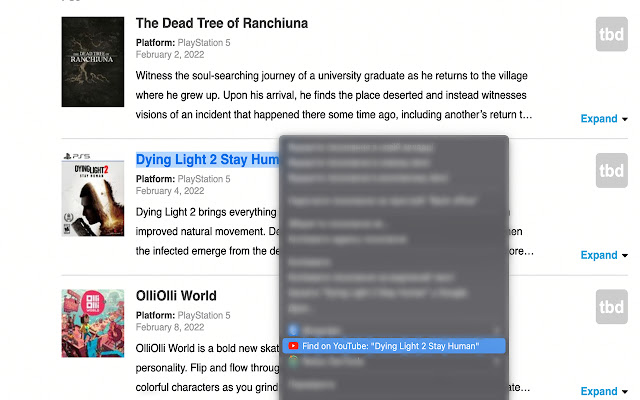
Search highlighted/selected text on YouTube with right click!
Qu'est-ce que Searchyy - Find on YouTube by Right-Click ?
Searchyy - Find on YouTube by Right-Click est une extension Chrome développée par Vladyslav Bova, et sa fonction principale est "Search highlighted/selected text on YouTube with right click!".
Captures d'Écran de l'Extension
Télécharger le fichier CRX de l'extension Searchyy - Find on YouTube by Right-Click
Téléchargez les fichiers d'extension Searchyy - Find on YouTube by Right-Click au format crx, installez manuellement les extensions Chrome dans le navigateur ou partagez les fichiers crx avec des amis pour installer facilement les extensions Chrome.
Instructions d'Utilisation de l'Extension
                        I developed this extension for myself and I hope you will love it too.

It's pretty simple. Right click on selected text will redirect you on YouTube with the results.

It just saves a time.
Informations de Base sur l'Extension
| Nom |  Searchyy - Find on YouTube by Right-Click Searchyy - Find on YouTube by Right-Click |
| ID | alhnhopmdlijlcdfbmlaflpfbcgfdekh |
| URL Officiel | https://chrome.google.com/webstore/detail/searchyy-find-on-youtube/alhnhopmdlijlcdfbmlaflpfbcgfdekh |
| Description | Search highlighted/selected text on YouTube with right click! |
| Taille du Fichier | 9.2 KB |
| Nombre d'Installations | 64 |
| Version Actuelle | 1.0 |
| Dernière Mise à Jour | 2022-02-01 |
| Date de Publication | 2022-02-01 |
| Évaluation | 5.00/5 Total 3 Évaluations |
| Développeur | Vladyslav Bova |
| [email protected] | |
| Type de Paiement | free |
| URL de la Page de Politique de Confidentialité | https://www.termsfeed.com/live/95cf2d84-de8d-42e0-ba80-1ab7d730e04e |
| Langues Prises en Charge | en |
| manifest.json | |
{
    "update_url": "https:\/\/clients2.google.com\/service\/update2\/crx",
    "name": "Searchyy - Find on YouTube by Right-Click",
    "description": "Search highlighted\/selected text on YouTube with right click!",
    "version": "1.0",
    "manifest_version": 3,
    "background": {
        "service_worker": "background.js"
    },
    "permissions": [
        "contextMenus",
        "storage"
    ],
    "action": {
        "default_popup": "popup.html",
        "default_icon": {
            "16": "\/images\/16.png",
            "32": "\/images\/32.png",
            "48": "\/images\/48.png",
            "128": "\/images\/128.png"
        }
    },
    "icons": {
        "16": "\/images\/16.png",
        "32": "\/images\/32.png",
        "48": "\/images\/48.png",
        "128": "\/images\/128.png"
    }
} | |