Task Manager
A simple task manager to use with chrome
Qu'est-ce que Task Manager ?
Task Manager est une extension Chrome développée par shuleiwang, et sa fonction principale est "A simple task manager to use with chrome".
Captures d'Écran de l'Extension

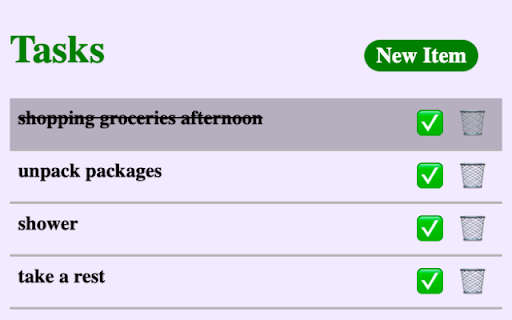
Télécharger le fichier CRX de l'extension Task Manager
Téléchargez les fichiers d'extension Task Manager au format crx, installez manuellement les extensions Chrome dans le navigateur ou partagez les fichiers crx avec des amis pour installer facilement les extensions Chrome.
Instructions d'Utilisation de l'Extension
                        Task Manager Chrome Extension - Effortless Task Tracking While You Browse

Summary:
Introducing Task Manager, a user-friendly Chrome extension designed to streamline your task management experience while seamlessly integrating into your web browsing routine. With an intuitive interface and essential features, Task Manager empowers you to effortlessly create, track, and organize your to-do list without disrupting your online workflow. Whether you're a multitasking professional or a student juggling assignments, Task Manager ensures you stay on top of your tasks right from your browser.

Key Features:

1. **Quick Task Creation:** With the "New Item" button, adding tasks to your list is a breeze. Just a click away, you can instantly create new task items without leaving your current tab, making sure no task goes unnoticed.

2. **Efficient Task Monitoring:** Keep track of your progress with the click of a button. Mark tasks as complete using the ✅ icon, which visually strikes through the task text, giving you a clear view of your accomplishments.

3. **Easy Deletion:** For tasks you no longer need, simply hit the 🗑️ icon to delete them. Maintaining a clutter-free list is as straightforward as removing the completed or irrelevant tasks.

4. **Automatic Data Persistence:** Say goodbye to the fear of losing your task list. Task Manager automatically saves your created items whenever you refresh your browser or close and reopen it, ensuring your progress is never lost.

5. **Seamless Multitasking:** The true power of Task Manager lies in its ability to complement your browsing tasks. You can manage your to-do list while researching, shopping, or working on other browser tabs, maintaining a productive balance.

6. **Intuitive User Interface:** Task Manager's minimalistic design guarantees an intuitive experience. The interface focuses on your tasks, making it easy to navigate and manage without any unnecessary distractions.

7. **User-Friendly Functionality:** Task Manager is designed with simplicity in mind. No complex settings or configurations are required—just install and start managing tasks right away.

Experience the convenience of Task Manager as it transforms your Chrome browser into a powerful task management tool. Create, complete, and stay organized with just a few clicks.
Informations de Base sur l'Extension
| Nom |  Task Manager Task Manager |
| ID | bbmdbpbebindikbjljigphjdmickgnah |
| URL Officiel | https://chromewebstore.google.com/detail/task-manager/bbmdbpbebindikbjljigphjdmickgnah |
| Description | A simple task manager to use with chrome |
| Taille du Fichier | 11.76 KB |
| Nombre d'Installations | 264 |
| Version Actuelle | 1.0.0 |
| Dernière Mise à Jour | 2023-08-22 |
| Date de Publication | 2023-08-22 |
| Développeur | shuleiwang |
| [email protected] | |
| Type de Paiement | free |
| URL de la Page de Politique de Confidentialité | https://www.freeprivacypolicy.com/live/6d46988e-ddaf-42a8-9ca4-5b6e42dfb65d |
| Langues Prises en Charge | en |
| manifest.json | |
{
    "update_url": "https:\/\/clients2.google.com\/service\/update2\/crx",
    "name": "Task Manager",
    "version": "1.0.0",
    "description": "A simple task manager to use with chrome",
    "icons": {
        "16": "icons\/icon16.png",
        "32": "icons\/icon32.png",
        "48": "icons\/icon48.png",
        "128": "icons\/icon128.png"
    },
    "action": {
        "default_title": "Task Manager",
        "default_popup": "popout.html"
    },
    "manifest_version": 3
} | |