GM Cheems
Chess.com and Lichess assistant
Qu'est-ce que GM Cheems ?
GM Cheems est une extension Chrome développée par http://gmcheems.com, et sa fonction principale est "Chess.com and Lichess assistant".
Captures d'Écran de l'Extension
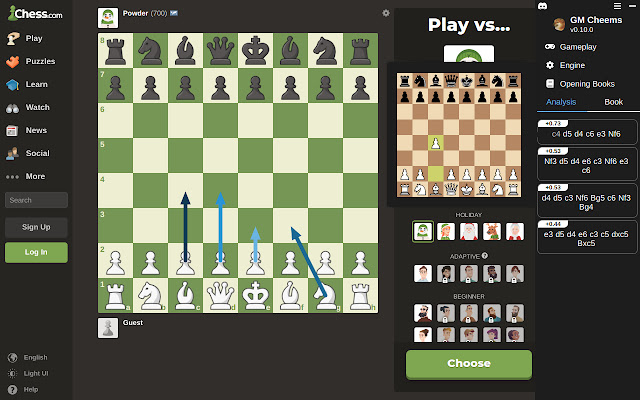
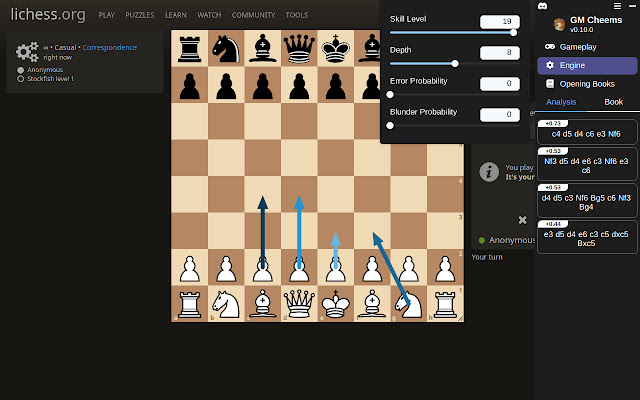
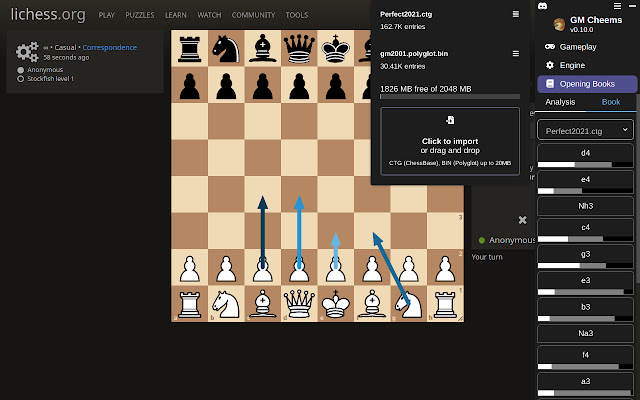
Télécharger le fichier CRX de l'extension GM Cheems
Téléchargez les fichiers d'extension GM Cheems au format crx, installez manuellement les extensions Chrome dans le navigateur ou partagez les fichiers crx avec des amis pour installer facilement les extensions Chrome.
Instructions d'Utilisation de l'Extension
                        GM Cheems helps you improve your chess skills by providing insight, hints and tips in real-time.

Changelog
------------------
0.11.0 - January 22, 2023
Added option to auto-play from a combination of book and engine movies
Draw opening book move arrows alongside engine move arrows
Chess board that is shown when hovering over a line will now stay in place as you move your cursor over each move
Split up the Gameplay options into three sub-menus

0.10.0 - December 24, 2022
Opening Books can now be imported and used during analysis! 🚀
Moves are now shown in SAN notation

0.9.0 - November 19, 2022
Added support for puzzle mode on Chess.com
Added option to choose how many lines to analyze
Added option to choose which line to draw arrows for
Fixed a bug where some options weren't being applied correctly
Informations de Base sur l'Extension
| Nom |  GM Cheems GM Cheems |
| ID | bmkmigdaklnhklmiialljbpjiedmnifh |
| URL Officiel | https://chrome.google.com/webstore/detail/gm-cheems/bmkmigdaklnhklmiialljbpjiedmnifh |
| Description | Chess.com and Lichess assistant |
| Taille du Fichier | 1.44 MB |
| Nombre d'Installations | 662 |
| Version Actuelle | 0.11.4 |
| Dernière Mise à Jour | 2023-05-17 |
| Date de Publication | 2022-08-02 |
| Évaluation | 3.86/5 Total 7 Évaluations |
| Développeur | http://gmcheems.com |
| [email protected] | |
| Type de Paiement | in_app |
| Site Web de l'Extension | https://www.gmcheems.com/ |
| URL de la Page d'Aide | https://gmcheems.com |
| Langues Prises en Charge | en |
| manifest.json | |
{
    "update_url": "https:\/\/clients2.google.com\/service\/update2\/crx",
    "description": "Chess.com and Lichess assistant",
    "version": "0.11.4",
    "name": "GM Cheems",
    "manifest_version": 3,
    "action": [],
    "background": {
        "service_worker": "background-wrapper.js"
    },
    "icons": {
        "128": "cheems_128.png"
    },
    "content_scripts": [
        {
            "run_at": "document_start",
            "matches": [
                "https:\/\/lichess.org\/*"
            ],
            "js": [
                "gmcContent.bundle.js"
            ]
        },
        {
            "run_at": "document_idle",
            "matches": [
                "https:\/\/*.chess.com\/*"
            ],
            "js": [
                "gmcContent.bundle.js"
            ]
        },
        {
            "run_at": "document_idle",
            "matches": [
                "https:\/\/lichess.org\/*",
                "https:\/\/*.chess.com\/*"
            ],
            "js": [
                "contentApp.bundle.js"
            ]
        }
    ],
    "content_security_policy": {
        "extension_pages": "script-src 'self'; object-src 'self'"
    },
    "web_accessible_resources": [
        {
            "resources": [
                "pages\/opening-book-import.html",
                "pages\/assets\/opening-book-import.bundle.js",
                "pages\/st11.html",
                "pages\/assets\/st11.wasm",
                "pages\/assets\/st11.js",
                "pages\/assets\/st11-proc.bundle.js"
            ],
            "matches": [
                "https:\/\/lichess.org\/*",
                "https:\/\/*.chess.com\/*"
            ],
            "use_dynamic_url": true
        }
    ],
    "sandbox": {
        "pages": [
            "pages\/st11.html",
            "pages\/opening-book-import.html"
        ]
    },
    "permissions": [
        "storage"
    ]
} | |