Netsso LoginPilot
Extension for Netsso AutoLogin, Simple Links, Notes. LoginPilot is also avalaible for Internet Explorer, FireFox, Edge, Opera.
Qu'est-ce que Netsso LoginPilot ?
Netsso LoginPilot est une extension Chrome développée par https://www.netsso.com, et sa fonction principale est "Extension for Netsso AutoLogin, Simple Links, Notes. LoginPilot is also avalaible for Internet Explorer, FireFox, Edge, Opera.".
Captures d'Écran de l'Extension

Télécharger le fichier CRX de l'extension Netsso LoginPilot
Téléchargez les fichiers d'extension Netsso LoginPilot au format crx, installez manuellement les extensions Chrome dans le navigateur ou partagez les fichiers crx avec des amis pour installer facilement les extensions Chrome.
Instructions d'Utilisation de l'Extension
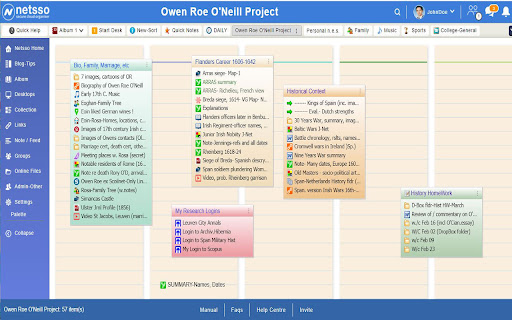
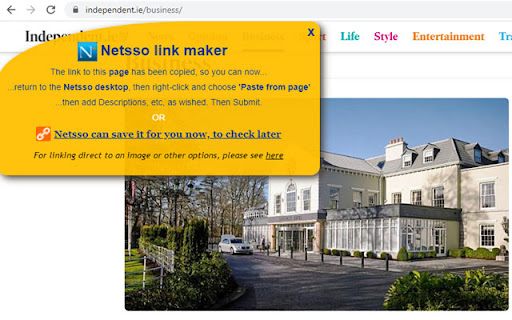
                        The LoginPilot is a free password manager to utilise Netsso's "AutoLogin Link" feature. Some web  sites require you to log in your Username and Password and the LoginPilot collects these from you, one time, and later guides Netsso in entering these for you when you visit those places afterwards. It also enables you to record any web object for Netsso with a simple right-click

Please Register on https://www.netsso.com to use the LoginPilot

Netsso is Your private, Single Sign On Portal to your personal internet world. After logging in to Netsso, on any computer and some tablets, you can double-click to any of your recorded web pages, web images, links, documents online, web mail, etc without having to remember and type their exact addresses, or your usernames and passwords. In a new service you can auto-encrypt any documents on your DropBox,  OneDrive or Google Drive by loading them through your Netsso. When you download them thru Netsso onto any computer, they will automatically decrypt. Netsso remembers each document's exclusive password. And you can share these encrypted documents with other Netsso members.
Informations de Base sur l'Extension
| Nom |  Netsso LoginPilot Netsso LoginPilot |
| ID | cihmbankckionldkkcnehkgmopjeojof |
| URL Officiel | https://chromewebstore.google.com/detail/netsso-loginpilot/cihmbankckionldkkcnehkgmopjeojof |
| Description | Extension for Netsso AutoLogin, Simple Links, Notes. LoginPilot is also avalaible for Internet Explorer, FireFox, Edge, Opera. |
| Taille du Fichier | 69.42 KB |
| Nombre d'Installations | 12 |
| Version Actuelle | 3.4 |
| Dernière Mise à Jour | 2020-10-27 |
| Date de Publication | 2019-03-25 |
| Évaluation | 4.80/5 Total 5 Évaluations |
| Développeur | https://www.netsso.com |
| [email protected] | |
| Type de Paiement | free |
| Site Web de l'Extension | https://www.netsso.com |
| URL de la Page d'Aide | https://www.netsso.com/manual |
| URL de la Page de Politique de Confidentialité | https://www.netsso.com/privacy-statement |
| Langues Prises en Charge | en |
| manifest.json | |
{
    "update_url": "https:\/\/clients2.google.com\/service\/update2\/crx",
    "manifest_version": 2,
    "name": "Netsso LoginPilot",
    "version": "3.4",
    "minimum_chrome_version": "15.0",
    "description": "Extension for Netsso AutoLogin, Simple Links, Notes. LoginPilot is also avalaible for Internet Explorer, FireFox, Edge, Opera.",
    "homepage_url": "http:\/\/www.netsso.com",
    "background": {
        "scripts": [
            "lpc.js",
            "lpb.js"
        ]
    },
    "content_scripts": [
        {
            "matches": [
                "http:\/\/*\/*",
                "https:\/\/*\/*"
            ],
            "js": [
                "lpi.js"
            ],
            "run_at": "document_start",
            "all_frames": true
        },
        {
            "matches": [
                "http:\/\/*\/*",
                "https:\/\/*\/*"
            ],
            "js": [
                "lpc.js",
                "lpd.js"
            ],
            "run_at": "document_idle",
            "all_frames": true
        }
    ],
    "content_security_policy": "script-src 'self' 'unsafe-eval'; object-src 'self';",
    "permissions": [
        "tabs",
        "contextMenus",
        "http:\/\/*\/*",
        "https:\/\/*\/*"
    ],
    "icons": {
        "16": "images\/icon16.png",
        "32": "images\/icon32.png",
        "48": "images\/icon48.png"
    },
    "browser_action": {
        "default_icon": "images\/icon16.png",
        "default_title": "Copy link for Netsso"
    },
    "web_accessible_resources": [
        "images\/icon16.png",
        "images\/x3.gif"
    ]
} | |