Advanced Download Manager
Manage downloads using a simple interface and top-notch tools.
Qu'est-ce que Advanced Download Manager ?
Advanced Download Manager est une extension Chrome développée par http://dm.browserextensions.store, et sa fonction principale est "Manage downloads using a simple interface and top-notch tools.".
Captures d'Écran de l'Extension
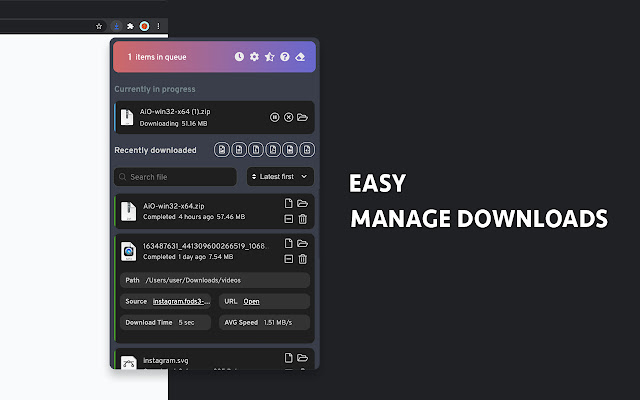

Télécharger le fichier CRX de l'extension Advanced Download Manager
Téléchargez les fichiers d'extension Advanced Download Manager au format crx, installez manuellement les extensions Chrome dans le navigateur ou partagez les fichiers crx avec des amis pour installer facilement les extensions Chrome.
Instructions d'Utilisation de l'Extension
                        Download manager was created to help you save time while you working with downloads.

Here is list of functionality that ADM propose:
  - Download queue - if this option is enabled, all next downloads will be paused automatically and resumed when the current download completed. You can control your queue and manually start/delete needed downloads
  - Downloads routing - routes files to necessary sub-folder according to the file type. (Example: jpg, png, gif files will be automatically downloaded to the "images" folder, but pdf, docx files - to the "documents" folder), you can manage directories and types on settings page.
 - Search files by keywords - find necessary file by keyword, according to the type of the necessary word in the search field
 - Sorting - find the oldest or biggest downloaded files with sorting option.
 - Filter downloads by files type
 - Clear downloads history with the help of one button.
 - Notifications - there is no need to follow download process, our extension will let you know
when downloading is completed with the sound and text notifications.
 - Control your downloads - you can directly control downloading process from downloads list, pause/cancel/remove/open/etc. with simple and user friendly interface.
 - Dark/Light theme - work with browser with comfort during the day and night.

►update 3.0.0:
  - 🔥 All-new UI for downloads window
  - 🔥New UI for downloads queue, now you can control your queue
  - Added more icons for extension panel
  - Removed slow-performance functionality(to be reworked)
  - Fixed issue with "Re-download" button

►  update 2.9.46:
 - 🔥 Added volume control for sound notifications(you can change it on Settings page -> Notifications section)
 - UI changes for downloads popup
 - Performance optimisation for video downloaders

►  update 2.9.43:
 - Fixed Instagram downloader button
 - Fixed issue with options for first installation, now functionality works correctly
 - Fixed issue for new downloads in downloads popup

►  update 2.9.41:
 - (new)* Integrated Facebook video downloader
 - (new)* Integrated Instagram stories downloader
 - (new)* Integrated Instagram video downloader
 - (new)* Integrated TikTok video downloader
 - (new)* Integrated LinkedIn video downloader
 - Fixed downloads popup

►  update 2.5.38:
 - (new)* Added functionality to hide canceled downloads
 - Translation fixes

►  update 2.5.37:
 - Erase history functionality was fixed

►  update 2.5.36:
 (new)* Added filter by files type (Images / Videos / Archives / Programs / Documents). You can disable it on settings page.
 (new)* Add erase downloads history
- Re-worked confirmation windows
- Re-worked scrollbar for all devices
- Fixed UI issues in downloads window and settings page
- Fixed issue with "icon indicator" when animation doesn't stop after download completed

►  update 2.4.28:
- Fix issue with download queue for small files

►  update 2.4.27:
- Performance optimisation
- Added a new languages
- Fixed issue with "Count of downloads from website"

►  update 2.4.26:
 - Fixed language switch from settings page
 - Fixed errors with image/video preview
 - Fixed file name in download list for windows devices
 - Fixed "Filter by website" function, now the icon will appear only for websites(not for file://, chrome-extension:// , new-tab)
 - Disabled "Count of downloads from website" by default.
 - Disabled "Image/Video" Preview by default, because it needs additional actions from the user, we've provided instruction for this.

► update 2.2.25:
 (new)* Photo and video preview in Downloads list
 (new)* Dark/Light mode for the Downloads window
 (new)* New User Interface for Downloads window
 (new)* New User Interface for Settings page
 (new)* Sorting for downloads (A-Z, Z-A, Latest first, Oldest first, Largest first, Smallest first)
 - Downloads queue now works correctly
 - "Show downloads count from the current site" now works correctly with instagram/facebook/google drive/youtube
- Fully re-worked filters
- Fully re-worked downloads window
- Fixed text notifications
Informations de Base sur l'Extension
| Nom |  Advanced Download Manager Advanced Download Manager |
| ID | cmajfhkcojdaopkobngoiinlihclbdgc |
| URL Officiel | https://chrome.google.com/webstore/detail/advanced-download-manager/cmajfhkcojdaopkobngoiinlihclbdgc |
| Description | Manage downloads using a simple interface and top-notch tools. |
| Taille du Fichier | 3.44 MB |
| Nombre d'Installations | 3,091 |
| Version Actuelle | 3.1.2 |
| Dernière Mise à Jour | 2021-05-26 |
| Date de Publication | 2020-08-01 |
| Évaluation | 4.73/5 Total 41 Évaluations |
| Développeur | http://dm.browserextensions.store |
| [email protected] | |
| Type de Paiement | free |
| Site Web de l'Extension | https://dm.browserextensions.store/ |
| URL de la Page de Politique de Confidentialité | https://dm.browserextensions.store/privacy-policy |
| Langues Prises en Charge | id,de,en,en-GB,en-US,fr,nl,ca,da,et,es,es-419,it,lv,pt-PT,sv,cs,el,bg,ru,uk,ko |
| manifest.json | |
null | |