TubersLab - Youtube Notepad
YouTube Note-Taking with Screen shots, Timestamps and many more features.
Qu'est-ce que TubersLab - Youtube Notepad ?
TubersLab - Youtube Notepad est une extension Chrome développée par BL Tech, et sa fonction principale est "YouTube Note-Taking with Screen shots, Timestamps and many more features.".
Captures d'Écran de l'Extension


Télécharger le fichier CRX de l'extension TubersLab - Youtube Notepad
Téléchargez les fichiers d'extension TubersLab - Youtube Notepad au format crx, installez manuellement les extensions Chrome dans le navigateur ou partagez les fichiers crx avec des amis pour installer facilement les extensions Chrome.
Instructions d'Utilisation de l'Extension
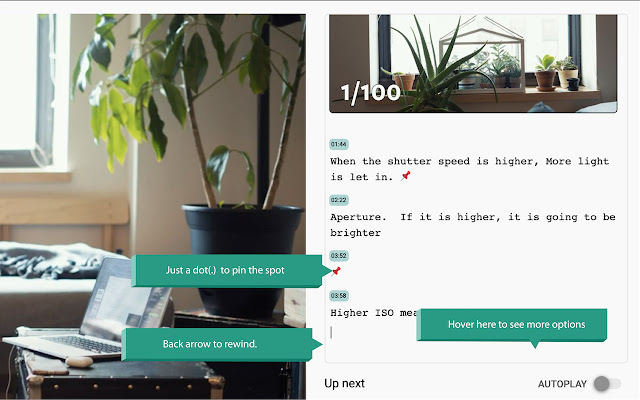
                        Once you install this extension, you will see a notepad next to the Youtube player in Chrome.

This extension enables you to take notes while watching a Youtube video.

Once you start typing your note on the pad, the Youtube video will pause, and then you can resume by pressing the ALT/Option key.

While typing in the notepad, press the CTRL button to take a screenshot of the Video.

And, entering a full-stop/period without any text will create a timestamp.

Click on a note's timestamp to jump right back to the place in the video.

By clicking on the browser icon, change your export option (copy as text, export to Evernote, OneNote, Notion, Readwise or Obsidian).

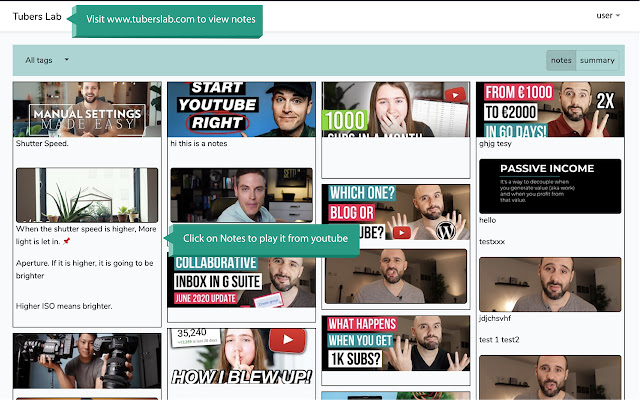
Go to tuberslab.com/notes to view a dashboard of all the notes you've taken with this extension.

If you like to view your notes on other devices, you can also create a free account.

You can download Tuberslab App for your mobile devices from respective app stores.
Google Play: https://bit.ly/2Cpwaly
App Store: https://apple.co/3fmJVzT

Send us your feature requests and feedback via [email protected]

Thank you for using TubersLab Youtube Notepad.
Informations de Base sur l'Extension
| Nom |  TubersLab - Youtube Notepad TubersLab - Youtube Notepad |
| ID | cnhhlbhfpjkbkpjkbdeopeamkecghpai |
| URL Officiel | https://chrome.google.com/webstore/detail/tuberslab-youtube-notepad/cnhhlbhfpjkbkpjkbdeopeamkecghpai |
| Description | YouTube Note-Taking with Screen shots, Timestamps and many more features. |
| Taille du Fichier | 516 KB |
| Nombre d'Installations | 4,216 |
| Version Actuelle | 1.3.9 |
| Dernière Mise à Jour | 2023-04-17 |
| Date de Publication | 2020-07-02 |
| Évaluation | 3.83/5 Total 46 Évaluations |
| Développeur | BL Tech |
| [email protected] | |
| Type de Paiement | free |
| Site Web de l'Extension | https://www.tuberslab.com |
| URL de la Page de Politique de Confidentialité | https://www.tuberslab.com/privacyPolicy |
| Langues Prises en Charge | en |
| manifest.json | |
{
    "update_url": "https:\/\/clients2.google.com\/service\/update2\/crx",
    "manifest_version": 3,
    "name": "TubersLab - Youtube Notepad",
    "version": "1.3.9",
    "description": "YouTube Note-Taking with Screen shots, Timestamps and many more features.",
    "icons": {
        "16": "16x16.png",
        "48": "48x48.png",
        "128": "128x128.png"
    },
    "action": {
        "default_title": "TubersLab",
        "default_popup": "popup.html"
    },
    "content_scripts": [
        {
            "matches": [
                "*:\/\/*.youtube.com\/*"
            ],
            "js": [
                "in-content.js",
                "notepad.js",
                "quill.min.js"
            ],
            "css": [
                "quill.snow.css",
                "notepad.css"
            ]
        }
    ],
    "commands": {
        "go_to_notes": {
            "suggested_key": {
                "default": "Alt+Shift+F"
            },
            "description": "Go to Notepad"
        },
        "toggle_notepad": {
            "suggested_key": {
                "default": "Alt+Shift+H"
            },
            "description": "Hide or Show Notepad"
        }
    },
    "web_accessible_resources": [
        {
            "resources": [
                "recommended.html",
                "notepad.html",
                "*.svg"
            ],
            "matches": [
                "http:\/\/*\/*",
                "https:\/\/*\/*"
            ]
        }
    ],
    "background": {
        "service_worker": "background.js"
    },
    "offline_enabled": false,
    "permissions": [
        "downloads",
        "tabs",
        "storage",
        "scripting"
    ],
    "host_permissions": [
        "https:\/\/tuberslab-image-storage-bucket-uswest.s3.us-west-2.amazonaws.com\/*",
        "https:\/\/www.tuberslab.com\/*",
        "https:\/\/fonts.googleapis.com\/*",
        "*:\/\/*.youtube.com\/*"
    ]
} | |