Print Google Doc with Comments
Print Google Doc with Comments
Qu'est-ce que Print Google Doc with Comments ?
Print Google Doc with Comments est une extension Chrome développée par theclassisflat, et sa fonction principale est "Print Google Doc with Comments".
Captures d'Écran de l'Extension
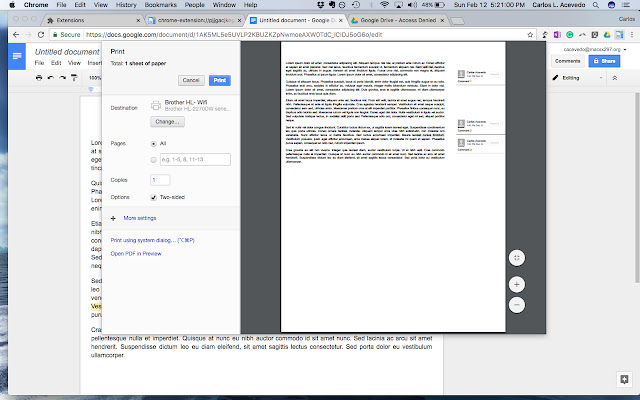
Télécharger le fichier CRX de l'extension Print Google Doc with Comments
Téléchargez les fichiers d'extension Print Google Doc with Comments au format crx, installez manuellement les extensions Chrome dans le navigateur ou partagez les fichiers crx avec des amis pour installer facilement les extensions Chrome.
Instructions d'Utilisation de l'Extension
This extension was developed by a teacher for teachers. Showing a student's progress is important when reflecting on a multi-draft assignment. This extension does just what it is titled to do. Teachers -- or anyone -- who would like to print a Google Doc with comments directly from the browser can now do so easily. No longer will you need to download a Google Doc as either an HTML file or a .docx to print. Informations de Base sur l'Extension
| Nom |  Print Google Doc with Comments Print Google Doc with Comments |
| ID | cohkclffagpcbnkiobagmipplkpoagbg |
| URL Officiel | https://chrome.google.com/webstore/detail/print-google-doc-with-com/cohkclffagpcbnkiobagmipplkpoagbg |
| Description | Print Google Doc with Comments |
| Taille du Fichier | 754 KB |
| Nombre d'Installations | 10,000 |
| Version Actuelle | 1.2.0 |
| Dernière Mise à Jour | 2017-02-12 |
| Date de Publication | 2017-02-12 |
| Évaluation | 1.85/5 Total 41 Évaluations |
| Développeur | theclassisflat |
| [email protected] | |
| Type de Paiement | free |
| Langues Prises en Charge | en-US |
| manifest.json | |
{
    "update_url": "https:\/\/clients2.google.com\/service\/update2\/crx",
    "author": "Muthukumaran Navaneethakrishnan(https:\/\/github.com\/muthuishere)",
    "background": {
        "scripts": [
            "scripts\/global.js"
        ]
    },
    "description": "Print Google Doc with Comments",
    "icons": {
        "128": "images\/google-doc-print-128.png",
        "48": "images\/google-doc-print-48.png",
        "64": "images\/google-doc-print-64.png"
    },
    "page_action": {
        "default_icon": "images\/google-doc-print-19.png",
        "default_title": "Print Google Doc with Comments"
    },
    "manifest_version": 2,
    "name": "Print Google Doc with Comments",
    "options_page": "faq\/index.html",
    "permissions": [
        "tabs",
        "declarativeContent",
        "notifications",
        "https:\/\/*\/*"
    ],
    "short_name": "google-doc-print",
    "version": "1.2.0",
    "web_accessible_resources": [
        "images\/*.png",
        "images\/*.svg",
        "faq\/images\/*.png",
        "donate.html"
    ]
} | |