Fortnite Stats
View the stats of any player of fortnite battle royale.
Qu'est-ce que Fortnite Stats ?
Fortnite Stats est une extension Chrome développée par https://fortnitestats.com, et sa fonction principale est "View the stats of any player of fortnite battle royale.".
Captures d'Écran de l'Extension
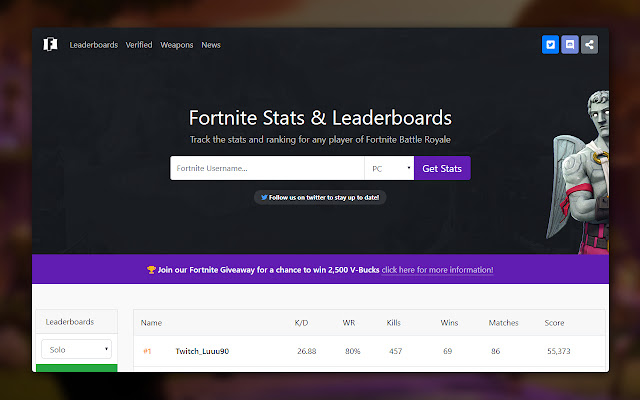
Télécharger le fichier CRX de l'extension Fortnite Stats
Téléchargez les fichiers d'extension Fortnite Stats au format crx, installez manuellement les extensions Chrome dans le navigateur ou partagez les fichiers crx avec des amis pour installer facilement les extensions Chrome.
Instructions d'Utilisation de l'Extension
                        FortniteStats.com are proud to announce our chrome extension!

This extension allows you to view the stats of any fortnite battle royale player quickly, from any location online.

Browse the online fortnite leaderboards for PC, XBOX and PSN.
Informations de Base sur l'Extension
| Nom |  Fortnite Stats Fortnite Stats |
| ID | djcidfjepmiibddlaikencjlakacickk |
| URL Officiel | https://chrome.google.com/webstore/detail/fortnite-stats/djcidfjepmiibddlaikencjlakacickk |
| Description | View the stats of any player of fortnite battle royale. |
| Taille du Fichier | 31.69 KB |
| Nombre d'Installations | 579 |
| Version Actuelle | 1.0.0 |
| Dernière Mise à Jour | 2018-03-30 |
| Date de Publication | 2018-03-30 |
| Évaluation | 4.33/5 Total 6 Évaluations |
| Développeur | https://fortnitestats.com |
| [email protected] | |
| Type de Paiement | free |
| Site Web de l'Extension | https://fortnitestats.com |
| Langues Prises en Charge | en |
| manifest.json | |
{
    "update_url": "https:\/\/clients2.google.com\/service\/update2\/crx",
    "manifest_version": 2,
    "name": "Fortnite Stats",
    "description": "View the stats of any player of fortnite battle royale.",
    "version": "1.0.0",
    "browser_action": {
        "default_icon": {
            "16": "images\/image-16x16.png",
            "24": "images\/image-24x24.png",
            "32": "images\/image-32x32.png",
            "48": "images\/image-48x48.png",
            "64": "images\/image-64x64.png",
            "128": "images\/image-128x128.png",
            "256": "images\/image-256x256.png"
        },
        "default_popup": "popup.html",
        "default_title": "Test Chrome Extension"
    },
    "icons": {
        "16": "images\/image-16x16.png",
        "24": "images\/image-24x24.png",
        "32": "images\/image-32x32.png",
        "48": "images\/image-48x48.png",
        "64": "images\/image-64x64.png",
        "128": "images\/image-128x128.png",
        "256": "images\/image-256x256.png"
    },
    "permissions": [
        "tabs"
    ]
} | |
















![Swift Snake 3D [Popup]](https://lh3.googleusercontent.com/dKqYwZebdeKQLn9AIeB5kH9rj8_mTwn9ncTXV-dh0MJRTCgkxF1T_01rw30c0UcKRqnzp0N4TBL6GGDGMyFaXSp1qw)