Phonal Assistant - Productive Online Meetings
Transcribe conversations in real-time, save transcripts and get tips about speaking performance.
Qu'est-ce que Phonal Assistant - Productive Online Meetings ?
Phonal Assistant - Productive Online Meetings est une extension Chrome développée par https://www.phonal.ai, et sa fonction principale est "Transcribe conversations in real-time, save transcripts and get tips about speaking performance.".
Captures d'Écran de l'Extension
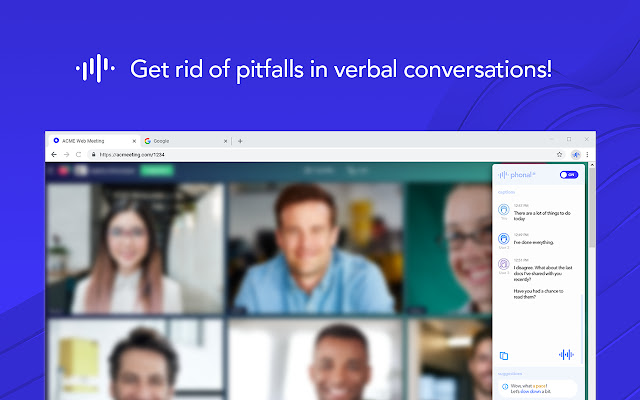
Télécharger le fichier CRX de l'extension Phonal Assistant - Productive Online Meetings
Téléchargez les fichiers d'extension Phonal Assistant - Productive Online Meetings au format crx, installez manuellement les extensions Chrome dans le navigateur ou partagez les fichiers crx avec des amis pour installer facilement les extensions Chrome.
Instructions d'Utilisation de l'Extension
                        The Phonal Assistant enables you to avoid pitfalls in any web meeting with instant transcripts and AI recommendations.


Get Instant Captions
Did you mis-hear or lose some sentences? No problem! You can always check the captions to stay on track.

Save Transcripts
Save and analyze the transcript of your conversation after it's finished, find out what worked the best or the worst, and improve iteratively.

Get AI-driven Tips about Speaking Performance
Most people can't control what they say, and how they act at the same time. That's completely natural. So we do the "controlling" part of the job for you and let you know whether you're speaking too quietly or loudly, hurrying, or using filler words.

__________

Works for any tab in Chrome.
No matter what kind of web-conferencing tool you are using. Phonal Assistant works everywhere inside Chrome.

> 70% Accuracy of speech recognition
Well, there is no 100% perfect speech recognition tech still. We did our best to deliver the best quality ever available to you.

Works for online videos
Do you need subtitles even when there are none available? We've got you covered. Use Phonal Assistant to generate captions for any video played in Chrome.

_________

Easy to setup
Just install and turn ON to start captioning and getting recommendations.

Easy to indicate and control when it's turned ON
Nobody loves the absence of control for speech recognition engines. So it's turned OFF by default and you’re the only person to decide when to turn it ON. Closing the tab also turns Phonal Assistant OFF.

Compliant
We don't store any part of your conversation. It's processed through us and disappears automatically.

_________

Start getting rid of pitfalls in verbal conversations!

If you have questions, concerns or suggestions please do not hesitate to reach out to us via email:
[email protected]
Informations de Base sur l'Extension
| Nom |  Phonal Assistant - Productive Online Meetings Phonal Assistant - Productive Online Meetings |
| ID | dkkioofdhpkkglijdapnfpeoojaodldd |
| URL Officiel | https://chrome.google.com/webstore/detail/phonal-assistant-producti/dkkioofdhpkkglijdapnfpeoojaodldd |
| Description | Transcribe conversations in real-time, save transcripts and get tips about speaking performance. |
| Taille du Fichier | 378 KB |
| Nombre d'Installations | 205 |
| Version Actuelle | 1.1.0.2 |
| Dernière Mise à Jour | 2019-12-16 |
| Date de Publication | 2019-12-13 |
| Évaluation | 3.67/5 Total 3 Évaluations |
| Développeur | https://www.phonal.ai |
| [email protected] | |
| Type de Paiement | free |
| Site Web de l'Extension | https://phonal.ai/assistant |
| URL de la Page d'Aide | https://phonal.ai/assistant |
| URL de la Page de Politique de Confidentialité | https://www.norns.ai/privacy |
| Langues Prises en Charge | en |
| manifest.json | |
{
"update_url": "https:\/\/clients2.google.com\/service\/update2\/crx",
"name": "Phonal Assistant - Productive Online Meetings",
"version": "1.1.0.2",
"manifest_version": 2,
"description": "Transcribe conversations in real-time, save transcripts and get tips about speaking performance.",
"permissions": [
"tabs",
"storage",
"activeTab",
"tabCapture",
"contextMenus",
"https:\/\/*.phonal.ai\/*",
"https:\/\/heapanalytics.com\/*",
"https:\/\/*.heapanalytics.com\/*"
],
"content_scripts": [
{
"matches": [
"http:\/\/*\/*",
"https:\/\/*\/*"
],
"js": [
"content-script.bundle.js"
],
"css": []
},
{
"matches": [
" | |