Link Folders
This extension allows the user to create folders of links/tabs for various topics
Qu'est-ce que Link Folders ?
Link Folders est une extension Chrome développée par brianchou121, et sa fonction principale est "This extension allows the user to create folders of links/tabs for various topics".
Captures d'Écran de l'Extension


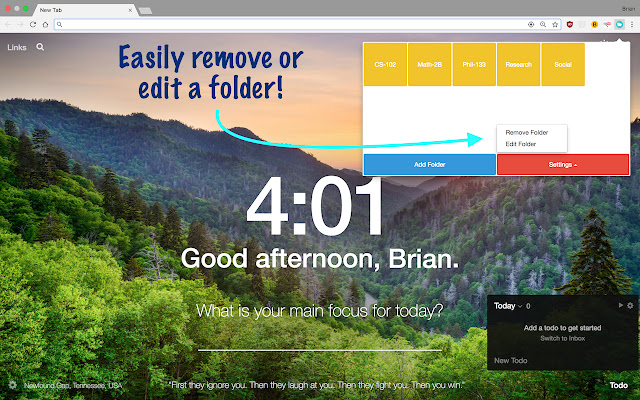
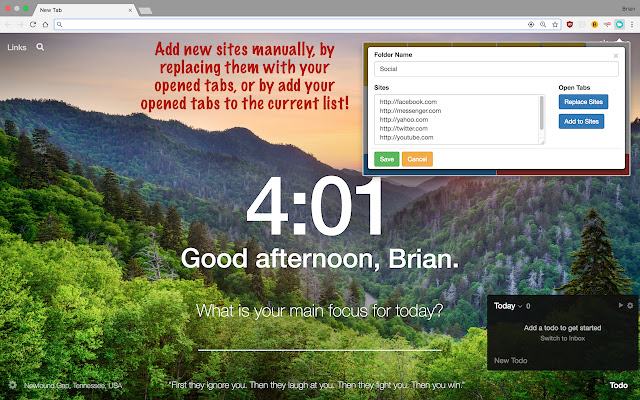
Télécharger le fichier CRX de l'extension Link Folders
Téléchargez les fichiers d'extension Link Folders au format crx, installez manuellement les extensions Chrome dans le navigateur ou partagez les fichiers crx avec des amis pour installer facilement les extensions Chrome.
Instructions d'Utilisation de l'Extension
                        Do you have so many desktops and tabs open, that you don't want to bookmark them all or close them because you don't want to lose them? Is your laptop always running out of memory, so that it ends up closing your browser and deleting all your opened tabs? Then this is the fix for you.

This extension allows the user to save their links/tabs in customizable folders of their choosing, allowing for easy organization and immediate access to all the sites with the click of a button. You can create folders for research so you can continue right where you left off.

Users have the option to save all current open tabs with the click of a button, or to manually enter them in. Sites require the "http://". The folders act as buttons and immediately open the links with a click.
Informations de Base sur l'Extension
| Nom |  Link Folders Link Folders |
| ID | dncmpfbjeippfclnpgbhpbhhapegibfp |
| URL Officiel | https://chrome.google.com/webstore/detail/link-folders/dncmpfbjeippfclnpgbhpbhhapegibfp |
| Description | This extension allows the user to create folders of links/tabs for various topics |
| Taille du Fichier | 13.46 KB |
| Nombre d'Installations | 82 |
| Version Actuelle | 1.0 |
| Dernière Mise à Jour | 2017-08-28 |
| Date de Publication | 2017-08-28 |
| Évaluation | 5.00/5 Total 4 Évaluations |
| Développeur | brianchou121 |
| [email protected] | |
| Type de Paiement | free |
| Langues Prises en Charge | en |
| manifest.json | |
{
    "update_url": "https:\/\/clients2.google.com\/service\/update2\/crx",
    "manifest_version": 2,
    "name": "Link Folders",
    "description": "This extension allows the user to create folders of links\/tabs for various topics",
    "version": "1.0",
    "browser_action": {
        "default_icon": "icon.png",
        "default_popup": "popup.html"
    },
    "content_security_policy": "script-src 'self' https:\/\/ajax.googleapis.com https:\/\/maxcdn.bootstrapcdn.com; object-src 'self'",
    "permissions": [
        "tabs",
        "storage"
    ]
} | |