Banish - Block Login Popups
Block annoying login popups and other dark patterns on the web.
Qu'est-ce que Banish - Block Login Popups ?
Banish - Block Login Popups est une extension Chrome développée par https://getbanish.com, et sa fonction principale est "Block annoying login popups and other dark patterns on the web.".
Captures d'Écran de l'Extension

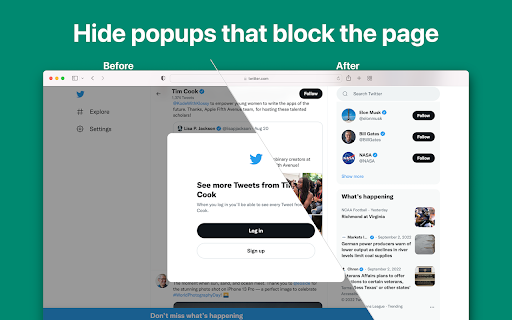
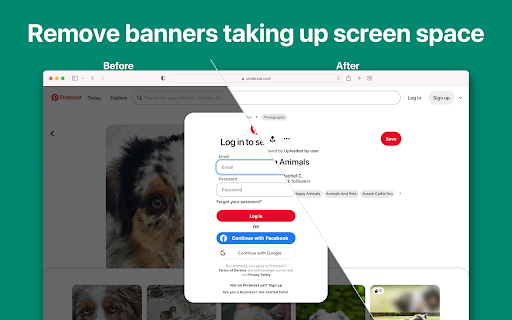
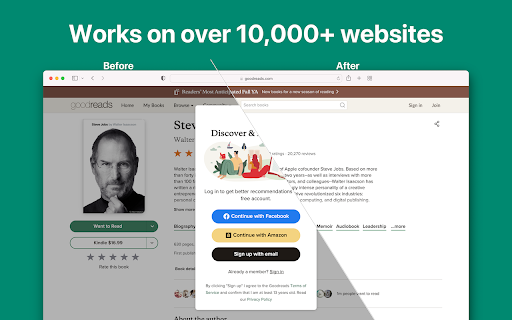

Télécharger le fichier CRX de l'extension Banish - Block Login Popups
Téléchargez les fichiers d'extension Banish - Block Login Popups au format crx, installez manuellement les extensions Chrome dans le navigateur ou partagez les fichiers crx avec des amis pour installer facilement les extensions Chrome.
Instructions d'Utilisation de l'Extension
                        BANISH. Featured on TechCrunch, Daring Fireball, MacRumors, and iMore.

"The app proved incredibly useful. For instance, when on Quora, clicking a link to another Quora page would normally pop up a blocker that requires you to log in to continue navigating the website. With Banish, this pop-up was gone and you could use the site normally"
— Sarah Perez, TechCrunch

“Banish does one thing and does it well: it nukes dickpanels in Safari on iPhone and iPad”
— John Gruber, Daring Fireball

PRIVATE
Banish does not collect or store any of your data - nothing leaves your device.

FAST
The extension performs the minimal, necessary changes to block popups and free up screen space.

SIMPLE
It's as easy as downloading the extension and giving it permission in Chrome. No maintenance needed.

---
FAQ
Q: Why can't I use Instagram without signing-in?
A: If you access too many pages on Instagram without signing in, it'll temporarily stop working, even with Banish installed. Instagram does this to prevent web scraping.

Q: Can Banish block cookie popups, paywalls, or other annoyances?
A: Banish is focused on blocking Login popups.
---

The free trial blocks popups on five websites. Please consider subscribing for full access.
Informations de Base sur l'Extension
| Nom |  Banish - Block Login Popups Banish - Block Login Popups |
| ID | dnnlfjflaoafiihoelaoliebgleoacko |
| URL Officiel | https://chromewebstore.google.com/detail/banish-block-login-popups/dnnlfjflaoafiihoelaoliebgleoacko |
| Description | Block annoying login popups and other dark patterns on the web. |
| Taille du Fichier | 139 KB |
| Nombre d'Installations | 51 |
| Version Actuelle | 1.14 |
| Dernière Mise à Jour | 2023-04-28 |
| Date de Publication | 2023-04-22 |
| Évaluation | 1.00/5 Total 1 Évaluations |
| Développeur | https://getbanish.com |
| [email protected] | |
| Type de Paiement | in_app |
| URL de la Page d'Aide | https://docs.google.com/forms/d/e/1FAIpQLSfIued1DADpfCXvAa3vOOKb4K_ACGT-49-ORE5Rp2Wr12YesA/viewform?usp=sf_link |
| Langues Prises en Charge | en |
| manifest.json | |
{
    "update_url": "https:\/\/clients2.google.com\/service\/update2\/crx",
    "manifest_version": 3,
    "name": "Banish - Block Login Popups",
    "description": "Block annoying login popups and other dark patterns on the web.",
    "version": "1.14",
    "icons": {
        "48": "images\/icon-48.png",
        "64": "images\/icon-64.png",
        "96": "images\/icon-96.png",
        "128": "images\/icon-128.png",
        "256": "images\/icon-256.png",
        "512": "images\/icon-512.png"
    },
    "action": {
        "default_title": "Banish",
        "default_popup": "popup.html",
        "default_icon": {
            "16": "images\/toolbar-icon-16.png",
            "19": "images\/toolbar-icon-19.png",
            "32": "images\/toolbar-icon-32.png",
            "38": "images\/toolbar-icon-38.png"
        }
    },
    "permissions": [
        "activeTab",
        "tabs",
        "scripting",
        "storage"
    ],
    "host_permissions": [
        "http:\/\/*\/*",
        "https:\/\/*\/*"
    ],
    "background": {
        "service_worker": "js\/background.js"
    },
    "options_page": "popup.html"
} | |