Date Highlighter
Highlights dates in the current tab.
Qu'est-ce que Date Highlighter ?
Date Highlighter est une extension Chrome développée par Atalia, et sa fonction principale est "Highlights dates in the current tab.".
Captures d'Écran de l'Extension

Télécharger le fichier CRX de l'extension Date Highlighter
Téléchargez les fichiers d'extension Date Highlighter au format crx, installez manuellement les extensions Chrome dans le navigateur ou partagez les fichiers crx avec des amis pour installer facilement les extensions Chrome.
Instructions d'Utilisation de l'Extension
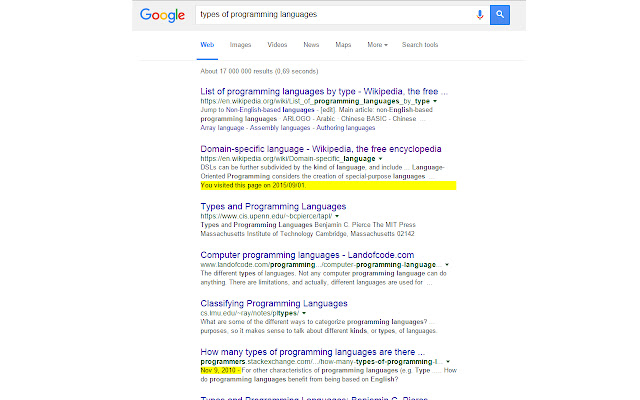
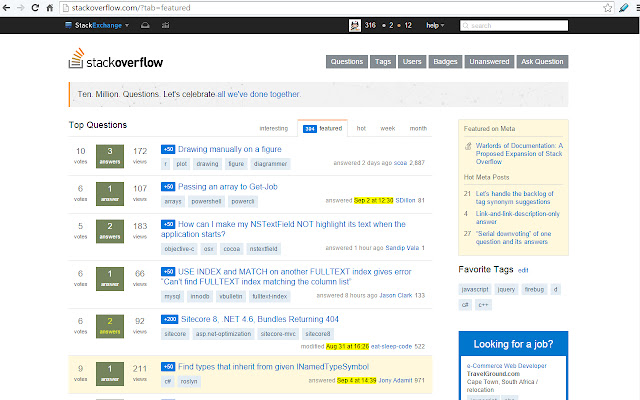
                        The extension will search for dates on the current web page and highlight them. Simply click on the blue highlighter icon and look for the highlighted text. This is useful for sites like coding blogs, where older content may become irrelevant.
This is an open source project, the code is available on https://github.com/amomsen/datehighlighter
Informations de Base sur l'Extension
| Nom |  Date Highlighter Date Highlighter |
| ID | efeboclghfaoicleloajmcaeegbkkjkh |
| URL Officiel | https://chrome.google.com/webstore/detail/date-highlighter/efeboclghfaoicleloajmcaeegbkkjkh |
| Description | Highlights dates in the current tab. |
| Taille du Fichier | 169 KB |
| Nombre d'Installations | 56 |
| Version Actuelle | 1.0.3 |
| Dernière Mise à Jour | 2016-09-05 |
| Date de Publication | 2016-09-05 |
| Évaluation | 3.33/5 Total 3 Évaluations |
| Développeur | Atalia |
| Type de Paiement | free |
| Langues Prises en Charge | en |
| manifest.json | |
{
    "update_url": "https:\/\/clients2.google.com\/service\/update2\/crx",
    "name": "Date Highlighter",
    "short_name": "Date Highlighter",
    "version": "1.0.3",
    "permissions": [
        "tabs",
        "notifications",
        "activeTab"
    ],
    "description": "Highlights dates in the current tab.",
    "icons": {
        "16": "16.png",
        "24": "24.png",
        "32": "32.png",
        "48": "48.png",
        "128": "128.png",
        "256": "256.png"
    },
    "background": {
        "scripts": [
            "background.js"
        ],
        "persistent": false
    },
    "browser_action": {
        "default_title": "Highlight dates",
        "default_icon": "16.png"
    },
    "manifest_version": 2,
    "web_accessible_resources": [
        "48.png"
    ]
} | |