日文翻譯及假名轉換
單擊日文文字時顯示平假名和翻譯,自動儲存文字並提供生字卡作練習用
Qu'est-ce que 日文翻譯及假名轉換 ?
日文翻譯及假名轉換 est une extension Chrome développée par techdebtor, et sa fonction principale est "單擊日文文字時顯示平假名和翻譯,自動儲存文字並提供生字卡作練習用".
Captures d'Écran de l'Extension
Télécharger le fichier CRX de l'extension 日文翻譯及假名轉換
Téléchargez les fichiers d'extension 日文翻譯及假名轉換 au format crx, installez manuellement les extensions Chrome dans le navigateur ou partagez les fichiers crx avec des amis pour installer facilement les extensions Chrome.
Instructions d'Utilisation de l'Extension
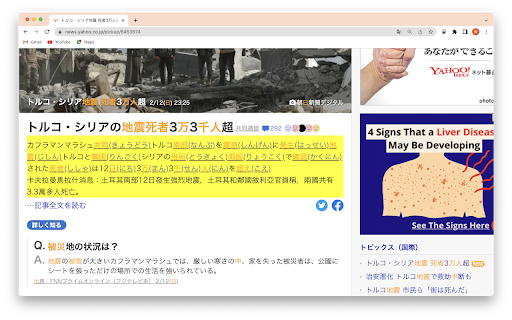
                        1. 打開任何包含日文或日文混合文本的網站。
2. 單擊您要轉換為平假名的文本。
3. 文字將轉換為平假名並顯示以供您查看。
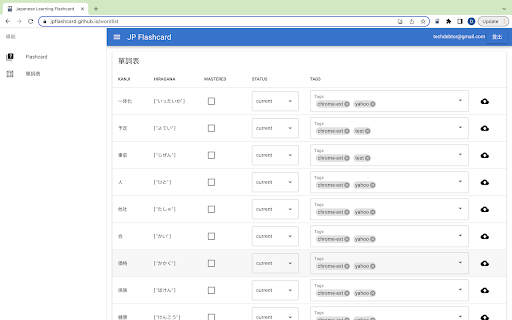
4. 資料也會存儲在JP Flashcard 應用程序(https://jpflashcard.github.io/)中,供您進一步學習和復習。
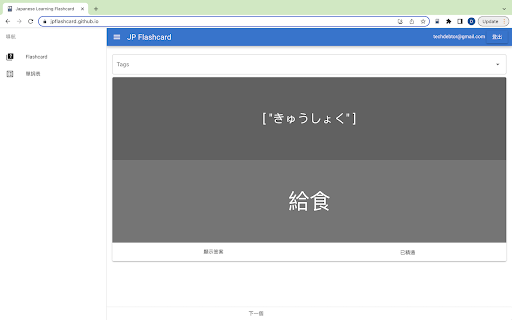
5.使用閃卡應用複習你查看過的平假名單詞和字符,提高你的日語能力。

日文翻譯及假名轉換 Chrome extension,將文本轉換為平假名並使用JP Flashcard應用程序進行進一步學習從未如此簡單。立即開始使用它,將您的日語技能提升到一個新的水平!
Informations de Base sur l'Extension
| Nom |  日文翻譯及假名轉換 日文翻譯及假名轉換 |
| ID | eilpehpjibclcpdhkejgfaapnadlkanl |
| URL Officiel | https://chromewebstore.google.com/detail/%E6%97%A5%E6%96%87%E7%BF%BB%E8%AD%AF%E5%8F%8A%E5%81%87%E5%90%8D%E8%BD%89%E6%8F%9B/eilpehpjibclcpdhkejgfaapnadlkanl |
| Description | 單擊日文文字時顯示平假名和翻譯,自動儲存文字並提供生字卡作練習用 |
| Taille du Fichier | 15 MB |
| Nombre d'Installations | 155 |
| Version Actuelle | 0.1 |
| Dernière Mise à Jour | 2023-03-02 |
| Date de Publication | 2023-03-02 |
| Évaluation | 4.00/5 Total 1 Évaluations |
| Développeur | techdebtor |
| [email protected] | |
| Type de Paiement | free |
| Site Web de l'Extension | https://jpflashcard.github.io/ |
| Langues Prises en Charge | zh-TW |
| manifest.json | |
{
"update_url": "https:\/\/clients2.google.com\/service\/update2\/crx",
"manifest_version": 3,
"name": "\u65e5\u6587\u7ffb\u8b6f\u53ca\u5047\u540d\u8f49\u63db",
"version": "0.1",
"description": "\u55ae\u64ca\u65e5\u6587\u6587\u5b57\u6642\u986f\u793a\u5e73\u5047\u540d\u548c\u7ffb\u8b6f\uff0c\u81ea\u52d5\u5132\u5b58\u6587\u5b57\u4e26\u63d0\u4f9b\u751f\u5b57\u5361\u4f5c\u7df4\u7fd2\u7528",
"permissions": [
"storage",
"identity",
"identity.email"
],
"background": {
"service_worker": "background.js"
},
"content_scripts": [
{
"matches": [
" | |