Capitalize!t
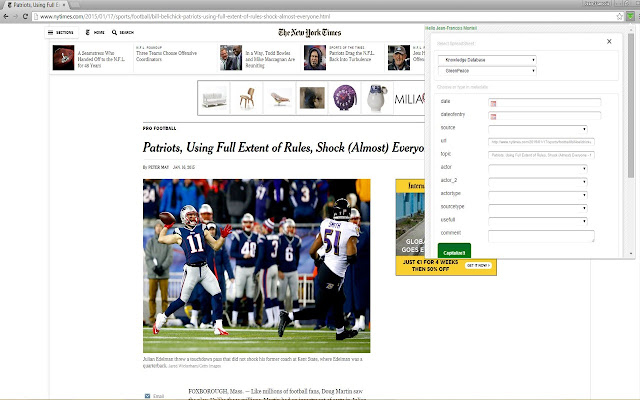
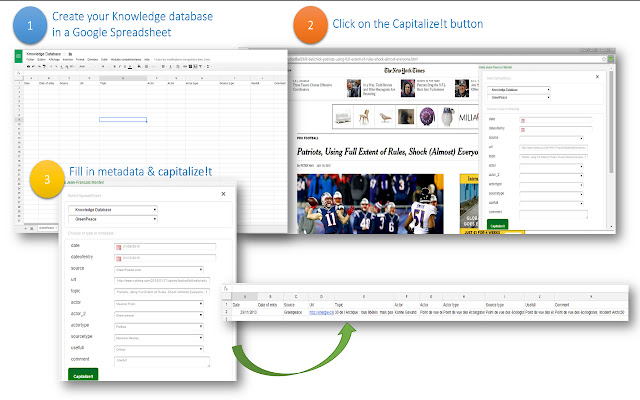
This Chrome Extension lets you bookmark any web page in a Google Spreadsheet, along with any structured metadata you want to add.…
Qu'est-ce que Capitalize!t ?
Capitalize!t est une extension Chrome développée par jfmonteil, et sa fonction principale est "This Chrome Extension lets you bookmark any web page in a Google Spreadsheet, along with any structured metadata you want to add.…".
Captures d'Écran de l'Extension
Télécharger le fichier CRX de l'extension Capitalize!t
Téléchargez les fichiers d'extension Capitalize!t au format crx, installez manuellement les extensions Chrome dans le navigateur ou partagez les fichiers crx avec des amis pour installer facilement les extensions Chrome.
Instructions d'Utilisation de l'Extension
                        This Chrome Extension lets you bookmark any web page in a Google Spreadsheet, along with any structured metadata you want to add.

Initially intended for my students, in their Business Intelligence and Media Analysis program, this “software” (if I can call it so) can be used for anyone who wants to create / edit / annotate easily and share a bookmark database.

Why Capitalize!t when plenty of bookmarks management tool exist ?

> Capability to create your custom metadata
> All bookmarks and metadata saved in Google Spreadsheet enabling  Analysis with free tools on the web and Sharing with other students

New version 4 : lets you pick images from the page and highlighted text
Informations de Base sur l'Extension
| Nom |  Capitalize!t Capitalize!t |
| ID | elkppeldmfcophocjliimofkdlnmeghk |
| URL Officiel | https://chrome.google.com/webstore/detail/capitalizet/elkppeldmfcophocjliimofkdlnmeghk |
| Description | This Chrome Extension lets you bookmark any web page in a Google Spreadsheet, along with any structured metadata you want to add.… |
| Taille du Fichier | 403 KB |
| Nombre d'Installations | 68 |
| Version Actuelle | 4.0 |
| Dernière Mise à Jour | 2015-02-01 |
| Date de Publication | 2015-02-01 |
| Évaluation | 4.25/5 Total 4 Évaluations |
| Développeur | jfmonteil |
| [email protected] | |
| Type de Paiement | free |
| Site Web de l'Extension | https://docs.google.com/document/d/1wQRXbFqNmNw-f4yDcX_Gfm_CYGbPIksEmj6VoX4gA1M/pub |
| URL de la Page d'Aide | https://docs.google.com/document/d/1wQRXbFqNmNw-f4yDcX_Gfm_CYGbPIksEmj6VoX4gA1M/pub |
| Langues Prises en Charge | en |
| manifest.json | |
{
"update_url": "https:\/\/clients2.google.com\/service\/update2\/crx",
"name": "Capitalize!t",
"version": "4.0",
"manifest_version": 2,
"minimum_chrome_version": "29",
"browser_action": {
"default_icon": "icon-small.png",
"default_popup": "popup.html"
},
"content_scripts": [
{
"js": [
"selectionjfm.js",
"jquery-1.11.1.min.js",
"jquery-ui.min.js"
],
"css": [
"jquery-ui.css"
],
"matches": [
"http:\/\/*\/*",
"https:\/\/*\/*"
],
"all_frames": true
}
],
"icons": {
"16": "icon-small.png",
"48": "icon.png",
"128": "icon-small.png"
},
"permissions": [
"https:\/\/secure.flickr.com\/",
"identity",
"https:\/\/accounts.google.com\/*",
"https:\/\/www.googleapis.com\/*",
"https:\/\/spreadsheets.google.com\/*",
"tabs",
"storage",
" | |