Grade Calculator for Blackboard Learn
Find out what your grade would be with certain assignments added.
Qu'est-ce que Grade Calculator for Blackboard Learn ?
Grade Calculator for Blackboard Learn est une extension Chrome développée par Rohan Mathur, et sa fonction principale est "Find out what your grade would be with certain assignments added.".
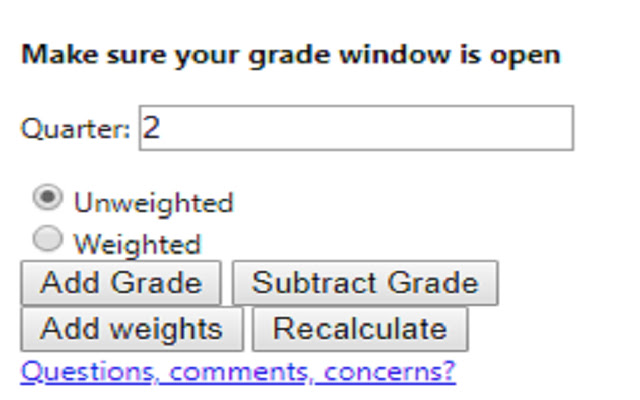
Captures d'Écran de l'Extension

Télécharger le fichier CRX de l'extension Grade Calculator for Blackboard Learn
Téléchargez les fichiers d'extension Grade Calculator for Blackboard Learn au format crx, installez manuellement les extensions Chrome dans le navigateur ou partagez les fichiers crx avec des amis pour installer facilement les extensions Chrome.
Instructions d'Utilisation de l'Extension
                        **MAJOR UPDATE**
I MADE AN ACTUAL GUI!! This is now an actually usable chrome extension and something I'm actually kind of proud of. I hope everyone finds it useful!

Thanks,
Rohan

This extension is meant to help you figure out what your total grade would be after an assignment is entered into the grade book.

Feedback Form:
https://goo.gl/forms/1fpCghIIhv49VfTr1
Informations de Base sur l'Extension
| Nom |  Grade Calculator for Blackboard Learn Grade Calculator for Blackboard Learn |
| ID | eohcolhmjdncdmicjibnnjfocokolonj |
| URL Officiel | https://chrome.google.com/webstore/detail/grade-calculator-for-blac/eohcolhmjdncdmicjibnnjfocokolonj |
| Description | Find out what your grade would be with certain assignments added. |
| Taille du Fichier | 71.73 KB |
| Nombre d'Installations | 435 |
| Version Actuelle | 4.0.0 |
| Dernière Mise à Jour | 2019-11-25 |
| Date de Publication | 2019-11-21 |
| Évaluation | 5.00/5 Total 3 Évaluations |
| Développeur | Rohan Mathur |
| Type de Paiement | free |
| URL de la Page d'Aide | https://goo.gl/forms/1fpCghIIhv49VfTr1 |
| Langues Prises en Charge | en |
| manifest.json | |
{
    "update_url": "https:\/\/clients2.google.com\/service\/update2\/crx",
    "name": "Grade Calculator for Blackboard Learn",
    "version": "4.0.0",
    "manifest_version": 2,
    "description": "Find out what your grade would be with certain assignments added.",
    "browser_action": {
        "default_icon": "icon.png",
        "default_popup": "index.html"
    },
    "icons": {
        "16": "icon.png",
        "48": "icon.png",
        "128": "icon.png"
    },
    "permissions": [
        "tabs",
        "activeTab"
    ]
} | |