Line Tab
A new tab page built for the quickest browsing experience
Qu'est-ce que Line Tab ?
Line Tab est une extension Chrome développée par Shahryar Parvez, et sa fonction principale est "A new tab page built for the quickest browsing experience".
Captures d'Écran de l'Extension

Télécharger le fichier CRX de l'extension Line Tab
Téléchargez les fichiers d'extension Line Tab au format crx, installez manuellement les extensions Chrome dans le navigateur ou partagez les fichiers crx avec des amis pour installer facilement les extensions Chrome.
Instructions d'Utilisation de l'Extension
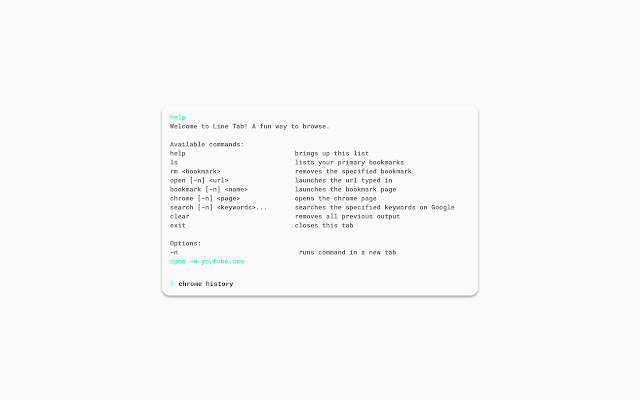
                        Speed up your browsing experience with Line Tab - the command-based new tab page.

For the regular CLI users out there, Line Tab will make you feel right at home in the browser. For others, it will make you feel like a true hacker.

Why use line tab?
- Launch your main bookmarks
- Search on Google
- Jump to any url
- A dark mode option

If there is a command or general feature you'd like to see, feel free to drop a message.
Informations de Base sur l'Extension
| Nom |  Line Tab Line Tab |
| ID | flfjdodphlkeahmbnchjjjkoooahhkio |
| URL Officiel | https://chrome.google.com/webstore/detail/line-tab/flfjdodphlkeahmbnchjjjkoooahhkio |
| Description | A new tab page built for the quickest browsing experience |
| Taille du Fichier | 167 KB |
| Nombre d'Installations | 28 |
| Version Actuelle | 1.0.0.0 |
| Dernière Mise à Jour | 2019-01-13 |
| Date de Publication | 2019-01-13 |
| Évaluation | 2.00/5 Total 1 Évaluations |
| Développeur | Shahryar Parvez |
| [email protected] | |
| Type de Paiement | free |
| Site Web de l'Extension | https://ssparvez.github.io/line-tab |
| URL de la Page de Politique de Confidentialité | https://ssparvez.github.io/line-tab/privacy |
| Langues Prises en Charge | en-US |
| manifest.json | |
{
    "update_url": "https:\/\/clients2.google.com\/service\/update2\/crx",
    "name": "Line Tab",
    "description": "A new tab page built for the quickest browsing experience",
    "icons": {
        "16": "assets\/icon16.png",
        "48": "assets\/icon48.png",
        "128": "assets\/icon128.png"
    },
    "version": "1.0.0.0",
    "manifest_version": 2,
    "chrome_url_overrides": {
        "newtab": "index.html"
    },
    "permissions": [
        "bookmarks",
        "tabs",
        "storage"
    ]
} | |