Check Drupal Version
This extension shows the drupal version installed in a site
Qu'est-ce que Check Drupal Version ?
Check Drupal Version est une extension Chrome développée par manimjs, et sa fonction principale est "This extension shows the drupal version installed in a site".
Captures d'Écran de l'Extension
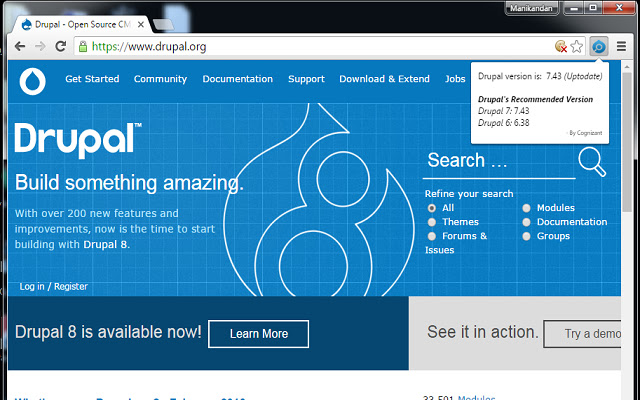
Télécharger le fichier CRX de l'extension Check Drupal Version
Téléchargez les fichiers d'extension Check Drupal Version au format crx, installez manuellement les extensions Chrome dans le navigateur ou partagez les fichiers crx avec des amis pour installer facilement les extensions Chrome.
Instructions d'Utilisation de l'Extension
                        * The add-on will be helpful for all developers to find the current Drupal version of a particular site.

* We can easily identify, whether the site is built in D6 or D7.

* This Chrome Extension is helpful for the Drupal Developers as well as for others to identify the version in a single click.

- Owning & Maintaining by Manikandan for Cognizant Technology Solutions.
Informations de Base sur l'Extension
| Nom |  Check Drupal Version Check Drupal Version |
| ID | gfhoiggdhkhjhokgokloaccfphldlfnf |
| URL Officiel | https://chrome.google.com/webstore/detail/check-drupal-version/gfhoiggdhkhjhokgokloaccfphldlfnf |
| Description | This extension shows the drupal version installed in a site |
| Taille du Fichier | 49.03 KB |
| Nombre d'Installations | 1,085 |
| Version Actuelle | 1.3 |
| Dernière Mise à Jour | 2019-08-20 |
| Date de Publication | 2019-08-20 |
| Évaluation | 2.43/5 Total 7 Évaluations |
| Développeur | manimjs |
| Type de Paiement | free |
| Langues Prises en Charge | en |
| manifest.json | |
{
    "update_url": "https:\/\/clients2.google.com\/service\/update2\/crx",
    "manifest_version": 2,
    "name": "Check Drupal Version",
    "description": "This extension shows the drupal version installed in a site",
    "version": "1.3",
    "short_name": "DrupalVers",
    "browser_action": {
        "default_icon": "icon.png",
        "default_popup": "popup.html"
    },
    "permissions": [
        "activeTab",
        "http:\/\/*\/*",
        "https:\/\/*\/*"
    ]
} | |