SendMyParcel.com
Create shipping labels from addresses on any website.
Qu'est-ce que SendMyParcel.com ?
SendMyParcel.com est une extension Chrome développée par SendMyParcel.com, et sa fonction principale est "Create shipping labels from addresses on any website.".
Captures d'Écran de l'Extension
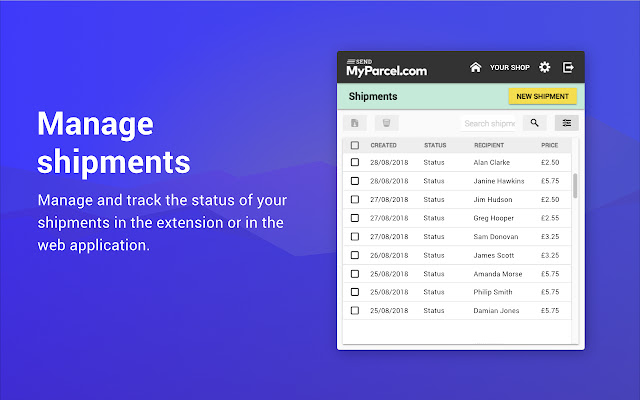
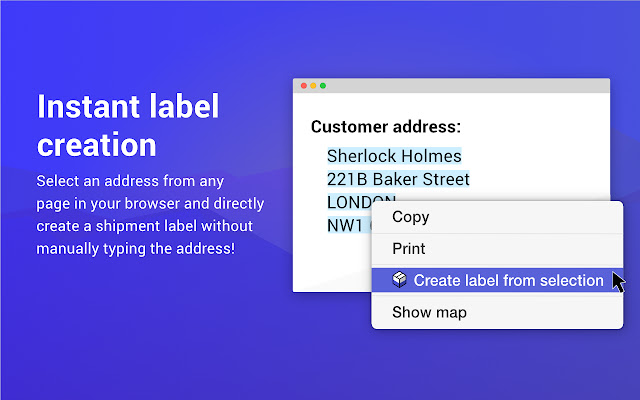
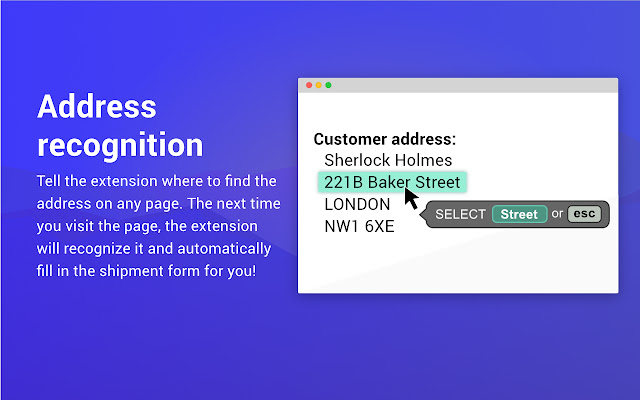
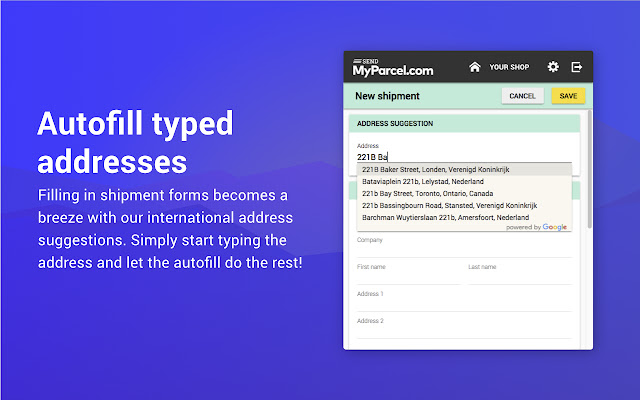
Télécharger le fichier CRX de l'extension SendMyParcel.com
Téléchargez les fichiers d'extension SendMyParcel.com au format crx, installez manuellement les extensions Chrome dans le navigateur ou partagez les fichiers crx avec des amis pour installer facilement les extensions Chrome.
Instructions d'Utilisation de l'Extension
                        SendMyParcel.com makes it easy to create labels and compare and pick the best rates for all major shipping carriers. Directly from any e-commerce platform, marketplace or website. It is our ambition to simplify shipping in such a way so that anyone can do it fast, regardless of company size, IT knowledge or infrastructure.

This extension will allow you to quickly transform a company name or address into a shipping label for all major carriers, from any webpage. No more typing addresses into legacy systems of carriers such as DPD, Hermes, DHL, Yodel, UPS and more.

It works with any platform and any website, since it allows you to create your own mapping if your platform is not yet mapped straight out of the box. Will work anywhere Chrome works.

This extension offers four key features:
- Automatically detects addresses from popular e-commerce platforms like Magento, Shopify, Amazon, eBay and more. For other platforms, addresses only have to be mapped to the right address fields once. After this addresses are automatically detected from these pages as well.
- Quickly compare prices of major UK carriers like Hermes and DPD.
- Right click a company name or address and our extension will look up the address in Google and autofill all of the found information. Add any missing information and get shipping labels in only a few seconds.
- Compatible with both SendMyParcel.com and MyParcel.com

Would you like to know more? Or knowledge base is available here: https://help.myparcel.com/support/solutions/folders/16000091925

Are we missing support for your webshop platform? Would you like to use other carriers? Want to help us further improve this extension with suggestions? Or just want to say hi? Let us know at [email protected]
Hope to hear from you soon!
Informations de Base sur l'Extension
| Nom |  SendMyParcel.com SendMyParcel.com |
| ID | gjnjgajlmalemgdkjpheknkhgjcalnfb |
| URL Officiel | https://chrome.google.com/webstore/detail/sendmyparcelcom/gjnjgajlmalemgdkjpheknkhgjcalnfb |
| Description | Create shipping labels from addresses on any website. |
| Taille du Fichier | 34.44 KB |
| Nombre d'Installations | 59 |
| Version Actuelle | 1.0.5 |
| Dernière Mise à Jour | 2019-08-01 |
| Date de Publication | 2019-08-01 |
| Évaluation | 4.00/5 Total 4 Évaluations |
| Développeur | SendMyParcel.com |
| [email protected] | |
| Type de Paiement | free |
| Site Web de l'Extension | https://www.sendmyparcel.com/ |
| URL de la Page d'Aide | https://help.myparcel.com/support/solutions/folders/16000091925 |
| URL de la Page de Politique de Confidentialité | https://cdn.myparcel.com/documents/privacy-policy.pdf |
| Langues Prises en Charge | en |
| manifest.json | |
{
    "update_url": "https:\/\/clients2.google.com\/service\/update2\/crx",
    "manifest_version": 2,
    "name": "SendMyParcel.com",
    "short_name": "SendMyParcel.com",
    "version": "1.0.5",
    "description": "Create shipping labels from addresses on any website.",
    "icons": {
        "16": "icons\/16.png",
        "32": "icons\/32.png",
        "48": "icons\/48.png",
        "64": "icons\/64.png",
        "128": "icons\/128.png"
    },
    "browser_action": {
        "default_icon": "icons\/48.png"
    },
    "background": {
        "scripts": [
            "js\/background.js"
        ],
        "persistent": false
    },
    "permissions": [
        "*:\/\/*\/*",
        "http:\/\/localhost\/*",
        "contextMenus",
        "tabs",
        "activeTab"
    ],
    "web_accessible_resources": [
        "icons\/*.png",
        "config\/*.json"
    ],
    "options_ui": {
        "page": "html\/options.html"
    },
    "externally_connectable": {
        "matches": [
            "*:\/\/*.sendmyparcel.com\/*",
            "*:\/\/*.myparcel.com\/*",
            "*:\/\/localhost\/*"
        ]
    }
} | |