eversign: eSign in Gmail, Drive & Google Docs
Sign documents right from Gmail, Google Docs, Google Drive, and from your Chrome Browser PDF Preview.
Qu'est-ce que eversign: eSign in Gmail, Drive & Google Docs ?
eversign: eSign in Gmail, Drive & Google Docs est une extension Chrome développée par https://eversign.com, et sa fonction principale est "Sign documents right from Gmail, Google Docs, Google Drive, and from your Chrome Browser PDF Preview.".
Captures d'Écran de l'Extension

Télécharger le fichier CRX de l'extension eversign: eSign in Gmail, Drive & Google Docs
Téléchargez les fichiers d'extension eversign: eSign in Gmail, Drive & Google Docs au format crx, installez manuellement les extensions Chrome dans le navigateur ou partagez les fichiers crx avec des amis pour installer facilement les extensions Chrome.
Instructions d'Utilisation de l'Extension
                        eversign for Chrome allows you to place legally binding signatures on any document in Gmail, Google Drive, Google Docs, and sign documents right from your Chrome Browsers. You’ll never need to print, sign or scan a document again — just open a document file, place your signature and other dynamic fields, and let eversign do the rest. eversign ensures legally binding signatures and complies with worldwide e-Signature legality standards.

1. Sign from Gmail

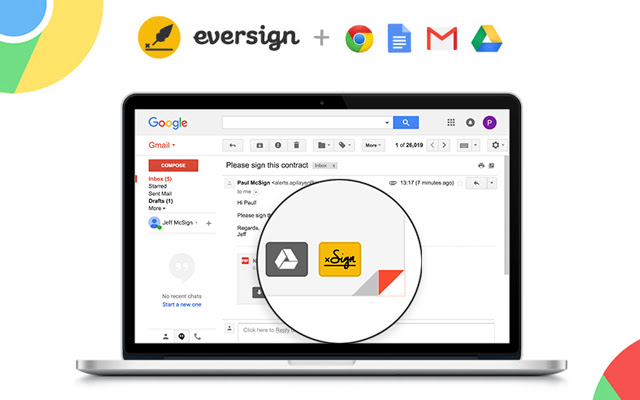
Just hover over an email attachment and click the new „Sign“ button in Gmail to immediately sign any document you receive without leaving your Gmail inbox. Once the document is signed, we’ll automatically attach it to your email’s draft response.

2. Sign from Google Docs

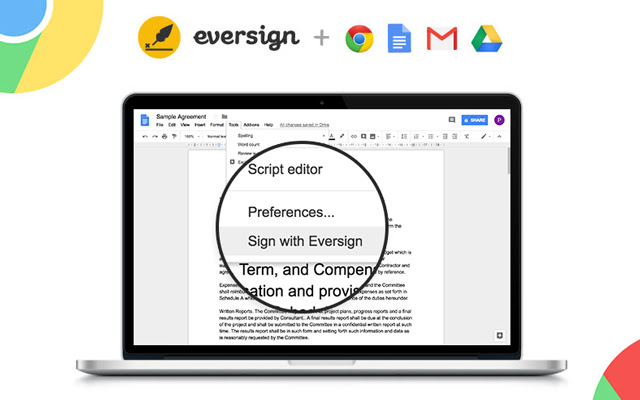
To sign a document right from Google Docs, just open the document, click „Tools“ in the top-options bar and select “Sign with eversign”. After signing you can download the document and we immediately archive it in your eversign account.

3. Sign from Google Drive

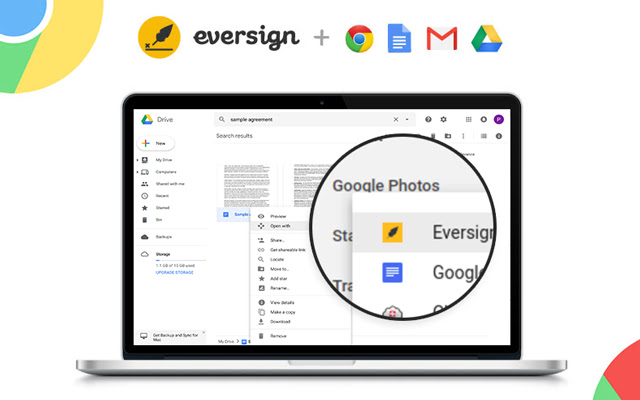
To sign a document right from Google Drive, simply right click on any File and choose „Open with eversign“. After signing you can download the final document and we immediately archive it in your eversign account.

4. Sign from Chrome Preview

Now you can sign PDF documents right from your Chrome Browser Preview Page. Simply click on the „Sign“ icon that appears in the lower right corner of your PDF Preview to sign any PDF document without leaving the page. After signing, you can download the document and we immediately archive it in your eversign account.

Want more information about eversign? Visit us at https://eversign.com
Informations de Base sur l'Extension
| Nom |  eversign: eSign in Gmail, Drive & Google Docs eversign: eSign in Gmail, Drive & Google Docs |
| ID | hdlhmemcpdlkhkiglelebglchamjmhce |
| URL Officiel | https://chrome.google.com/webstore/detail/eversign-esign-in-gmail-d/hdlhmemcpdlkhkiglelebglchamjmhce |
| Description | Sign documents right from Gmail, Google Docs, Google Drive, and from your Chrome Browser PDF Preview. |
| Taille du Fichier | 253 KB |
| Nombre d'Installations | 13,474 |
| Version Actuelle | 1.1.11 |
| Dernière Mise à Jour | 2021-05-27 |
| Date de Publication | 2020-06-24 |
| Évaluation | 3.44/5 Total 18 Évaluations |
| Développeur | https://eversign.com |
| [email protected] | |
| Type de Paiement | free |
| Site Web de l'Extension | https://eversign.com |
| URL de la Page d'Aide | https://eversign.com/help |
| URL de la Page de Politique de Confidentialité | https://eversign.com/legal/privacy |
| Langues Prises en Charge | de,en,fr,nl,tr,da,es,it,pl,pt-PT,sv,ru,zh-CN |
| manifest.json | |
{
    "update_url": "https:\/\/clients2.google.com\/service\/update2\/crx",
    "name": "__MSG_name__",
    "description": "__MSG_description__",
    "default_locale": "en",
    "version": "1.1.11",
    "manifest_version": 2,
    "author": "",
    "key": "MIIBIjANBgkqhkiG9w0BAQEFAAOCAQ8AMIIBCgKCAQEAmUy0PlVAsDxDMfG4ioIokYOht64Ilg9nVLSN7JvcKLvZ1Ooy5IOlurXyeE8GC1LnyMf4Jqacykvua3ZPSqvw9NHmmUNbOQfuvx1tuZGbyENx1CLbLzQfIh108L1KB\/SRGms3XGZLA1Qg+lW9Nkd8n8cS0hYCVkzb6ucAjdwW4BExhuaQXf1gqycHdq43BfH8rs6tkVCgArmSjVqweopnm4tlMWWee5f+qFlXUu4cNOrtPV8sy0z+cqBTe72EbA2fZOx4VuWSfG55OQ\/oTlKBykQlPvRPjqDM7tlhNsZ9To\/YLTBrVGnwitNRdlMGZqPIwvVzOyXvxAFowBk78n8kJQIDAQAB",
    "icons": {
        "128": "\/img\/logo_rounded.png"
    },
    "browser_action": {
        "default_icon": "\/img\/logo_rounded.png",
        "default_popup": "\/pages\/popup\/index.html"
    },
    "background": {
        "scripts": [
            "\/lib\/jquery.min.js",
            "\/lib\/x.js",
            "\/js\/background\/background.js"
        ],
        "persistent": false
    },
    "content_scripts": [
        {
            "matches": [
                "https:\/\/mail.google.com\/*",
                "https:\/\/drive.google.com\/*",
                "https:\/\/docs.google.com\/*",
                "https:\/\/eversign.com\/*",
                "https:\/\/*.eversign.com\/*"
            ],
            "all_frames": true,
            "js": [
                "\/lib\/jquery.min.js",
                "\/lib\/moment.min.js",
                "\/lib\/URI.min.js",
                "\/lib\/x.js",
                "\/js\/converters\/main_converter.js",
                "\/js\/converters\/gmail_converter.js",
                "\/js\/converters\/google_docs_converter.js",
                "\/js\/converters\/google_drive_converter.js",
                "\/js\/components\/FileDataManager.js",
                "\/js\/components\/InjectedCodeManager.js",
                "\/js\/components\/WidgetManager.js",
                "\/js\/components\/ApiManager.js",
                "\/js\/components\/GoogleDocsMenuItemManager.js",
                "\/js\/components\/GoogleDriveContextmenuManager.js",
                "\/js\/components\/GmailButtonManager.js",
                "\/js\/components\/PdfButtonManager.js",
                "\/js\/components\/Controller.js",
                "\/js\/content_scripts\/main.js"
            ]
        }
    ],
    "permissions": [
        "storage",
        "https:\/\/mail.google.com\/*",
        "https:\/\/drive.google.com\/*",
        "https:\/\/docs.google.com\/*",
        "https:\/\/*.googleusercontent.com\/*",
        "https:\/\/eversign.com\/*",
        "https:\/\/*.eversign.com\/*"
    ],
    "web_accessible_resources": [
        "\/*"
    ]
} | |