Personal Clipboard
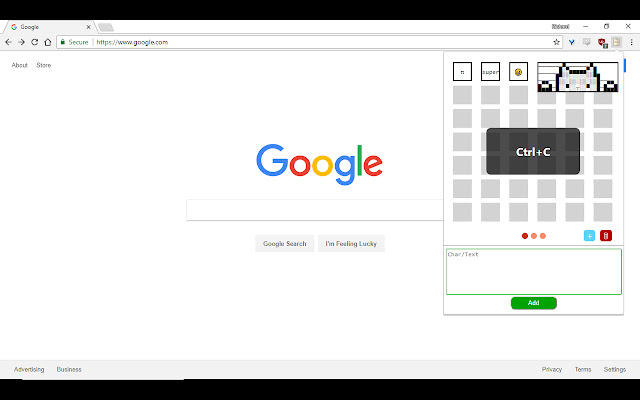
Creates an editable clipboard to copy and paste Characters, Text, Emojis, ASCII/Text Art to and from.
Qu'est-ce que Personal Clipboard ?
Personal Clipboard est une extension Chrome développée par hardlyrichie, et sa fonction principale est "Creates an editable clipboard to copy and paste Characters, Text, Emojis, ASCII/Text Art to and from.".
Captures d'Écran de l'Extension

Télécharger le fichier CRX de l'extension Personal Clipboard
Téléchargez les fichiers d'extension Personal Clipboard au format crx, installez manuellement les extensions Chrome dans le navigateur ou partagez les fichiers crx avec des amis pour installer facilement les extensions Chrome.
Instructions d'Utilisation de l'Extension
                        Features:
- Copy and paste text, emojis, ASCII, text art into personal clipboard for future use
- Copies saved text when item is clicked
- Add or delete items and pages
- Expand animation when hovering over items that overflow
- Quickly access clipboard with shortcut "Alt + C"
Informations de Base sur l'Extension
| Nom |  Personal Clipboard Personal Clipboard |
| ID | hgepghkbaemgjfgegdmffllpgapbngmb |
| URL Officiel | https://chrome.google.com/webstore/detail/personal-clipboard/hgepghkbaemgjfgegdmffllpgapbngmb |
| Description | Creates an editable clipboard to copy and paste Characters, Text, Emojis, ASCII/Text Art to and from. |
| Taille du Fichier | 15.68 KB |
| Nombre d'Installations | 10 |
| Version Actuelle | 1.0.1 |
| Dernière Mise à Jour | 2018-03-13 |
| Date de Publication | 2018-03-13 |
| Développeur | hardlyrichie |
| Type de Paiement | free |
| Langues Prises en Charge | en |
| manifest.json | |
{
    "update_url": "https:\/\/clients2.google.com\/service\/update2\/crx",
    "manifest_version": 2,
    "name": "Personal Clipboard",
    "description": "Creates an editable clipboard to copy and paste Characters, Text, Emojis, ASCII\/Text Art to and from.",
    "author": "Richard Gao",
    "version": "1.0.1",
    "background": {
        "scripts": [
            "background.js"
        ],
        "persistent": false
    },
    "browser_action": {
        "default_popup": "popup.html"
    },
    "commands": {
        "_execute_browser_action": {
            "suggested_key": {
                "default": "Alt+C"
            },
            "description": "Open Clipboard"
        }
    },
    "icons": {
        "16": "clipboard16.png",
        "48": "clipboard48.png",
        "128": "clipboard128.png"
    },
    "permissions": [
        "clipboardRead",
        "clipboardWrite",
        "storage",
        "unlimitedStorage"
    ]
} | |